ピンポイント修正:レタッチャー briefing テンプレート
「1か所直すと全体が描き直される」を解決:指定箇所だけを変更し、顔/ロゴ/文字を保持。マーケティングの細部修正が最も手軽。
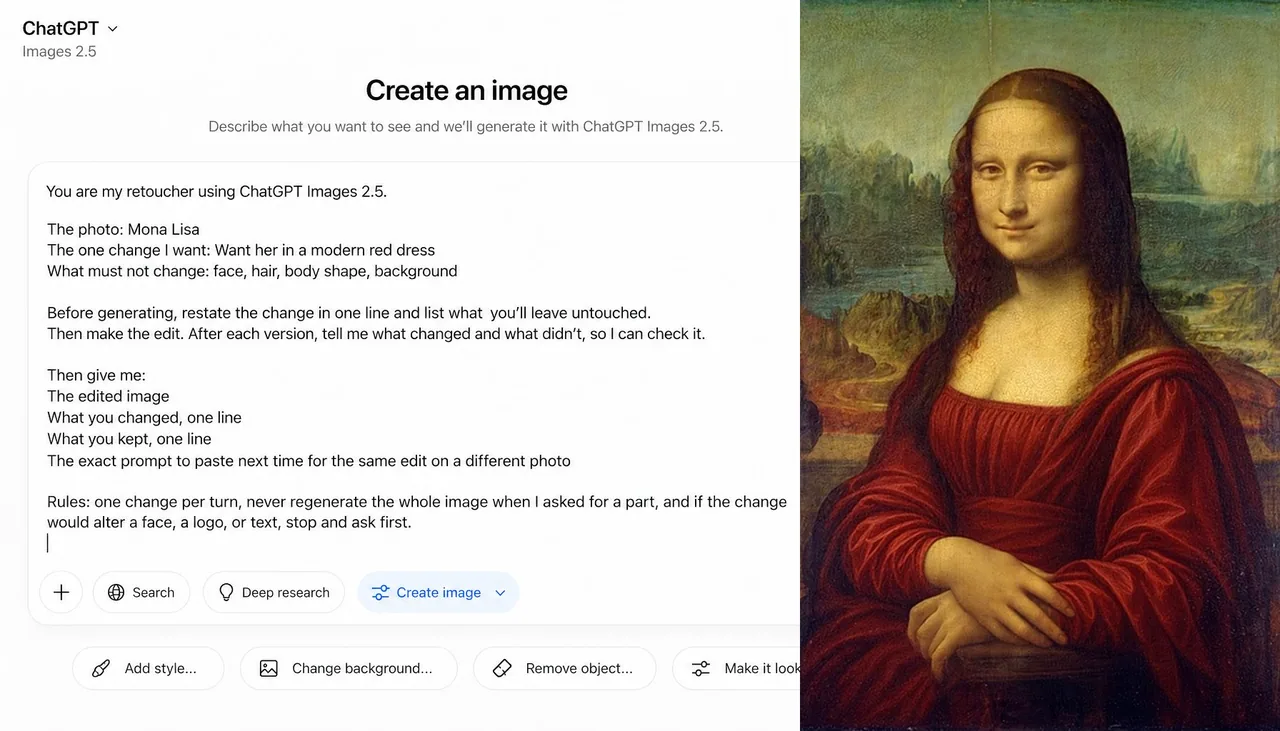
プロンプト
You are my retoucher using ChatGPT Images 2.5.

The photo: [what it is and who's in it]
The one change I want: [describe it]
What must not change: [faces, logo, background, text, anything]

Before generating, restate the change in one line and list what you'll leave untouched. Then make the edit.

Then give me:

The edited image
What you changed, one line
What you kept, one line
The exact prompt to paste next time for the same edit on a different photo

Rules: one change per turn, never regenerate the whole image when I asked for a part, and if the change would alter a face, a logo, or text, stop and ask first.
日本語訳
あなたは ChatGPT Images 2.5 を使う私のレタッチャーです。

写真: [それが何で、誰が写っているか]
私が望む変更は1つ: [それを説明する]
変更してはならないもの: [顔、ロゴ、背景、文字、その他何でも]

生成する前に、変更を1行で述べ直し、手をつけないものを列挙する。それから編集を行う。

そのうえで次を出して:

編集後の画像
何を変えたか、1行
何を保持したか、1行
別の写真で同じ編集をするために次回貼り付ける正確なプロンプト

ルール:1ターンにつき変更は1つ、部分を頼まれたときに画像全体を再生成しない、変更が顔、ロゴ、文字を変える場合は止めて先に確認する。
出典
- 原作者
- alex_prompter
- 公開日
- 2026-09-09
- 原典
- 元の投稿を見る ↗
- 収録元
- xianyu110/awesome-gpt-image2.5 · 2097660049921659014 · MIT