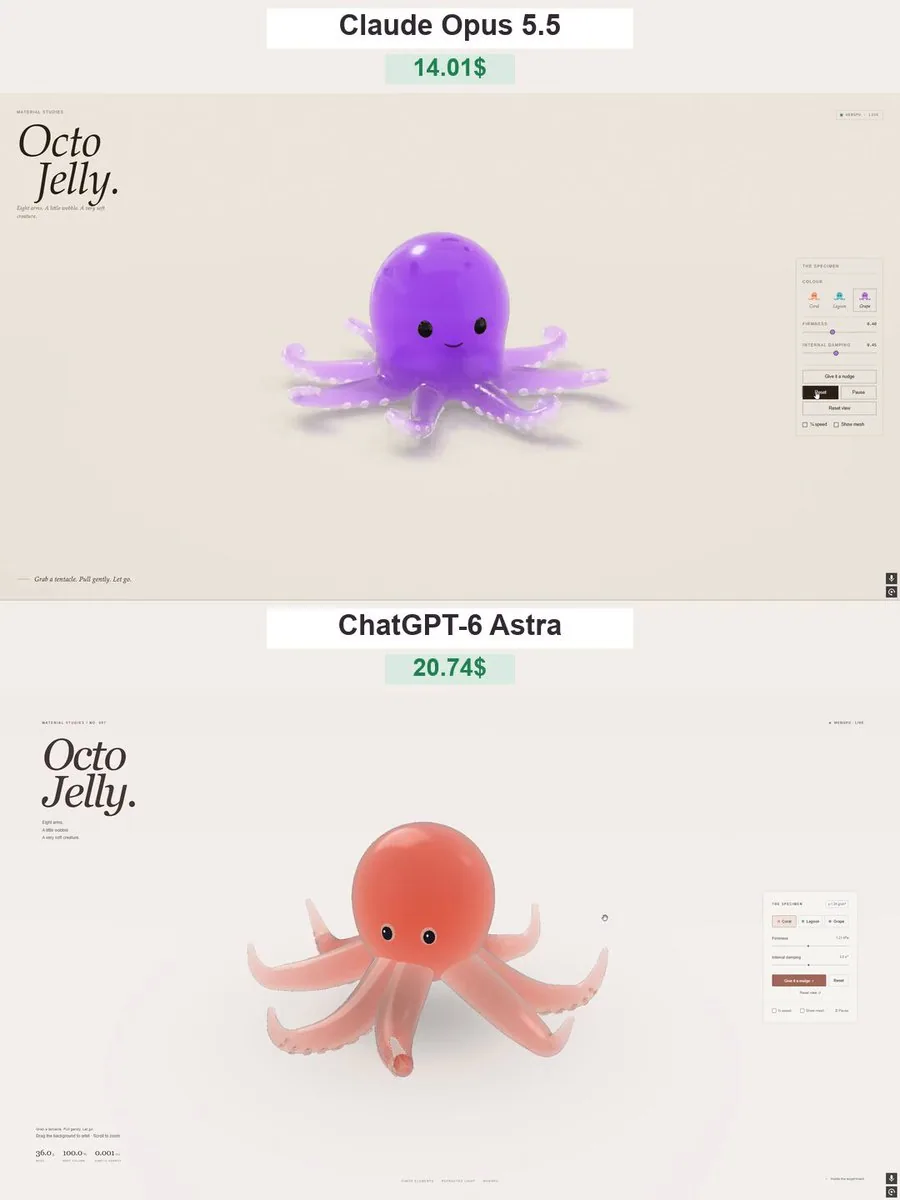
Create “Octo Jelly” - a beautiful, interactive 3D gummy octopus that users can grab, stretch, and squish directly in their browser. Deliver a complete single-file HTML experience using genuine WebGPU.
ART DIRECTION
Make the octopus look like a premium translucent gummy candy: a rounded head, eight curled tentacles, small suction cups, and a cute, understated face.
Use a warm off-white background, soft studio lighting, and a subtle ground shadow. Keep the scene elegant and uncluttered, with the octopus large and centered.
GEOMETRY AND MATERIAL

* Generate all geometry procedurally. No external models or image files.
* Connect all eight tentacles smoothly to the body, without visible gaps or floating parts.
* Add rounded suction cups that stay attached as the tentacles deform.
* Use glossy, translucent jelly with thickness-dependent color absorption, refraction, soft internal light scattering, and delicate rim highlights.
* Thick areas should have richer color; thin tentacle tips should transmit more light.
* Avoid opaque plastic, blown-out highlights, and visible mesh seams.

SOFT-BODY PHYSICS
Use a stable mass-spring or position-based dynamics system with elastic constraints and approximate volume preservation.

* The head should feel soft but substantial.
* Tentacles should be more flexible than the head, especially near their tips.
* Allow users to grab the head or any tentacle at the clicked location.
* Pulling should deform the nearby geometry first, then elastically pull the rest of the body.
* On release, the octopus should wobble and gradually settle into its original shape.
* Tentacles should react independently, with slightly delayed motion.
* Include gravity, floor collisions, friction, and damping.
* Prevent tentacles from passing through the floor.
* Clamp extreme stretching and use fixed simulation steps so strong pulls do not break the model.
* Do not fake softness by scaling or rotating the entire octopus.

INTERACTION

* Left-click or touch the octopus to grab and stretch it.
* Right-drag or drag empty space to gently orbit the camera.
* Support a limited zoom range.
* Keep camera gestures separate from object dragging.
* Add “Give it a nudge,” “Reset,” “Pause,” and “Reset view” buttons.
* Include Firmness and Internal damping sliders.
* Add “¼ speed” and “Show mesh” toggles.
* Provide three color presets: Coral, Lagoon, and Grape. Change the material colors without resetting the simulation.

INTERFACE
Use a minimal editorial layout:

* Top left: small “MATERIAL STUDIES” label.
* Large italic serif heading: “Octo Jelly.”
* Caption: “Eight arms. A little wobble. A very soft creature.”
* Top right: a WebGPU status indicator.
* Right side: a compact “THE SPECIMEN” control panel.
* Bottom left: “Grab a tentacle. Pull gently. Let go.”

Use clean sans-serif text for controls, thin borders, and generous whitespace. Avoid heavy panels or decorative UI effects.
PERFORMANCE AND QUALITY

* Use real WebGPU rendering, not a 2D canvas imitation or prerecorded animation.
* Reuse geometry and buffers; do not rebuild meshes during dragging.
* Keep suction cups, eyes, and other details attached to the deforming body.
* Handle transparency without flickering, disappearing surfaces, or harsh black edges.
* Support desktop and mobile layouts.
* Show a clear fallback message if WebGPU is unavailable.
* Test repeated grabs, strong pulls, releases, floor collisions, palette changes, pause, and reset.

The result should feel like a little living gummy toy - glossy, squishy, expressive, and satisfying to stretch. Deliver the full working HTML, not a mockup or a code fragment.