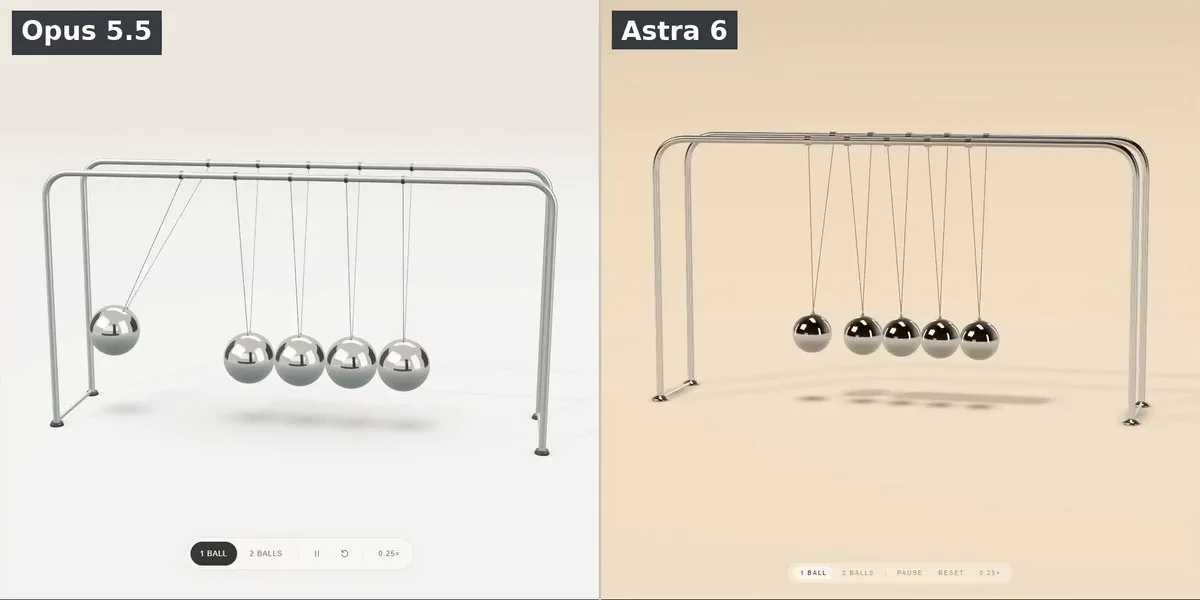
Build a complete, single-file HTML/Three.js experience showing an exceptionally beautiful, interactive Newton’s cradle.

Use the attached image as the reference for the recognizable construction: five polished metal balls suspended inside two parallel chrome frames.

The result should feel like a luxury product filmed in a real photography studio, with convincing materials, graceful pendulum motion, and working collision physics.

Open directly into the finished scene. The first rendered frame must already be composed beautifully enough to use as a video thumbnail.

Prioritize three things equally: the beauty of the chrome, the physical construction, and the correctness of the motion.

Create a square, recording-ready composition that adapts to the browser without stretching. Center one substantial Newton’s cradle on a seamless warm-ivory studio surface.

Use a fixed camera positioned mostly in front of the cradle, slightly above the balls and slightly off-center. Show enough depth to distinguish the front and rear frames, while keeping all five balls easy to count.

Use a restrained product-photography perspective, approximately equivalent to a 70mm lens. Avoid a wide-angle appearance.

The cradle should fill most of the image. Leave comfortable margins for the full outward swing on both sides. Neither the balls nor the frame may leave the image during normal operation.

Keep the camera stationary throughout. No orbiting, automatic zoom, camera shake, or cuts.

Construct exactly five identical, perfectly round polished stainless-steel spheres.

At rest, their centers must form one horizontal row, with neighboring spheres touching. Their diameters, masses, and suspension lengths must match.

Use two slender, parallel, inverted-U chrome support frames with rounded corners, positioned in front of and behind the ball row.

Each ball must hang from two fine, taut suspension wires: one connected to the front support and one to the rear support. These wires constrain its motion to the shared vertical swing plane.

Include small, believable attachment details. The wires must connect visibly to the balls and frame.

The support frame and anchors remain completely stationary. Update the suspension geometry from the actual ball positions every frame. Wires must never stretch, disconnect, pass through the spheres, or wave independently.

Choose elegant proportions: substantial spheres, slender tubular supports, and enough suspension length for a satisfying swing. Avoid thick ropes, oversized frames, and a bulky decorative base.

Make the metal look convincingly reflective.

Use physically based metallic materials, high-quality sphere geometry, restrained surface roughness, and a carefully designed reflection environment.

Create large studio-softbox reflections that wrap naturally around the spheres and curved frame. Include broad bright highlights, darker reflected regions, and subtle warm tones from the studio.

The spheres must retain readable volume. Avoid flat gray metal, featureless white balls, plastic shading, and excessive bloom.

Build the reflection environment procedurally inside the file. Do not depend on downloaded HDR images or external texture assets.

Use a large soft key light from the upper-left, gentle fill from the opposite side, and a restrained rim light to define the metal against the background.

Add soft contact shadows beneath the frame and moving shadows beneath the balls. Shadows should follow the motion and help communicate height.

Keep the background uncluttered, with a very subtle ivory gradient. The overall image should feel calm, precise, and expensive.

Implement a working simplified Newton’s cradle simulation.

Represent each sphere as an equal-mass pendulum with an angular position and angular velocity. Gravity must drive the swing. Derive the sphere positions from the pendulum geometry.

Use stable time integration and collision handling that can propagate impacts through the full chain of touching balls.

A fixed timestep with sufficient substeps, event-based impacts, or a suitable constraint-aware solver is acceptable. Choose an approach that remains stable at different rendering frame rates.

Do not animate the balls with unrelated sine waves or a prerecorded sequence. The motion must respond to the simulated state and user input.

The required behavior is:

Release one outer ball. It swings into the row, transfers its motion through the chain, and approximately one ball swings outward at the opposite end.
The outgoing ball returns, strikes the row, and sends the original outer ball outward again.
Release two adjacent balls together from one side. Approximately two balls must swing outward together from the opposite side.
The remaining balls should stay close to their resting positions, allowing small physically plausible movement during impacts.
Motion transfers at contact. The outgoing balls must not begin swinging before the incoming balls reach the row.

Handle the chain of contacts consistently. A single order-dependent collision pass must not produce a different result when the direction reverses.

Collisions should approximately conserve momentum and kinetic energy over the brief impact interval, with small losses. Use gentle damping so the swing amplitude decreases gradually.

The simulation must not gain energy, accelerate indefinitely, visibly interpenetrate, jitter continuously, or send the entire row swinging after every impact.

The balls should accelerate toward the bottom of their arcs and slow naturally near their turning points. Avoid constant-speed swinging.

Start with the leftmost ball raised approximately 35 degrees and the other four hanging at rest. Hold this initial pose briefly, around 0.4 seconds, then release automatically.

The experience must immediately demonstrate the classic alternating motion without requiring a click. Continue running without an automatic reset.

Add a small, elegant control strip near the bottom edge with:

“1 BALL”
“2 BALLS”
Pause / Resume
Reset
“0.25×” slow motion

Keep these controls visually secondary. They must not overlap the cradle or its swing paths.

Selecting “1 BALL” or “2 BALLS” should reset the simulation, raise the corresponding leftmost ball or pair to the same release angle, briefly hold, and release.

Reset should restore and replay the currently selected mode.

Slow motion must scale simulated time while preserving the same physics. It must not change gravity, collision behavior, or suspension geometry.

Allow the user to drag either outer ball outward within its permitted swing plane, then release it. Clamp the drag angle to a sensible maximum, around 45 degrees. Keep its suspension wires taut throughout.

Add an “H” keyboard shortcut to hide or reveal the controls for clean recording.

Keep the experience silent. No music, collision sounds, particles, motion trails, impact flashes, explanatory overlays, large titles, model names, or decorative text.

Deliver one complete HTML file with inline CSS and JavaScript. Use one consistently pinned Three.js version and matching modules if needed.

No build step, backend, external models, external textures, or HDR downloads.

Initialize the renderer, camera, lighting, materials, and starting pose before revealing the canvas. Avoid a visible black startup frame.

Support browser resizing without distorting the scene. Aim for smooth performance on a normal laptop and cap pixel density sensibly.

Before finishing, check that:

Exactly five spheres remain visible and correctly suspended.
The complete frame and maximum swing fit inside the square composition.
One-ball mode transfers approximately one ball at each impact.
Two-ball mode transfers approximately two balls at each impact.
Pause, reset, slow motion, and dragging work.
Chrome reflections remain readable throughout the motion.
The scene appears immediately and produces no runtime errors.

Return the complete working HTML.