먼저 Image 2.5로 사이트 비주얼 목업, 그다음 Codex로 사이트 구현
코드부터 던지지 마세요: 타깃/카피/브랜드 컬러/레퍼런스 이미지를 Codex에 넘기고 'imagegen으로 웹 목업 먼저, 프런트엔드는 그다음'이라고 명확히 지시하세요. 레이아웃과 CTA를 검수한 뒤 구현하고, 스크린샷과 대조해 차이를 수정 — Images 2→2.5로 갈수록 안정된 1인 팀 사이트 제작법.
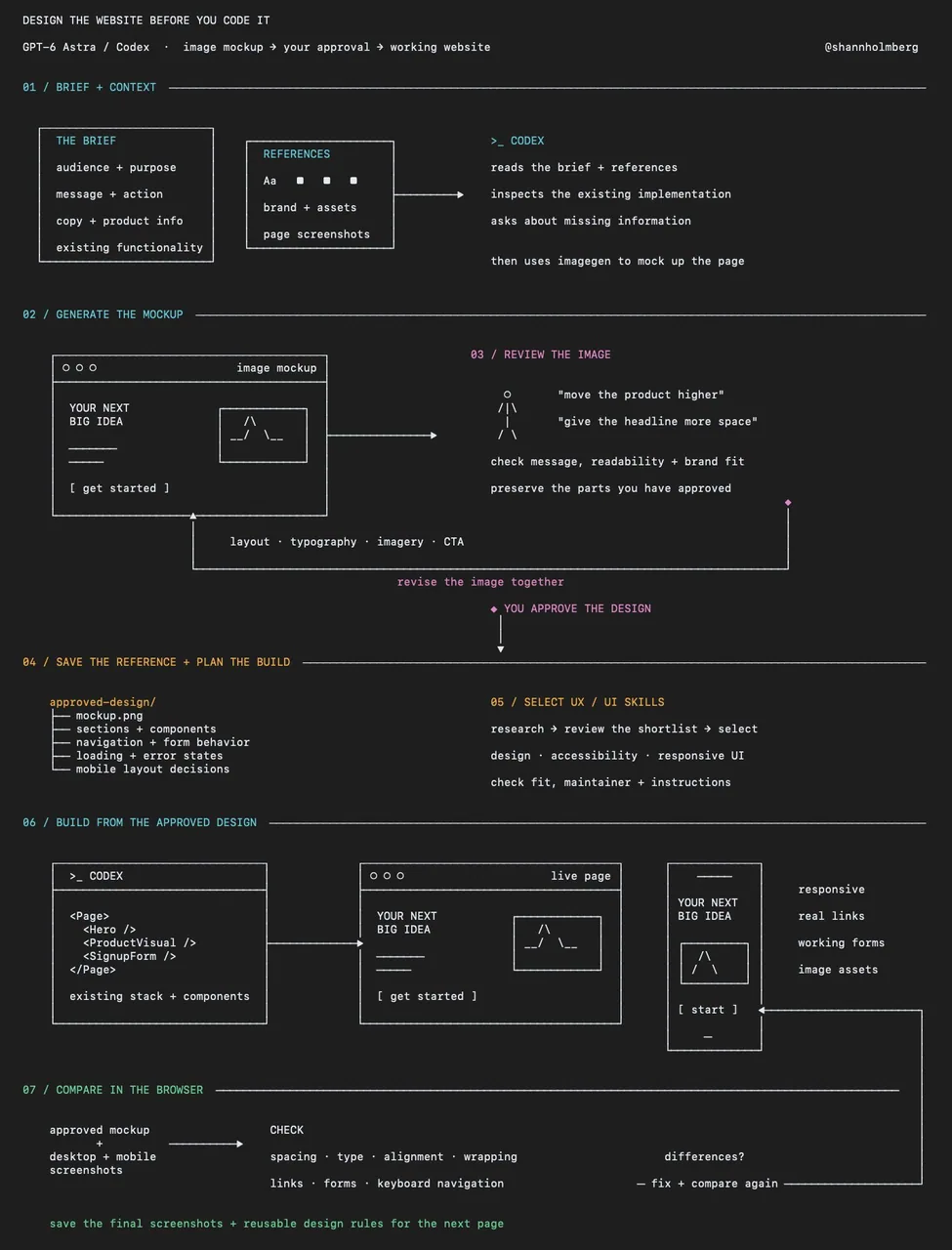
프롬프트
use imagegen to create a website mockup from this brief and the attached references
use the supplied copy, brand assets and product information
show the page layout, typography, imagery and calls to action, and wait for my feedback before writing code

---

build the approved mockup as a responsive page
preserve its layout, spacing, typography and visual hierarchy, use the approved copy and implement the interactions we agreed
flag anything that needs a design decision before changing it
한국어 번역
이 브리프와 첨부한 레퍼런스로 imagegen을 사용해 웹사이트 목업을 만들어 줘
제공한 카피, 브랜드 에셋, 제품 정보를 사용해
페이지 레이아웃, 타이포그래피, 이미지, 콜투액션을 보여주고 코드를 작성하기 전에 내 피드백을 기다려

---

승인된 목업을 반응형 페이지로 구현해
레이아웃, 여백, 타이포그래피, 시각적 위계를 그대로 유지하고, 승인된 카피를 사용하고, 합의한 인터랙션을 구현해
디자인 결정이 필요한 부분은 변경하기 전에 알려줘
출처
- 원작자
- shannholmberg
- 게시일
- 2026-09-21
- 원문 출처
- 원문 보기 ↗
- 수록 출처
- xianyu110/awesome-gpt-image2.5 · 2102163474709389562 · MIT