커스텀 대형 배경 타이포: TEXT HERE 하나로 editorial 포스터 변신
레퍼런스 이미지로 구도와 레이아웃을 고정하고, 셀카로 얼굴을 고정하며, TEXT HERE로 거대한 배경 글자를 제어합니다. 小红书 / 페르소나 포스터 템플릿, 세 글자만 바꾸면 양산 가능.
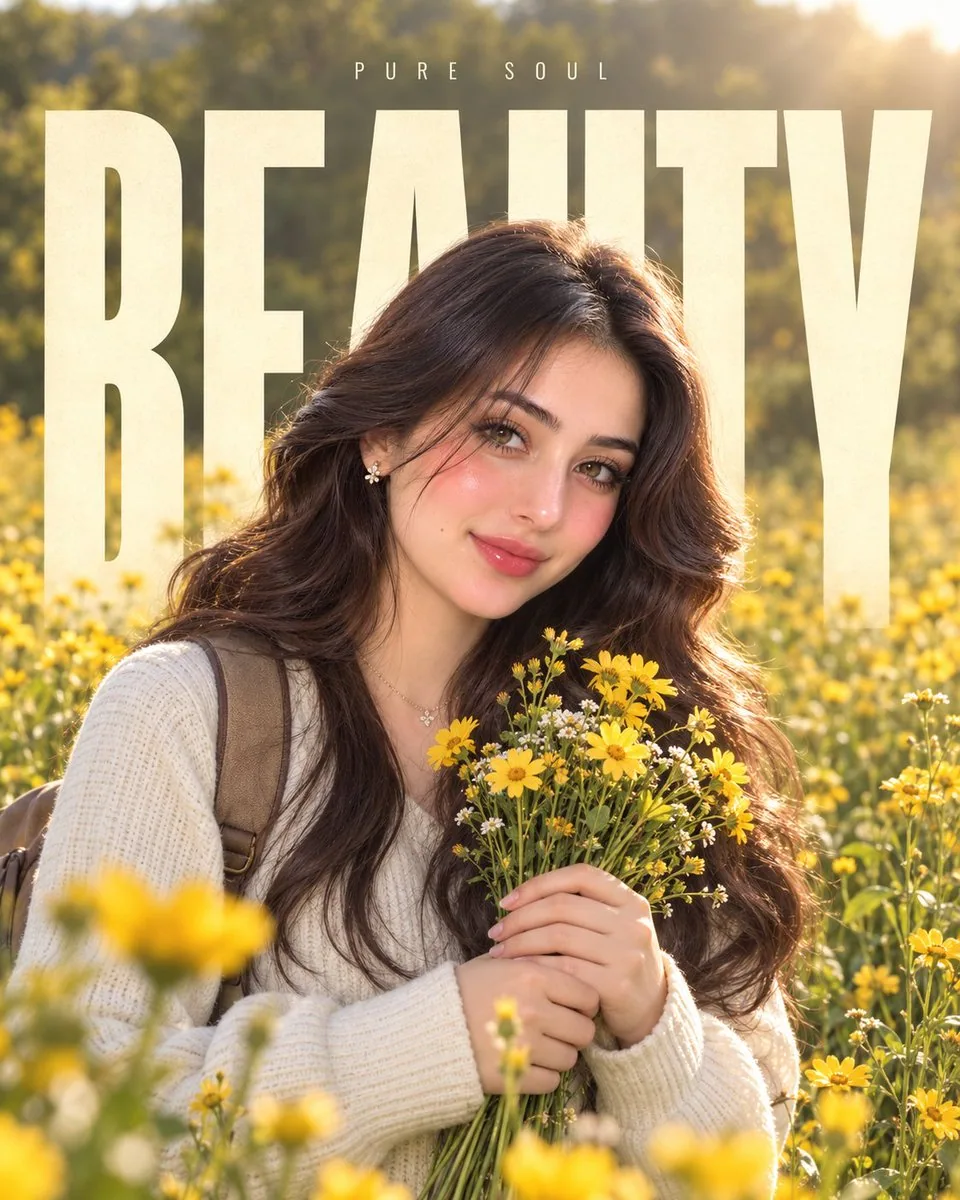
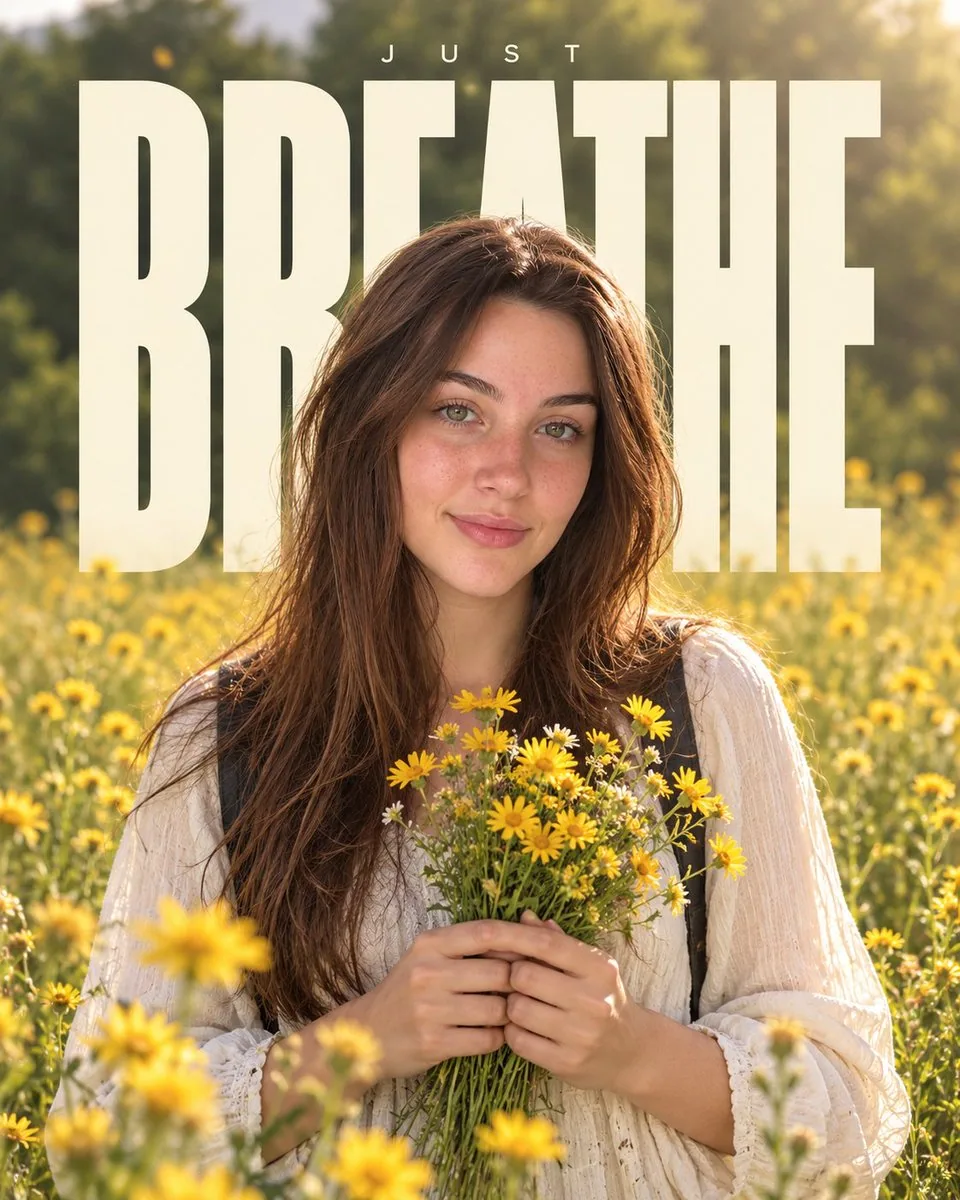
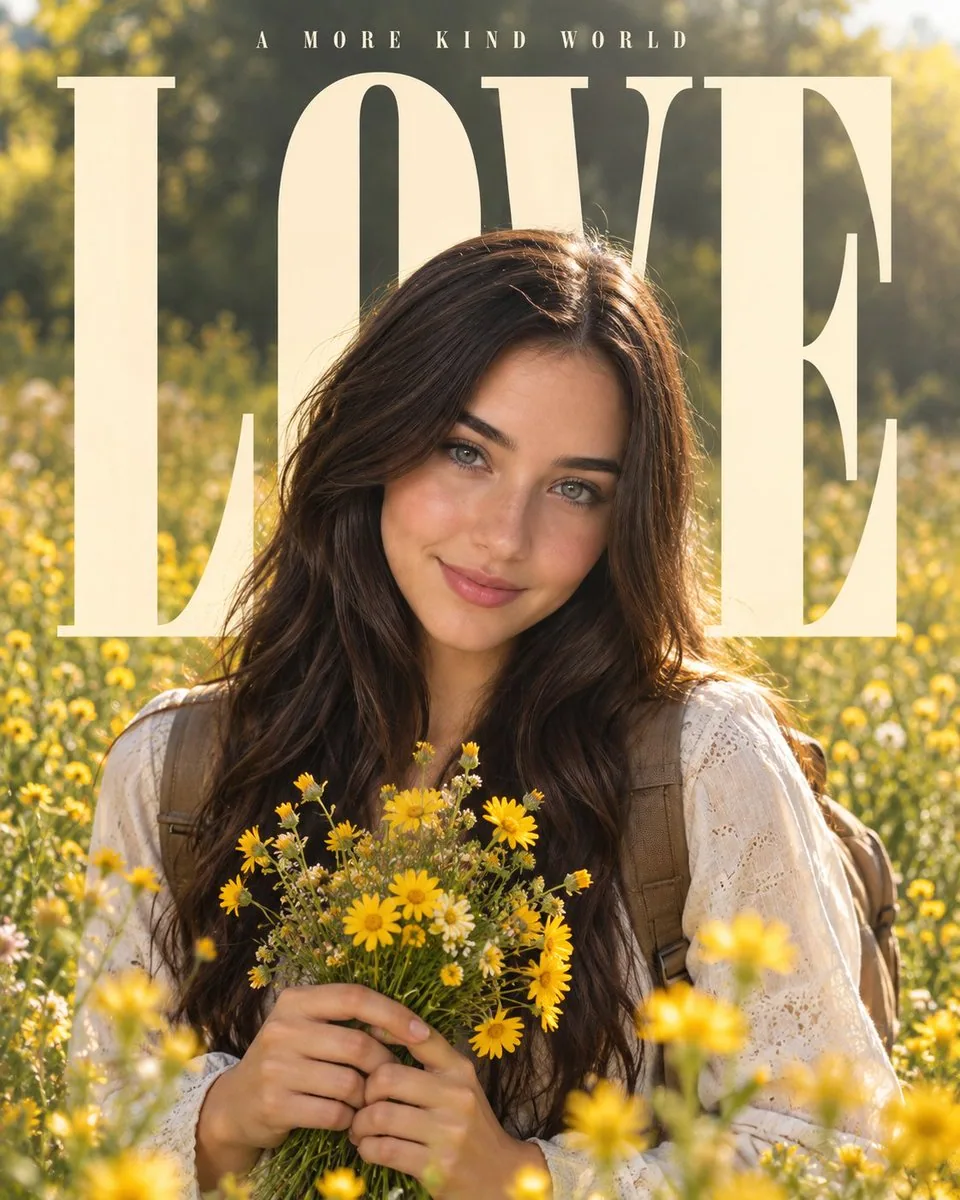
프롬프트
MASTER PROMPT — REFERENCE-BASED EDITORIAL PORTRAIT

REFERENCE IMAGE IS MANDATORY.

Use the uploaded reference image as the PRIMARY VISUAL REFERENCE for the entire composition, layout, typography treatment, background, lighting, proportions, depth, and overall premium editorial poster aesthetic.

Use the user's uploaded personal image as the PRIMARY IDENTITY REFERENCE for the subject.

The uploaded subject can be ANY PERSON, male or female. Preserve the exact identity of the person from the uploaded image, including facial structure, facial features, skin tone, hairstyle, hair texture, age, and natural appearance. Do not replace or redesign the person's face.

==================================================
CUSTOM TEXT CONTROL
==================================================

TEXT HERE: [TYPE ANY WORD OR SHORT TEXT HERE]

IMPORTANT:
Whatever text the user writes after "TEXT HERE:" must become the MAIN LARGE BACKGROUND TYPOGRAPHY.

The user can write ANY word, name, phrase, or short custom text they want.

Examples:
TEXT HERE: LOVE
TEXT HERE: DREAM
TEXT HERE: MAGIC
TEXT HERE: FOREVER
TEXT HERE: LIFE
TEXT HERE: WILD
TEXT HERE: HOPE
TEXT HERE: ZARNAB
TEXT HERE: MY STORY
TEXT HERE: CREATE
TEXT HERE: FREEDOM

Never automatically use "LOVE" unless the user specifically writes LOVE.

Use the user's exact custom text. Do not invent, replace, misspell, remove, or add words.

==================================================
SUBJECT & IDENTITY
==================================================

Place the person naturally in the center of the composition, matching the approximate position, scale, and framing of the reference image.

Preserve the person's exact identity from the uploaded image.

The subject should have a relaxed, natural, candid editorial pose.

The person is holding a small bouquet of fresh yellow wildflowers naturally in both hands, similar to the reference.

Maintain realistic anatomy, natural body proportions, realistic hands and fingers, authentic facial expression, realistic skin texture, and natural hair.

The final image must look like a professionally photographed version of the person, not an AI-generated replacement person.

==================================================
OUTFIT
==================================================

Create a clean, casual, elegant outfit inspired by the reference image while keeping it natural for the person's gender, appearance, and identity.

Use realistic fabric texture, natural folds, stitching, shadows, and physically accurate clothing.

Include subtle backpack straps similar to the reference when visually appropriate.

Do not make the outfit overly dramatic or fantasy-like.

==================================================
BACKGROUND
==================================================

Recreate the same overall outdoor environment as the reference:

A beautiful dreamy yellow wildflower meadow with soft green foliage and trees in the background, abundant yellow flowers throughout the foreground and midground, warm natural daylight, soft golden sunlight, subtle atmospheric haze, delicate floating light particles, cinematic depth, and a peaceful premium editorial atmosphere.

Keep the background visually very similar in mood, color balance, depth, and softness to the reference image.

Use realistic natural vegetation and physically accurate flowers.

==================================================
MAIN TYPOGRAPHY
==================================================

Place the CUSTOM TEXT behind the subject.

The text must be:

- Extremely large
- Bold
- Tall and condensed
- Uppercase
- Minimal
- Elegant
- Cream/off-white
- Highly readable
- Vertically dominant

The typography should occupy most of the background, similar to the reference composition.

The person's body must naturally overlap and partially cover the letters, creating a realistic foreground/background layering effect.

The text must remain BEHIND the person — never place the main typography over the person's face or body as a foreground graphic.

Match the reference's typography scale, spacing, positioning, and visual hierarchy as closely as possible.

If the custom text contains multiple words, arrange them in a visually balanced way while keeping the same oversized editorial poster aesthetic.

==================================================
SMALL TOP TEXT
==================================================

Add a small minimalist uppercase text above the main typography.

SMALL TEXT HERE: [TYPE SHORT TEXT HERE]

Keep this text subtle, centered, thin/minimal, with generous letter spacing.

If the user does not provide small text, use a simple minimal decorative uppercase word that complements the main custom text without distracting from it.

==================================================
COMPOSITION
==================================================

Match the reference image's composition as closely as possible.

Portrait 4:5 aspect ratio.

Keep the subject centered.

Use the oversized custom typography behind the subject.

Maintain the same approximate proportions between:

subject,
background typography,
flower field,
foreground,
negative space,
and upper text.

Create strong natural foreground, midground, and background depth.

The final result should feel like a premium fashion/editorial social-media poster.

==================================================
LIGHTING & CAMERA
==================================================

Natural soft golden daylight.

Warm cinematic exposure.

Soft realistic shadows.

Gentle highlights.

Natural skin illumination.

Shallow depth of field.

Realistic optical bokeh.

50mm professional portrait photography look.

Subtle cinematic filmic softness.

High dynamic range.

Natural premium color grading.

Avoid excessive HDR, artificial glow, plastic skin, or oversaturated colors.

==================================================
PHOTOREALISM
==================================================

Make the final image highly photorealistic.

Preserve:

- Realistic skin pores and texture
- Individual hair strands
- Natural facial details
- Realistic eyes
- Realistic hands and fingers
- Physically accurate flowers
- Natural fabric texture
- Correct shadows
- Realistic depth of field
- Natural perspective
- Authentic photographic imperfections

The final image should look like a real professional photograph captured with a high-end camera.

==================================================
STRICT REFERENCE RULES
==================================================

Use the reference image ONLY for:

- Composition
- Layout
- Typography style
- Typography placement
- Background environment
- Lighting
- Color mood
- Subject positioning
- Depth
- Overall visual aesthetic

Do NOT copy the identity, face, or personal appearance of the person in the reference image.

The user's uploaded image is the ONLY identity reference for the subject.

Do not change the person's identity.

Do not create an unrelated face.

Do not distort the face, hands, fingers, body, flowers, backpack, or clothing.

Do not put the large custom text in front of the person.

Do not use random words.

Do not automatically use "LOVE".

Use EXACTLY the text provided after:

TEXT HERE:

Keep all typography clean, correctly spelled, readable, and professionally integrated into the photograph.

FINAL GOAL:
Create a highly realistic premium editorial portrait that feels like the SAME visual concept, composition, typography treatment, background, lighting, and aesthetic as the reference image, while using the user's uploaded person as the subject and allowing the user to freely control the large background text through "TEXT HERE:".
한국어 번역
MASTER PROMPT — 레퍼런스 기반 EDITORIAL 포트레이트

레퍼런스 이미지는 필수입니다.

업로드한 레퍼런스 이미지를 전체 구도, 레이아웃, 타이포그래피 처리, 배경, 조명, 비율, 깊이감, 그리고 전반적인 프리미엄 editorial 포스터 미학의 PRIMARY VISUAL REFERENCE(최우선 시각 레퍼런스)로 사용하세요.

사용자가 업로드한 개인 이미지를 피사체의 PRIMARY IDENTITY REFERENCE(최우선 정체성 레퍼런스)로 사용하세요.

업로드된 피사체는 남성이든 여성이든 누구나 가능합니다. 업로드된 이미지 속 인물의 정체성을 얼굴 구조, 이목구비, 피부톤, 헤어스타일, 모발 질감, 나이, 자연스러운 외모까지 그대로 유지하세요. 인물의 얼굴을 교체하거나 재디자인하지 마세요.

==================================================
커스텀 텍스트 제어
==================================================

TEXT HERE: [원하는 단어나 짧은 텍스트를 입력하세요]

중요:
사용자가 "TEXT HERE:" 뒤에 쓴 텍스트는 반드시 메인 대형 배경 타이포그래피가 되어야 합니다.

사용자는 원하는 어떤 단어, 이름, 문구 또는 짧은 커스텀 텍스트든 쓸 수 있습니다.

예시:
TEXT HERE: LOVE
TEXT HERE: DREAM
TEXT HERE: MAGIC
TEXT HERE: FOREVER
TEXT HERE: LIFE
TEXT HERE: WILD
TEXT HERE: HOPE
TEXT HERE: ZARNAB
TEXT HERE: MY STORY
TEXT HERE: CREATE
TEXT HERE: FREEDOM

사용자가 직접 LOVE라고 쓰지 않는 한 "LOVE"를 자동으로 사용하지 마세요.

사용자의 정확한 커스텀 텍스트를 사용하세요. 단어를 만들어내거나, 바꾸거나, 철자를 틀리거나, 삭제하거나, 추가하지 마세요.

==================================================
피사체 & 정체성
==================================================

인물을 구도 중앙에 자연스럽게 배치하고, 레퍼런스 이미지의 대략적인 위치, 크기, 프레이밍과 맞추세요.

업로드된 이미지 속 인물의 정확한 정체성을 유지하세요.

피사체는 편안하고 자연스러운, 있는 그대로의 editorial 포즈를 취해야 합니다.

인물은 레퍼런스와 비슷하게 신선한 노란 야생화로 만든 작은 부케를 두 손으로 자연스럽게 들고 있습니다.

사실적인 해부학, 자연스러운 신체 비율, 사실적인 손과 손가락, 진짜 같은 표정, 사실적인 피부 질감, 자연스러운 모발을 유지하세요.

최종 이미지는 AI가 생성한 대체 인물이 아니라, 그 사람을 전문적으로 촬영한 사진처럼 보여야 합니다.

==================================================
의상
==================================================

레퍼런스 이미지에서 영감을 받되 그 사람의 성별, 외모, 정체성에 자연스러운 깔끔하고 캐주얼하며 우아한 의상을 만들어내세요.

사실적인 원단 질감, 자연스러운 주름, 바느질, 그림자, 물리적으로 정확한 의복을 사용하세요.

레퍼런스처럼 은은한 백팩 스트랩을 포함하되 시각적으로 자연스럽게 표현하세요.

의상을 지나치게 드라마틱하거나 판타지풍으로 만들지 마세요.

==================================================
배경
==================================================

레퍼런스와 동일한 전반적인 야외 환경을 재현하세요:

아름답고 몽환적인 노란 야생화 초원, 배경의 부드러운 녹색 잎과 나무들, 전경과 중경에 가득한 노란 꽃들, 따뜻한 자연광, 부드러운 황금빛 햇살, 은은한 대기 안개, 섬세하게 떠다니는 빛 입자, 시네마틱한 깊이감, 평화롭고 프리미엄한 editorial 분위기.

배경은 분위기, 색 균형, 깊이감, 부드러움 면에서 레퍼런스 이미지와 시각적으로 매우 유사하게 유지하세요.

사실적인 자연 식생과 물리적으로 정확한 꽃을 사용하세요.

==================================================
메인 타이포그래피
==================================================

커스텀 텍스트를 피사체 뒤에 배치하세요.

텍스트는 반드시:

- 매우 크게
- 볼드하게
- 길고 응축된 형태로
- 대문자로
- 미니멀하게
- 우아하게
- 크림/오프화이트 색으로
- 높은 가독성으로
- 수직으로 압도적이게

타이포그래피는 레퍼런스 구도처럼 배경의 대부분을 차지해야 합니다.

인물의 신체는 글자와 자연스럽게 겹치고 부분적으로 가리며, 사실적인 전경/배경 레이어링 효과를 만들어야 합니다.

텍스트는 반드시 인물 뒤에 있어야 합니다 — 메인 타이포그래피를 인물의 얼굴이나 몸 위에 전경 그래픽으로 올려놓지 마세요.

레퍼런스의 타이포그래피 크기, 자간, 위치, 시각적 위계를 최대한 가깝게 맞추세요.

커스텀 텍스트에 여러 단어가 있으면, 동일한 대형 editorial 포스터 미학을 유지하면서 시각적으로 균형 있게 배치하세요.

==================================================
상단 작은 텍스트
==================================================

메인 타이포그래피 위에 작은 미니멀 대문자 텍스트를 추가하세요.

SMALL TEXT HERE: [짧은 텍스트를 입력하세요]

이 텍스트는 은은하고 중앙 정렬되며 얇고 미니멀하게, 넉넉한 자간으로 유지하세요.

사용자가 작은 텍스트를 제공하지 않으면, 메인 커스텀 텍스트를 보완하면서 시선을 빼앗지 않는 단순하고 미니멀한 장식용 대문자 단어를 사용하세요.

==================================================
구도
==================================================

레퍼런스 이미지의 구도를 최대한 가깝게 맞추세요.

4:5 세로 비율.

피사체를 중앙에 유지하세요.

피사체 뒤에 거대한 커스텀 타이포그래피를 사용하세요.

다음 요소들 사이의 대략적인 비율을 동일하게 유지하세요:

피사체,
배경 타이포그래피,
꽃밭,
전경,
여백,
그리고 상단 텍스트.

강한 자연스러운 전경, 중경, 배경의 깊이감을 만드세요.

최종 결과물은 프리미엄 패션/editorial 소셜 미디어 포스터처럼 느껴져야 합니다.

==================================================
조명 & 카메라
==================================================

자연스러운 부드러운 황금빛 일광.

따뜻한 시네마틱 노출.

부드럽고 사실적인 그림자.

은은한 하이라이트.

자연스러운 피부 조명.

얕은 심도.

사실적인 광학 보케.

50mm 전문 인물 사진 룩.

은은한 시네마틱 필름 같은 부드러움.

높은 다이내믹 레인지.

자연스러운 프리미엄 색 보정.

과도한 HDR, 인위적인 광택, 플라스틱 같은 피부, 과도하게 채도 높은 색은 피하세요.

==================================================
포토리얼리즘
==================================================

최종 이미지를 매우 사실적으로 만드세요.

유지할 것:

- 사실적인 피부 모공과 질감
- 한 올 한 올 살아 있는 머리카락
- 자연스러운 얼굴 디테일
- 사실적인 눈
- 사실적인 손과 손가락
- 물리적으로 정확한 꽃
- 자연스러운 원단 질감
- 정확한 그림자
- 사실적인 심도
- 자연스러운 원근감
- 진짜 사진 같은 불완전함

최종 이미지는 고급 카메라로 촬영한 실제 전문 사진처럼 보여야 합니다.

==================================================
엄격한 레퍼런스 규칙
==================================================

레퍼런스 이미지는 다음에만 사용하세요:

- 구도
- 레이아웃
- 타이포그래피 스타일
- 타이포그래피 배치
- 배경 환경
- 조명
- 색 분위기
- 피사체 위치
- 깊이감
- 전반적인 시각 미학

레퍼런스 이미지 속 인물의 정체성, 얼굴, 개인적인 외모를 복사하지 마세요.

사용자가 업로드한 이미지가 피사체의 유일한 정체성 레퍼런스입니다.

인물의 정체성을 바꾸지 마세요.

무관한 얼굴을 만들지 마세요.

얼굴, 손, 손가락, 신체, 꽃, 백팩, 의상을 왜곡하지 마세요.

커스텀 대형 텍스트를 인물 앞에 놓지 마세요.

임의의 단어를 사용하지 마세요.

"LOVE"를 자동으로 사용하지 마세요.

다음 뒤에 제공된 텍스트를 정확히 사용하세요:

TEXT HERE:

모든 타이포그래피를 깔끔하고, 철자가 정확하고, 읽기 쉽고, 사진에 전문적으로 통합된 상태로 유지하세요.

FINAL GOAL:
레퍼런스 이미지와 동일한 시각적 콘셉트, 구도, 타이포그래피 처리, 배경, 조명, 미학을 지닌 매우 사실적인 프리미엄 editorial 포트레이트를 만드세요. 이때 사용자가 업로드한 인물을 피사체로 사용하고, "TEXT HERE:"를 통해 사용자가 대형 배경 텍스트를 자유롭게 제어할 수 있어야 합니다.
출처
- 원작자
- meAsifAi
- 게시일
- 2026-09-14
- 원문 출처
- 원문 보기 ↗
- 수록 출처
- xianyu110/awesome-gpt-image2.5 · 2099302118104444953 · MIT