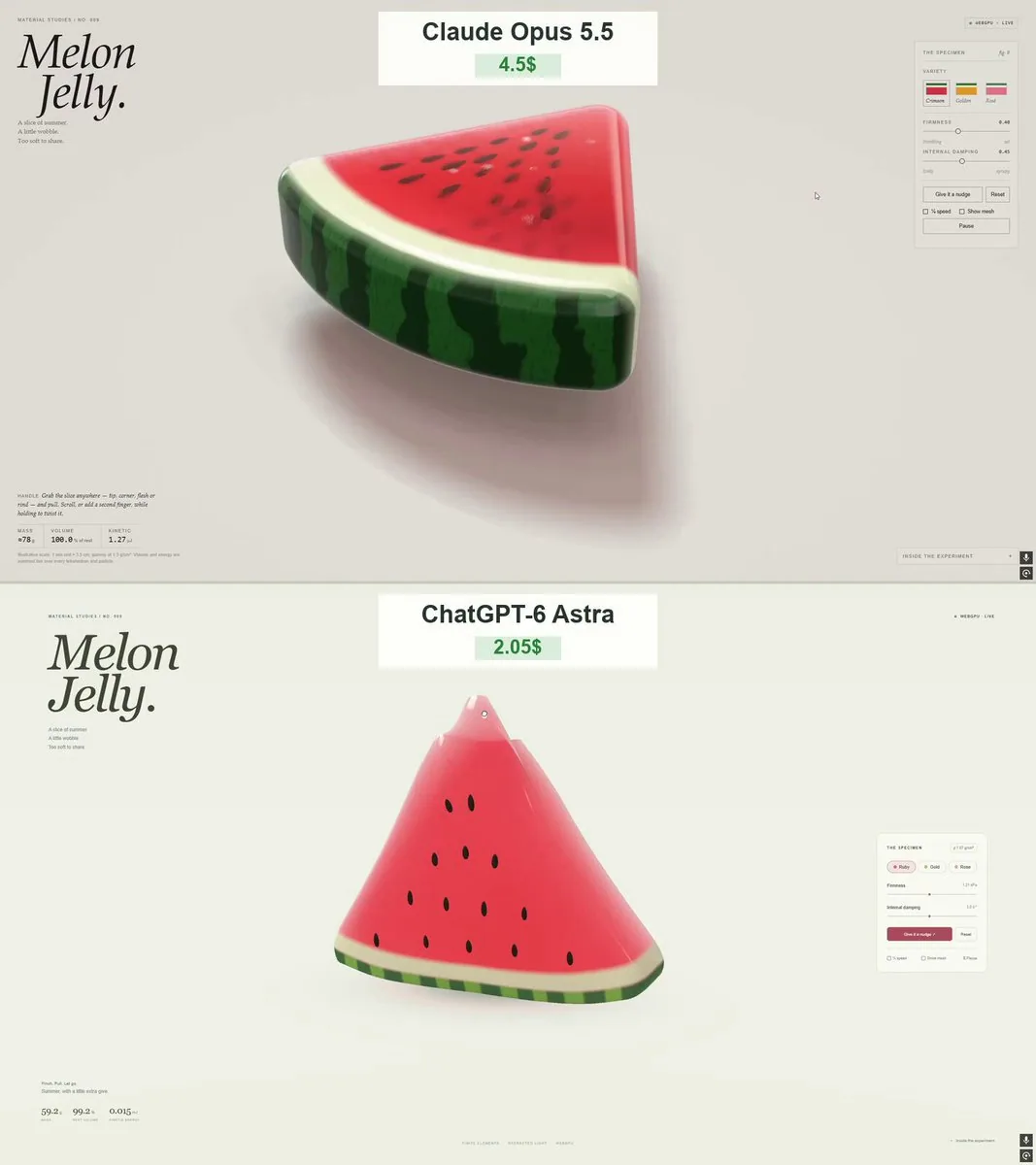
Create “Melon Jelly” - a polished, interactive 3D watermelon jelly slice that runs directly in the browser using genuine WebGPU and WGSL shaders.
Deliver a single, self-contained HTML file with embedded JavaScript and CSS. This must be an actual interactive 3D simulation, not a static render, video, or 2D imitation.
THE WATERMELON
Create a thick, rounded triangular watermelon wedge with:
Translucent ruby-red jelly flesh.
A pale, slightly translucent layer between the flesh and rind.
A glossy green outer rind with irregular dark-green stripes.

Individually modeled dark seeds embedded in both exposed sides.
Softly rounded corners and an appealing, substantial thickness.
Make it look like an expensive gummy candy photographed in a studio. It should feel juicy, soft, and almost edible. Keep the colors rich without overexposing the highlights.
SOFT-BODY PHYSICS
Use a volumetric soft-body simulation, such as a tetrahedral mesh with XPBD elastic and volume-preservation constraints.
The user must be able to:
Grab the tip, a corner, the flesh, or the rind.
Stretch, bend, lift, and gently twist the slice.

Release it and watch it wobble before gradually settling.
The slice must visibly deform locally, not simply move or scale as one rigid object. Make the rind slightly firmer than the flesh while keeping the whole slice flexible.
Preserve volume reasonably during stretching. Prevent inverted elements, explosive motion, and permanent collapse. Use a fixed simulation timestep and bounded substeps for stability.
After release, the motion should decay naturally - no instant snapping back and no endless oscillation.
Keep seeds attached to the deforming flesh. They must move and rotate with the surface rather than float independently or remain fixed in space.
Include ground contact, gentle friction, and soft bouncing. Avoid visible floor penetration.
RENDERING
Use native WebGPU with WGSL shaders.
Include:
Thickness-dependent light absorption.
Refraction through the jelly.

Fresnel reflections and glossy highlights.
Soft transmitted light through thin edges.
Subtle internal details and a few tiny air bubbles.

Soft contact shadows beneath the slice.
A light, neutral studio background.
The flesh, pale rind, and green skin should have distinct material responses. Avoid making everything look like clear glass or opaque plastic.
Keep the slice large and easy to inspect, with a three-quarter camera angle that reveals the flesh, seeds, and thickness.
INTERFACE
Use a minimal editorial layout with generous whitespace, thin borders, restrained controls, and no decorative UI gradients.
Top left:
“MATERIAL STUDIES / NO. 009”
A large italic serif heading split across two lines: “Melon” and “Jelly.”
Small caption:
“A slice of summer.”
“A little wobble.”
“Too soft to share.”
Top right:
A small status indicator showing “WEBGPU · LIVE” when the renderer is running.

Right-side panel:
“THE SPECIMEN”
Three coordinated watermelon-inspired color presets.
Firmness slider with its current value.
Internal damping slider with its current value.
“Give it a nudge” and “Reset” buttons.
“¼ speed” and “Show mesh” checkboxes.

Pause / Resume button.
Bottom left:
A short hint explaining that the slice can be grabbed and stretched.
Live mass, relative volume, and kinetic-energy readouts derived from the simulation. Clearly describe illustrative units or approximate values where appropriate.
Bottom right:

A collapsible “Inside the experiment” section briefly explaining the physics and rendering.
BEHAVIOR AND PERFORMANCE
Support both mouse and touch input. Use pointer capture so dragging remains reliable when the pointer leaves the object.
Make the layout work on desktop and mobile without controls covering the slice.
Reuse buffers and avoid rebuilding geometry or compiling shaders during dragging. Keep interaction smooth and responsive.
Respect reduced-motion preferences. If WebGPU is unavailable, display a clear explanation instead of silently substituting a fake renderer.
VALIDATION
Test dragging from several locations, strong stretches, repeated releases, ground collisions, all sliders, presets, pause, reset, and slow motion.
Check that the model returns to a stable resting shape, seeds stay attached, the mesh remains intact, and there are no rendering errors.
Prioritize the quality of the jelly response and lighting. The result should be something people want to keep grabbing and playing with.
한국어 번역
“Melon Jelly”를 만들어 줘 — 진짜 WebGPU와 WGSL 셰이더를 사용해 브라우저에서 바로 실행되는, 완성도 높고 인터랙티브한 3D 수박 젤리 조각.
JavaScript와 CSS를 내장한 단일 자체 포함 HTML 파일로 전달해. 이것은 실제 인터랙티브 3D 시뮬레이션이어야 하며, 정적 렌더나 영상, 2D 모방이어서는 안 돼.
수박
다음과 같은 두껍고 둥근 삼각형 수박 조각을 만들어:
반투명한 루비 레드 젤리 과육.
과육과 껍질 사이의 옅고 약간 반투명한 층.
불규칙한 진녹색 줄무늬가 있는 광택 있는 녹색 겉껍질.

양쪽 노출된 면에 각각 모델링되어 박힌 어두운 씨앗.
부드럽게 둥근 모서리와 매력적이고 묵직한 두께.
스튜디오에서 촬영한 값비싼 구미 캔디처럼 보이게 해. 과즙이 많고 부드러우며 거의 먹을 수 있을 것 같은 느낌이어야 해. 하이라이트를 과다 노출시키지 않으면서 색감은 풍부하게 유지해.
소프트 바디 물리
XPBD 탄성 및 부피 보존 제약이 있는 사면체 메시 같은 체적 소프트 바디 시뮬레이션을 사용해.
사용자는 다음을 할 수 있어야 해:
끝부분, 모서리, 과육 또는 껍질을 잡을 수 있어야 해.
조각을 늘리고, 구부리고, 들어 올리고, 부드럽게 비틀 수 있어야 해.

놓으면 흔들리다가 서서히 자리를 잡는 것을 볼 수 있어야 해.
조각은 단순히 하나의 강체처럼 움직이거나 크기가 변하는 것이 아니라, 국소적으로 눈에 띄게 변형되어야 해. 전체 조각은 유연하게 유지하면서 껍질을 과육보다 약간 더 단단하게 만들어.
늘리는 동안 부피를 합리적으로 보존해. 뒤집힌 요소, 폭발적인 움직임, 영구적인 붕괴를 방지해. 안정성을 위해 고정 시뮬레이션 타임스텝과 제한된 서브스텝을 사용해.
놓은 뒤 움직임은 자연스럽게 감쇠해야 해 — 즉시 원래대로 튕겨 돌아오거나 끝없이 진동해서는 안 돼.
씨앗은 변형되는 과육에 붙어 있게 해. 씨앗은 독립적으로 떠다니거나 공간에 고정되어 있지 않고, 표면과 함께 움직이고 회전해야 해.
지면 접촉, 부드러운 마찰, 부드러운 바운스를 포함해. 눈에 띄는 바닥 관통을 피해.
렌더링
WGSL 셰이더와 함께 네이티브 WebGPU를 사용해.
다음을 포함해:
두께에 따른 빛 흡수.
젤리를 통과하는 굴절.

프레넬 반사와 광택 하이라이트.
얇은 가장자리를 통과하는 부드러운 투과광.
은은한 내부 디테일과 몇 개의 작은 기포.

조각 아래의 부드러운 접촉 그림자.
밝고 중립적인 스튜디오 배경.
과육, 옅은 껍질층, 녹색 껍질은 각기 다른 재질 반응을 보여야 해. 모든 것이 투명 유리나 불투명 플라스틱처럼 보이지 않게 해.
조각을 크게 유지해 살펴보기 쉽게 하고, 과육과 씨앗, 두께가 드러나는 3/4 카메라 앵글을 사용해.
인터페이스
넉넉한 여백, 얇은 테두리, 절제된 컨트롤을 갖춘 미니멀한 에디토리얼 레이아웃을 사용하고, 장식적인 UI 그라디언트는 넣지 마.
왼쪽 상단:
“MATERIAL STUDIES / NO. 009”
두 줄로 나뉜 큰 이탤릭 세리프 제목: “Melon”과 “Jelly.”
작은 캡션:
“A slice of summer.”
“A little wobble.”
“Too soft to share.”
오른쪽 상단:
렌더러가 실행 중일 때 “WEBGPU · LIVE”를 표시하는 작은 상태 인디케이터.

오른쪽 패널:
“THE SPECIMEN”
수박에서 영감을 받은 서로 조화되는 세 가지 색상 프리셋.
현재 값이 표시되는 단단함 슬라이더.
현재 값이 표시되는 내부 감쇠 슬라이더.
“Give it a nudge” 및 “Reset” 버튼.
“¼ speed” 및 “Show mesh” 체크박스.

일시정지 / 재개 버튼.
왼쪽 하단:
조각을 잡고 늘릴 수 있다는 것을 설명하는 짧은 힌트.
시뮬레이션에서 도출된 실시간 질량, 상대 부피, 운동 에너지 판독값. 해당되는 경우 예시 단위나 근사값임을 명확히 설명해.
오른쪽 하단:

물리와 렌더링을 간단히 설명하는 접을 수 있는 “Inside the experiment” 섹션.
동작 및 성능
마우스와 터치 입력을 모두 지원해. 포인터가 오브젝트를 벗어나도 드래그가 안정적으로 유지되도록 포인터 캡처를 사용해.
컨트롤이 조각을 가리지 않으면서 데스크톱과 모바일 모두에서 레이아웃이 작동하게 해.
버퍼를 재사용하고 드래그 중에 지오메트리를 다시 만들거나 셰이더를 컴파일하지 마. 상호작용을 부드럽고 반응성 있게 유지해.
모션 감소 설정을 존중해. WebGPU를 사용할 수 없으면 가짜 렌더러로 조용히 대체하지 말고 명확한 설명을 표시해.
검증
여러 위치에서의 드래그, 강한 늘리기, 반복된 놓기, 지면 충돌, 모든 슬라이더, 프리셋, 일시정지, 리셋, 슬로 모션을 테스트해.
모델이 안정적인 휴지 형태로 돌아오는지, 씨앗이 붙어 있는지, 메시가 온전한지, 렌더링 오류가 없는지 확인해.
젤리 반응과 조명의 품질을 우선시해. 결과물은 사람들이 계속 잡고 갖고 놀고 싶어 하는 것이어야 해.