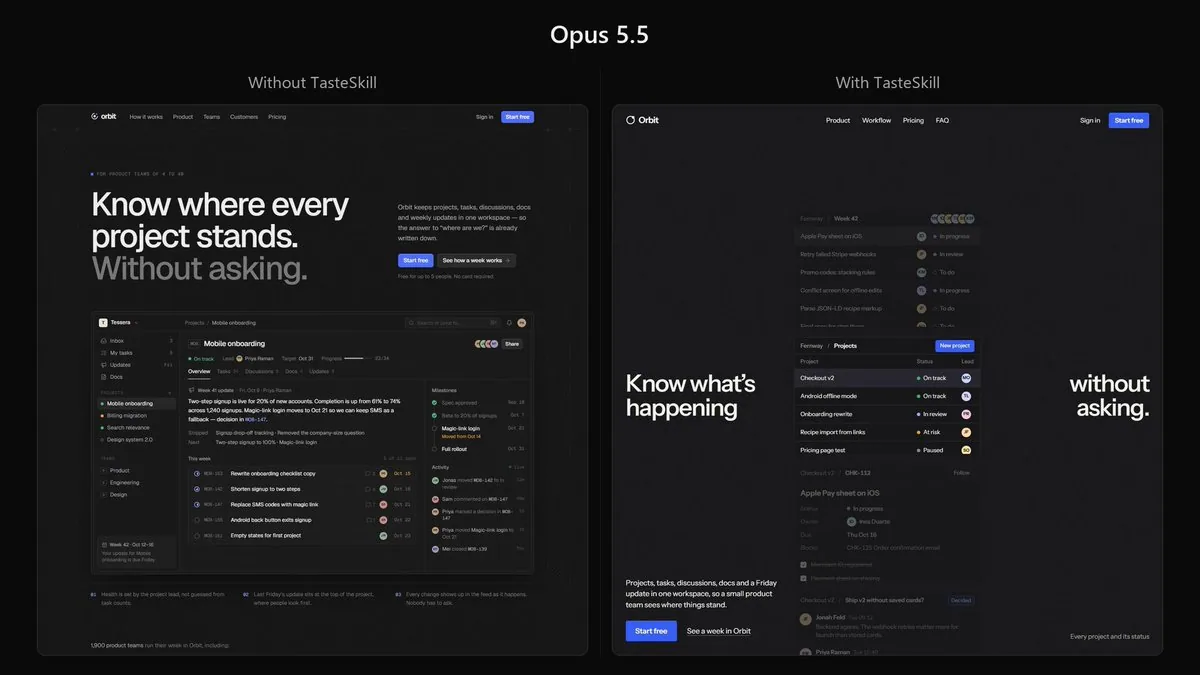
Build a complete, production-quality landing page for Orbit, a project management platform for small product teams.
Orbit combines projects, tasks, discussions, documents, and weekly progress updates in one workspace. Its core purpose is to let teams understand what is happening without constantly asking for updates or scheduling status meetings.
Technical requirements
Build the website using Next.js, React, and TypeScript.
Use TSX components and a proper Next.js project structure. Do not create a plain HTML/CSS website.
The implementation should be clean, componentized, responsive, and production-quality. Use modern CSS or Tailwind CSS for styling where appropriate.
Do not merely describe the implementation. Build the complete working page.
Visual reference
Use the provided reference image as the primary art-direction reference.
Match its overall visual character very closely: typography treatment, density, spacing philosophy, texture, contrast, borders, surface treatment, visual weight, image treatment, and general design atmosphere.
However, do not copy the reference website or recreate its content.
Do not copy its:
branding
text or copy
logos
illustrations
exact layout
individual components
imagery
proprietary visual assets
Instead, understand the design language behind the reference and reinterpret it for Orbit.
For example, if the reference uses grain, paper texture, sharp borders, muted surfaces, unusual typography, dense layouts, editorial spacing, or a particular treatment of imagery, use those qualities as inspiration while creating an original design.
The finished page should clearly belong to the same visual world as the reference while still being an original website.
Page
The hero should immediately explain Orbit and show a convincing view of the actual product.
Throughout the page, create realistic Orbit UI showing projects, tasks, assignees, discussions, documents, statuses, deadlines, and weekly updates.
Include the sections that genuinely help sell the product, such as:
Hero
Product demonstration

Core workflow
Features
Team use cases
Integrations
Customer proof
Pricing
FAQ
Final CTA
You may change, combine, reorder, or remove sections when doing so produces a stronger page.
Design quality
Avoid the stereotypical AI-generated SaaS aesthetic.
No purple gradient hero.
No glowing blobs.
No glassmorphism.
No giant collection of rounded cards.
No endless 3-column feature grids.
No random floating icons.
No meaningless charts.
No fake AI functionality.
No excessive pills.
No generic startup illustrations.
No repetitive centered sections.
Do not make every element a card or container.
Use typography, composition, whitespace, texture, product UI, imagery, and hierarchy to create visual interest.
The product UI itself should be detailed and believable. Keep names, projects, dates, statuses, and other information consistent across different product previews.
Copy should be concise and specific. Avoid phrases such as “supercharge your workflow,” “unlock your potential,” and other generic SaaS language.
Add subtle, intentional interactions and motion where they improve the experience. Avoid animation for animation's sake.
Make the page excellent on desktop and mobile.
The final result should feel designed, not generated.
Take the reference image seriously. Analyze its design system first, then translate that design language into an original Orbit website.
Do not ask me to choose colors, fonts, layouts, libraries, or design direction. Make those decisions yourself and implement the complete site.
한국어 번역
소규모 제품 팀을 위한 프로젝트 관리 플랫폼 Orbit의 완성도 높은 프로덕션 수준 랜딩 페이지를 만들어 주세요.
Orbit은 프로젝트, 작업, 토론, 문서, 주간 진행 업데이트를 하나의 워크스페이스에 결합합니다. 핵심 목적은 팀이 끊임없이 업데이트를 요청하거나 상태 회의를 잡지 않고도 무슨 일이 진행 중인지 파악하게 하는 것입니다.
기술 요구 사항
Next.js, React, TypeScript를 사용해 웹사이트를 구축하세요.
TSX 컴포넌트와 적절한 Next.js 프로젝트 구조를 사용하세요. 평범한 HTML/CSS 웹사이트를 만들지 마세요.
구현은 깔끔하고, 컴포넌트화되어 있으며, 반응형이고, 프로덕션 수준이어야 합니다. 스타일링에는 적절한 곳에 최신 CSS 또는 Tailwind CSS를 사용하세요.
구현을 설명만 하지 마세요. 완전히 동작하는 페이지를 구축하세요.
시각적 레퍼런스
제공된 레퍼런스 이미지를 주요 아트 디렉션 레퍼런스로 사용하세요.
타이포그래피 처리, 밀도, 여백 철학, 질감, 대비, 테두리, 표면 처리, 시각적 무게감, 이미지 처리, 전반적인 디자인 분위기 등 전체적인 시각적 성격을 매우 가깝게 맞추세요.
다만 레퍼런스 웹사이트를 복사하거나 그 콘텐츠를 재현하지 마세요.
다음을 복사하지 마세요:
브랜딩
텍스트나 카피
로고
일러스트레이션
정확한 레이아웃
개별 컴포넌트
이미지
독점적 시각 자산
대신 레퍼런스 뒤에 있는 디자인 언어를 이해하고 Orbit에 맞게 재해석하세요.
예를 들어 레퍼런스가 그레인, 종이 질감, 날카로운 테두리, 차분한 표면, 독특한 타이포그래피, 밀도 높은 레이아웃, 에디토리얼 여백, 또는 특정한 이미지 처리를 사용한다면, 독창적인 디자인을 만들면서 그런 특성을 영감으로 삼으세요.
완성된 페이지는 분명히 레퍼런스와 같은 시각적 세계에 속하면서도 독창적인 웹사이트여야 합니다.
페이지
히어로 섹션은 즉시 Orbit을 설명하고 실제 제품의 설득력 있는 모습을 보여주어야 합니다.
페이지 전반에 걸쳐 프로젝트, 작업, 담당자, 토론, 문서, 상태, 마감일, 주간 업데이트를 보여주는 현실적인 Orbit UI를 만드세요.
제품을 판매하는 데 실제로 도움이 되는 섹션을 포함하세요. 예를 들면:
히어로
제품 데모

핵심 워크플로
기능
팀 활용 사례
통합
고객 사례
가격
FAQ
최종 CTA
더 나은 페이지가 된다면 섹션을 변경, 결합, 재배치하거나 제거해도 됩니다.
디자인 품질
전형적인 AI 생성 SaaS 미학을 피하세요.
보라색 그라데이션 히어로 금지.
빛나는 블롭 금지.
글래스모피즘 금지.
둥근 카드가 잔뜩 모인 구성 금지.
끝없이 이어지는 3열 기능 그리드 금지.
무작위로 떠다니는 아이콘 금지.
의미 없는 차트 금지.
가짜 AI 기능 금지.
과도한 필(pill) 요소 금지.
흔한 스타트업 일러스트레이션 금지.
반복적인 중앙 정렬 섹션 금지.
모든 요소를 카드나 컨테이너로 만들지 마세요.
타이포그래피, 구성, 여백, 질감, 제품 UI, 이미지, 위계를 활용해 시각적 흥미를 만드세요.
제품 UI 자체는 상세하고 믿을 만해야 합니다. 서로 다른 제품 미리보기에서 이름, 프로젝트, 날짜, 상태 및 기타 정보를 일관되게 유지하세요.
카피는 간결하고 구체적이어야 합니다. “워크플로를 강화하세요,” “잠재력을 발휘하세요” 같은 표현과 기타 흔한 SaaS 언어를 피하세요.
경험을 개선하는 곳에는 은은하고 의도적인 인터랙션과 모션을 추가하세요. 애니메이션을 위한 애니메이션은 피하세요.
데스크톱과 모바일 모두에서 페이지가 뛰어나게 만드세요.
최종 결과물은 생성된 것이 아니라 디자인된 느낌이어야 합니다.
레퍼런스 이미지를 진지하게 대하세요. 먼저 그 디자인 시스템을 분석한 다음, 그 디자인 언어를 독창적인 Orbit 웹사이트로 옮기세요.
색상, 폰트, 레이아웃, 라이브러리, 디자인 방향을 고르라고 저에게 묻지 마세요. 그 결정은 직접 하고 완전한 사이트를 구현하세요.