Control / Astra 向けプロンプト 10 選
コントロール系プロンプト集。構図を制御し、スタイルを制御する。
プロンプト
The biggest change with ChatGPT Images 2.5 isn’t quality.
It’s control.

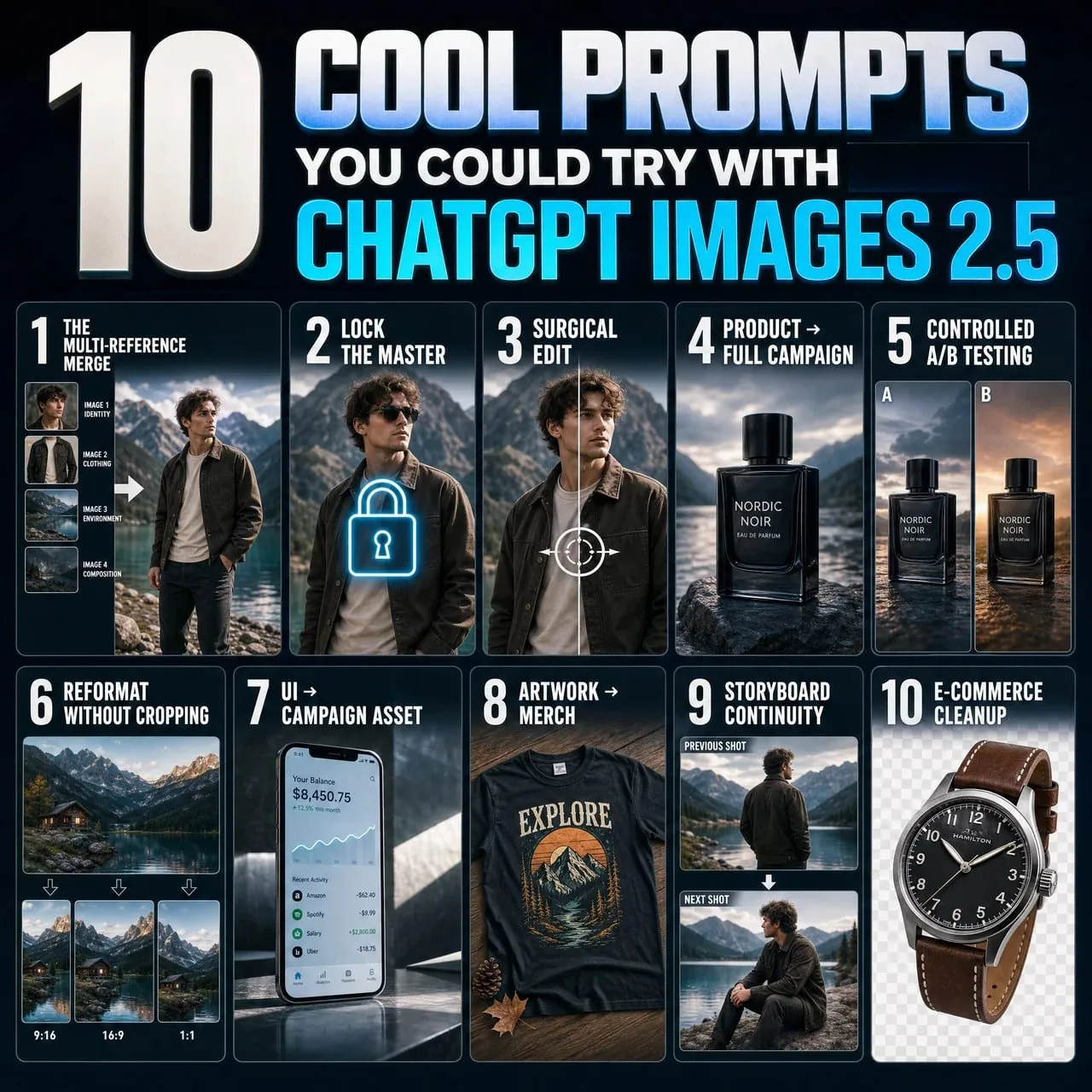
10 Images 2.5 × Astra prompts that change how you generate graphics (full prompts included) ↓

1. The multi-reference merge.
“Image 1 = identity. Image 2 = clothing. Image 3 = environment. Image 4 = composition. Use each only for its assigned role. Combine into one coherent photorealistic scene.”

2. Lock the master.
“This image is the approved master. Treat every visible attribute as locked unless I explicitly name it. For future edits, change only the requested variable and preserve everything else.”

3. Surgical edit.
“Change ONLY [ELEMENT/REGION]. Match existing anatomy, materials, lighting, and perspective. Do not modify anything else.”

4. Product → full campaign.
“Treat image 1 as the immutable product reference. Preserve exact geometry, materials, colors, and branding. Place it in [SCENE]. Change only environment, lighting, and camera.”

5. Controlled A/B testing.
“Create [N] variants of this creative. Preserve product, composition, typography, and lighting. Change ONLY [VARIABLE]. Everything else stays locked.”

6. Reformat without cropping.
“Recompose this exact image for [ASPECT RATIO]. Do not simply crop it. Preserve the subject and visual hierarchy while intelligently extending and rearranging the scene.”

7. UI → campaign asset.
“Treat the uploaded UI as locked artwork. Do not redesign it. Place it accurately inside a premium [DEVICE/CAMPAIGN] scene with realistic lighting, reflections, and negative space.”

8. Artwork → merch.
“Treat image 1 as the exact artwork. Preserve composition and colors. Apply it realistically to [PRODUCT], following folds, texture, and print behavior. Do not redesign it.”

9. Storyboard continuity.
“Treat this image as the canonical character, wardrobe, and location. Generate the next shot: [SHOT]. Change only camera, framing, and pose. Preserve everything else.”

10. E-commerce cleanup.
“Preserve the product exactly. Remove the environment and isolate it on [BACKGROUND/TRANSPARENT]. Repair only edge details for a clean catalog image. Do not alter color, branding, or proportions.”
日本語訳
ChatGPT Images 2.5 の最大の変化は品質ではない。
それはコントロールだ。

グラフィックの生成方法を変える Images 2.5 × Astra プロンプト 10 選(プロンプト全文付き)↓

1. 複数参照のマージ。
「画像 1 = アイデンティティ。画像 2 = 衣装。画像 3 = 環境。画像 4 = 構図。それぞれを割り当てられた役割にのみ使用する。一つの首尾一貫したフォトリアルなシーンに統合する。」

2. マスターを固定する。
「この画像は承認済みのマスターである。私が明示的に指定しない限り、目に見えるすべての属性をロック済みとして扱う。今後の編集では、要求された変数のみを変更し、それ以外はすべて保持する。」

3. 外科的編集。
「[ELEMENT/REGION] のみを変更する。既存の解剖学的構造、素材、ライティング、遠近感に合わせる。それ以外は一切変更しない。」

4. 商品 → フルキャンペーン。
「画像 1 を不変の商品リファレンスとして扱う。正確な形状、素材、色、ブランディングを保持する。[SCENE] に配置する。環境、ライティング、カメラのみを変更する。」

5. 制御された A/B テスト。
「このクリエイティブのバリエーションを [N] 個作成する。商品、構図、タイポグラフィ、ライティングを保持する。[VARIABLE] のみを変更する。それ以外はすべてロックしたままにする。」

6. クロップせずにリフォーマット。
「この画像をそのまま [ASPECT RATIO] 用に再構成する。単純にクロップしない。被写体と視覚的ヒエラルキーを保持しつつ、シーンをインテリジェントに拡張・再配置する。」

7. UI → キャンペーン素材。
「アップロードされた UI をロック済みのアートワークとして扱う。再デザインしない。リアルなライティング、反射、ネガティブスペースを備えたプレミアムな [DEVICE/CAMPAIGN] シーンの中に正確に配置する。」

8. アートワーク → グッズ。
「画像 1 を正確なアートワークとして扱う。構図と色を保持する。折り目、質感、プリントの挙動に従って、[PRODUCT] にリアルに適用する。再デザインしない。」

9. 絵コンテの連続性。
「この画像を正典となるキャラクター、衣装、ロケーションとして扱う。次のカットを生成する:[SHOT]。カメラ、フレーミング、ポーズのみを変更する。それ以外はすべて保持する。」

10. EC 向けクリーンアップ。
「商品を正確に保持する。環境を除去し、[BACKGROUND/TRANSPARENT] 上に分離する。クリーンなカタログ画像のためにエッジのディテールのみを修復する。色、ブランディング、プロポーションは変更しない。」
出典
- 原作者
- vinsonleow
- 公開日
- 2026-09-09
- 原典
- 元の投稿を見る ↗
- 収録元
- xianyu110/awesome-gpt-image2.5 · 2097592608583471184 · MIT