10 條 Control / Astra 向 Prompt
控制向提示合集,控構圖、控風格。
提示詞
The biggest change with ChatGPT Images 2.5 isn’t quality.
It’s control.

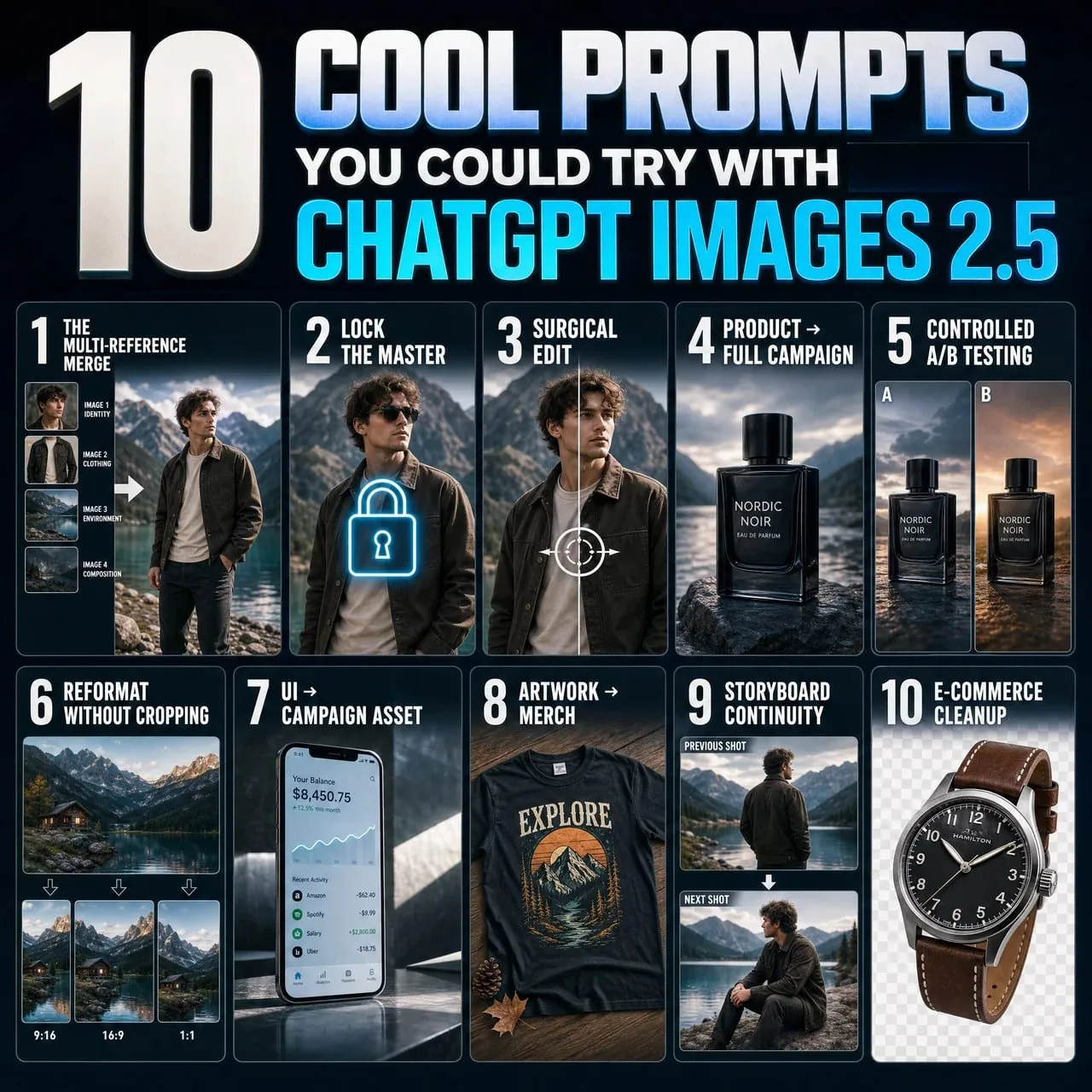
10 Images 2.5 × Astra prompts that change how you generate graphics (full prompts included) ↓

1. The multi-reference merge.
“Image 1 = identity. Image 2 = clothing. Image 3 = environment. Image 4 = composition. Use each only for its assigned role. Combine into one coherent photorealistic scene.”

2. Lock the master.
“This image is the approved master. Treat every visible attribute as locked unless I explicitly name it. For future edits, change only the requested variable and preserve everything else.”

3. Surgical edit.
“Change ONLY [ELEMENT/REGION]. Match existing anatomy, materials, lighting, and perspective. Do not modify anything else.”

4. Product → full campaign.
“Treat image 1 as the immutable product reference. Preserve exact geometry, materials, colors, and branding. Place it in [SCENE]. Change only environment, lighting, and camera.”

5. Controlled A/B testing.
“Create [N] variants of this creative. Preserve product, composition, typography, and lighting. Change ONLY [VARIABLE]. Everything else stays locked.”

6. Reformat without cropping.
“Recompose this exact image for [ASPECT RATIO]. Do not simply crop it. Preserve the subject and visual hierarchy while intelligently extending and rearranging the scene.”

7. UI → campaign asset.
“Treat the uploaded UI as locked artwork. Do not redesign it. Place it accurately inside a premium [DEVICE/CAMPAIGN] scene with realistic lighting, reflections, and negative space.”

8. Artwork → merch.
“Treat image 1 as the exact artwork. Preserve composition and colors. Apply it realistically to [PRODUCT], following folds, texture, and print behavior. Do not redesign it.”

9. Storyboard continuity.
“Treat this image as the canonical character, wardrobe, and location. Generate the next shot: [SHOT]. Change only camera, framing, and pose. Preserve everything else.”

10. E-commerce cleanup.
“Preserve the product exactly. Remove the environment and isolate it on [BACKGROUND/TRANSPARENT]. Repair only edge details for a clean catalog image. Do not alter color, branding, or proportions.”
中文翻譯
ChatGPT Images 2.5 最大的變化不在於質量。
而在於控制力。

10 條 Images 2.5 × Astra 提示詞,改變你生成圖形的方式(含完整提示詞)↓

1. 多參考圖融合。
“圖像 1 = 身份。圖像 2 = 服裝。圖像 3 = 環境。圖像 4 = 構圖。每張圖只用於它被指定的角色。融合成一個連貫的寫實場景。”

2. 鎖定母版。
“這張圖是已確認的母版。除非我明確點名,否則將所有可見屬性視爲已鎖定。後續編輯時,只修改所請求的變量,其餘一切保持不變。”

3. 外科手術式編輯。
“只修改 [ELEMENT/REGION]。匹配現有的人體結構、材質、光照與透視。不要改動任何其他內容。”

4. 產品 → 完整營銷企劃。
“將圖像 1 視爲不可更改的產品參考。保留精確的幾何形態、材質、顏色與品牌元素。把它放置在 [SCENE] 中。只改變環境、光照與機位。”

5. 可控 A/B 測試。
“爲這一創意生成 [N] 個變體。保留產品、構圖、字體排版與光照。只修改 [VARIABLE]。其餘一切保持鎖定。”

6. 不裁切的重排版。
“爲 [ASPECT RATIO] 重新構圖這張具體的圖像。不要簡單地裁切它。在保留主體與視覺層級的同時,智能地延展並重新安排場景。”

7. UI → 營銷素材。
“將上傳的 UI 視爲已鎖定的畫面。不要重新設計它。把它精準地置入一個高端 [DEVICE/CAMPAIGN] 場景中,具備真實的光照、反射與留白。”

8. 插畫 → 周邊商品。
“將圖像 1 視爲確切的圖案。保留構圖與色彩。以寫實方式將其應用到 [PRODUCT] 上,遵循褶皺、材質與印刷表現。不要重新設計它。”

9. 分鏡連續性。
“將這張圖視爲標準角色、服裝與場景。生成下一個鏡頭:[SHOT]。只改變機位、取景與姿勢。其餘一切保持不變。”

10. 電商產品淨化。
“精確保留產品本身。移除環境,並將其隔離在 [BACKGROUND/TRANSPARENT] 上。只修復邊緣細節,得到乾淨的目錄圖。不要改變顏色、品牌或比例。”
溯源
- 原作者
- vinsonleow
- 發佈日期
- 2026-09-09
- 原始出處
- 查看原帖 ↗
- 收錄來源
- xianyu110/awesome-gpt-image2.5 · 2097592608583471184 · MIT