Control / Astra 지향 프롬프트 10종
제어 지향 프롬프트 모음, 구도 제어·스타일 제어.
프롬프트
The biggest change with ChatGPT Images 2.5 isn’t quality.
It’s control.

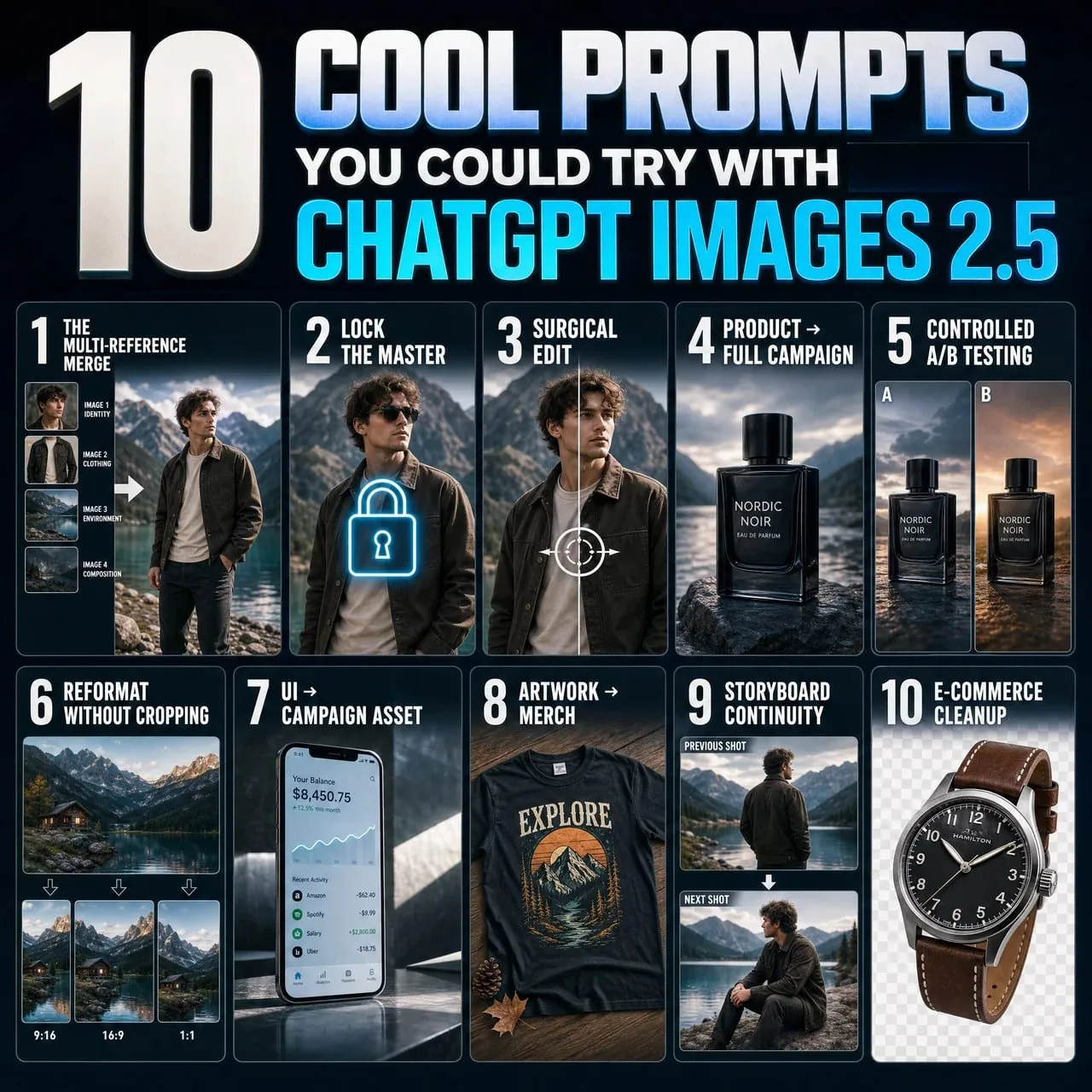
10 Images 2.5 × Astra prompts that change how you generate graphics (full prompts included) ↓

1. The multi-reference merge.
“Image 1 = identity. Image 2 = clothing. Image 3 = environment. Image 4 = composition. Use each only for its assigned role. Combine into one coherent photorealistic scene.”

2. Lock the master.
“This image is the approved master. Treat every visible attribute as locked unless I explicitly name it. For future edits, change only the requested variable and preserve everything else.”

3. Surgical edit.
“Change ONLY [ELEMENT/REGION]. Match existing anatomy, materials, lighting, and perspective. Do not modify anything else.”

4. Product → full campaign.
“Treat image 1 as the immutable product reference. Preserve exact geometry, materials, colors, and branding. Place it in [SCENE]. Change only environment, lighting, and camera.”

5. Controlled A/B testing.
“Create [N] variants of this creative. Preserve product, composition, typography, and lighting. Change ONLY [VARIABLE]. Everything else stays locked.”

6. Reformat without cropping.
“Recompose this exact image for [ASPECT RATIO]. Do not simply crop it. Preserve the subject and visual hierarchy while intelligently extending and rearranging the scene.”

7. UI → campaign asset.
“Treat the uploaded UI as locked artwork. Do not redesign it. Place it accurately inside a premium [DEVICE/CAMPAIGN] scene with realistic lighting, reflections, and negative space.”

8. Artwork → merch.
“Treat image 1 as the exact artwork. Preserve composition and colors. Apply it realistically to [PRODUCT], following folds, texture, and print behavior. Do not redesign it.”

9. Storyboard continuity.
“Treat this image as the canonical character, wardrobe, and location. Generate the next shot: [SHOT]. Change only camera, framing, and pose. Preserve everything else.”

10. E-commerce cleanup.
“Preserve the product exactly. Remove the environment and isolate it on [BACKGROUND/TRANSPARENT]. Repair only edge details for a clean catalog image. Do not alter color, branding, or proportions.”
한국어 번역
ChatGPT Images 2.5의 가장 큰 변화는 품질이 아니다.
바로 제어다.

그래픽 생성 방식을 바꾸는 Images 2.5 × Astra 프롬프트 10종 (전체 프롬프트 포함) ↓

1. 멀티 레퍼런스 병합.
"이미지 1 = 정체성. 이미지 2 = 의상. 이미지 3 = 환경. 이미지 4 = 구도. 각 이미지는 지정된 역할에만 사용하라. 하나의 일관된 사실적 장면으로 결합하라."

2. 마스터 고정.
"이 이미지는 승인된 마스터다. 내가 명시적으로 언급하지 않는 한 보이는 모든 속성을 고정된 것으로 취급하라. 이후 편집에서는 요청된 변수만 변경하고 나머지는 전부 보존하라."

3. 정밀 편집.
"[ELEMENT/REGION]만 변경하라. 기존 해부학, 재질, 조명, 원근감에 맞춰라. 그 외에는 아무것도 수정하지 마라."

4. 제품 → 전체 캠페인.
"이미지 1을 변경 불가능한 제품 레퍼런스로 취급하라. 정확한 형상, 재질, 색상, 브랜딩을 보존하라. [SCENE]에 배치하라. 환경, 조명, 카메라만 변경하라."

5. 통제된 A/B 테스트.
"이 크리에이티브의 변형 [N]개를 생성하라. 제품, 구도, 타이포그래피, 조명을 보존하라. [VARIABLE]만 변경하라. 나머지는 모두 고정된다."

6. 크롭 없는 재포맷.
"이 이미지를 [ASPECT RATIO]에 맞게 재구성하라. 단순히 크롭하지 마라. 주체와 시각적 위계를 보존하면서 장면을 지능적으로 확장하고 재배치하라."

7. UI → 캠페인 에셋.
"업로드된 UI를 고정된 아트워크로 취급하라. 재디자인하지 마라. 사실적인 조명, 반사, 여백이 있는 프리미엄 [DEVICE/CAMPAIGN] 장면 안에 정확하게 배치하라."

8. 아트워크 → 굿즈.
"이미지 1을 정확한 아트워크로 취급하라. 구도와 색상을 보존하라. 주름, 질감, 인쇄 특성을 따라 [PRODUCT]에 사실적으로 적용하라. 재디자인하지 마라."

9. 스토리보드 연속성.
"이 이미지를 기준 캐릭터, 의상, 장소로 취급하라. 다음 샷을 생성하라: [SHOT]. 카메라, 프레이밍, 포즈만 변경하라. 나머지는 모두 보존하라."

10. 이커머스 정리.
"제품을 정확히 보존하라. 환경을 제거하고 [BACKGROUND/TRANSPARENT]에 분리하라. 깔끔한 카탈로그 이미지를 위해 가장자리 디테일만 보정하라. 색상, 브랜딩, 비율을 변경하지 마라."
출처
- 원작자
- vinsonleow
- 게시일
- 2026-09-09
- 원문 출처
- 원문 보기 ↗
- 수록 출처
- xianyu110/awesome-gpt-image2.5 · 2097592608583471184 · MIT