プロンプト
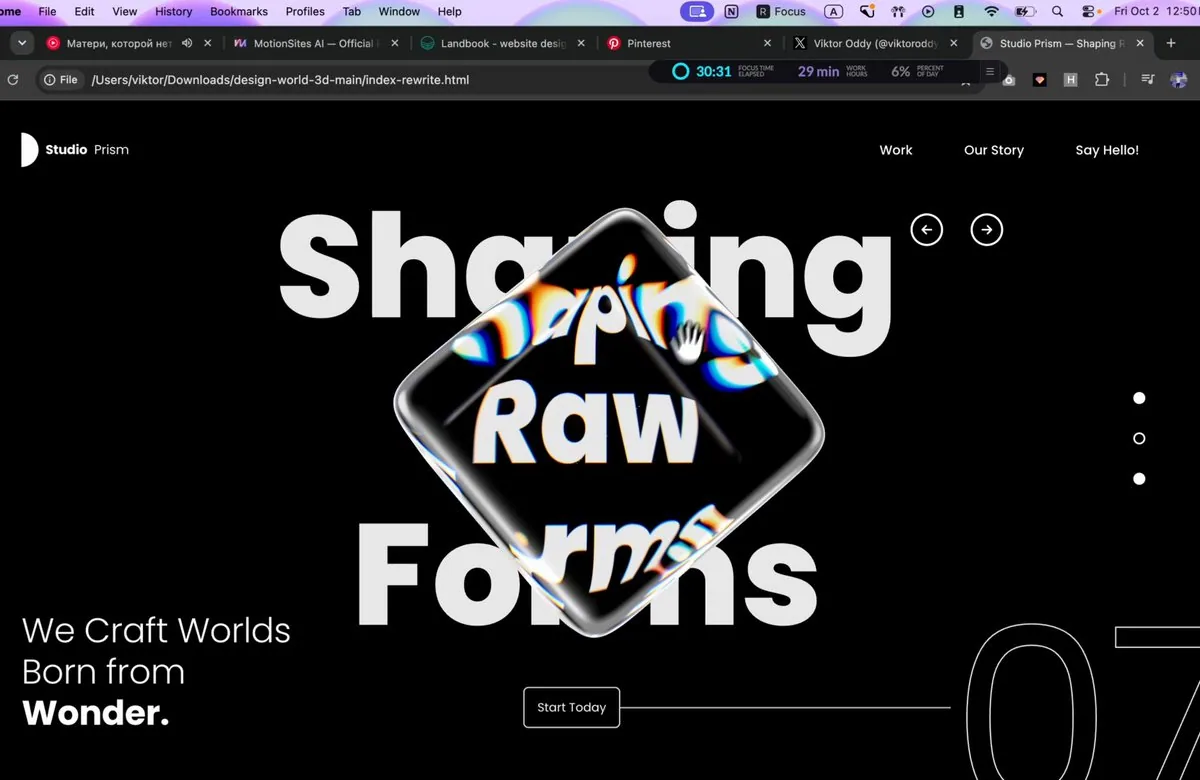
Build a single standalone index.html file (inline CSS + inline JS, no local assets, no build step) containing ONE full-screen hero section: a black "Design World" landing hero with a rotatable 3D glass cuboid in the centre that refracts a huge background headline with chromatic dispersion. Recreate it exactly to the spec below.

==================================================
1. EXTERNAL RESOURCES (use these exact URLs)
==================================================
- Font: Google Fonts Poppins, weights 300/400/500/600/700/800
<link rel="preconnect" href="https://fonts.googleapis.com/">
<link rel="preconnect" href="https://fonts.gstatic.com/" crossorigin>
<link href="https://fonts.googleapis.com/css2?family=Poppins:wght@300;400;500;600;700;800&display=swap" rel="stylesheet">
- Three.js r169 via importmap:
"three": "https://cdn.jsdelivr.net/npm/[email protected]/build/three.module.js"
"three/addons/": "https://cdn.jsdelivr.net/npm/[email protected]/examples/jsm/"
Imports: GLTFLoader (loaders/GLTFLoader.js), mergeVertices + mergeGeometries (utils/BufferGeometryUtils.js), RoundedBoxGeometry (geometries/RoundedBoxGeometry.js).
- 3D model (rounded cube GLB, CORS-enabled, load directly, do NOT download or replace):
const MODEL_URL = 'https://d8j0ntlcm91z4.cloudfront.net/user_38xzZboKViGWJOttwIXH07lWA1P/hf_20260929_212926_92423081-b0e4-4f5a-b650-14af6c05c058.glb';
If it fails to load, fall back to new RoundedBoxGeometry(1, 1, 1, 8, 0.12).

Page <title>: "Design World — Explore New Ideas".

==================================================
2. PAGE STRUCTURE (HTML)
==================================================
<section class="hero" id="hero">
<canvas id="scene" aria-label="Rotatable glass cube. Drag to rotate."></canvas>
<div class="ui">
<h1 class="sr-only">Explore New Ideas</h1>
<header class="nav">
<a href="#" class="logo"><i class="logo-mark"></i><b>Design</b><span>World</span></a>
<ul class="nav-links"><li><a>Home</a></li><li><a>Portfolio</a></li><li><a>Contact Us</a></li></ul>
</header>
<div class="arrows">
<button class="arrow" id="prev">[left-arrow SVG]</button>
<button class="arrow" id="next">[right-arrow SVG]</button>
</div>
<nav class="dots"><button class="dot"></button><button class="dot active"></button><button class="dot"></button></nav>
<p class="tagline">Let's Build the<br>Future of <strong>Design.</strong></p>
<div class="cta-row">
<a href="#" class="cta">Explore Now</a>
<span class="cta-line"></span>
<span class="count" aria-hidden="true">07</span>
</div>
<div class="loader" id="loader">Loading model</div>
</div>
</section>

Arrow SVGs: viewBox 0 0 24 24, fill none, stroke currentColor, stroke-width 2.6, round caps/joins.
prev path: "M19 12H5M11 6l-6 6 6 6" next path: "M5 12h14M13 6l6 6-6 6"

IMPORTANT: The big "Explore / New / Ideas" headline is NOT HTML text. It is drawn onto a 2D canvas inside WebGL so the glass cube can refract it (see section 4). The HTML only has a visually hidden <h1> for accessibility.

==================================================
3. CSS (exact values)
==================================================
:root { --bg:#000; --fg:#fff; --pad-x: clamp(20px, 6.95vw, 120px) }
html, body { height:100%; background:#000; color:#fff; font-family:'Poppins',sans-serif; -webkit-font-smoothing:antialiased }

.hero { position:relative; width:100%; height:100vh; height:100svh; min-height:520px; overflow:hidden; background:#000 }
#scene { position:absolute; inset:0; width:100%; height:100%; display:block; cursor:grab; touch-action:none }
#scene.dragging { cursor:grabbing }
.ui { position:absolute; inset:0; pointer-events:none; z-index:2 } /* drags pass through to the canvas */
.ui a, .ui button { pointer-events:auto }
.sr-only { position:absolute; width:1px; height:1px; overflow:hidden; clip:rect(0 0 0 0); white-space:nowrap }

NAV
.nav { position:absolute; top:clamp(24px,4.7vh,40px); left:var(--pad-x); right:var(--pad-x); display:flex; align-items:center; justify-content:space-between }
.logo { display:flex; align-items:center; gap:8px; color:#fff; text-decoration:none; font-size:15px; letter-spacing:-0.01em }
.logo-mark { width:20px; height:40px; background:#fff; border-radius:0 20px 20px 0 } /* white "D" half-circle */
.logo b { font-weight:700 } .logo span { font-weight:400 }
.nav-links { display:flex; gap:clamp(20px,4.1vw,60px); list-style:none }
.nav-links a { color:#fff; text-decoration:none; font-size:15px; font-weight:500; position:relative }
.nav-links a::after { content:''; position:absolute; left:0; right:0; bottom:-4px; height:1px; background:currentColor; transform:scaleX(0); transform-origin:right; transition:transform .35s ease }
.nav-links a:hover::after { transform:scaleX(1); transform-origin:left }

ARROWS (top-right, left of the dots column)
.arrows { position:absolute; top:18.9%; left:76.7%; display:flex; gap:32px; transform:translate(-19px,-50%) }
.arrow { width:38px; height:38px; border-radius:50%; border:2.5px solid #fff; background:transparent; color:#fff; display:grid; place-items:center; cursor:pointer; transition:background .25s, color .25s }
.arrow svg { width:18px; height:18px }
.arrow:hover { background:#fff; color:#000 }

PAGINATION DOTS (vertical, right edge)
.dots { position:absolute; right:calc(var(--pad-x) - 7px); top:49.4%; transform:translateY(-50%); display:flex; flex-direction:column; gap:33px }
.dot { width:14px; height:14px; border-radius:50%; border:2px solid #fff; background:#fff; cursor:pointer; transition:background .25s }
.dot.active { background:transparent } /* active = hollow ring, middle one active by default */

TAGLINE (bottom-left)
.tagline { position:absolute; left:var(--pad-x); bottom:clamp(40px,7.5vh,70px); font-size:clamp(24px,2.65vw,44px); line-height:1.2; font-weight:300; letter-spacing:-0.01em }
.tagline strong { font-weight:700; display:block }

CTA ROW (button → horizontal line → giant outlined "07" bleeding off the right edge)
.cta-row { position:absolute; left:45.6%; right:-1vw; top:88.7%; transform:translateY(-50%); display:flex; align-items:center }
.cta { flex:none; padding:0 15px; height:48px; display:inline-flex; align-items:center; border:1.5px solid rgba(255,255,255,.85); border-radius:6px; background:rgba(0,0,0,.15); color:#fff; font-size:14px; font-weight:400; text-decoration:none; cursor:pointer; transition:background .25s, color .25s }
.cta:hover { background:#fff; color:#000 }
.cta-line { flex:1; height:1.5px; background:rgba(255,255,255,.8); min-width:40px }
.count { flex:none; font-size:clamp(140px,19.8vw,360px); font-weight:400; line-height:1; letter-spacing:-0.02em; color:transparent; -webkit-text-stroke:1.5px rgba(255,255,255,.9); transform:translateY(6%); user-select:none }

LOADER
.loader { position:absolute; left:50%; top:50%; transform:translate(-50%,-50%); font-size:12px; letter-spacing:.2em; text-transform:uppercase; opacity:.6; transition:opacity .6s }
.loader.done { opacity:0 }

RESPONSIVE
@media (max-width:900px), (max-aspect-ratio:1/1) {
.arrows { left:auto; right:var(--pad-x); top:15%; transform:translateY(-50%); gap:14px }
.tagline { bottom:clamp(150px,20vh,220px) }
.cta-row { left:var(--pad-x); right:-3vw; top:auto; bottom:24px; transform:none }
.count { font-size:clamp(120px,22vw,200px) }
}
@media (max-width:640px) {
.nav-links { gap:16px }
.nav-links a, .logo { font-size:13px }
.dots { gap:20px; right:16px }
.dot { width:10px; height:10px }
.cta-row { right:-8vw }
.count { font-size:120px }
}
@media (max-width:420px) { .nav-links li:nth-child(2) { display:none } } /* hide "Portfolio" */
No horizontal page scroll at any width.

==================================================
4. WEBGL SCENE (Three.js)
==================================================
Renderer: WebGLRenderer({ canvas:#scene, antialias:true, alpha:false }), clearColor #000, outputColorSpace SRGBColorSpace, pixelRatio = min(devicePixelRatio, 2).
Camera: PerspectiveCamera(fov 30, aspect W/H, 0.1, 100) at (0,0,10) looking at origin.

4a. Background headline (drawn into an offscreen 2D canvas → CanvasTexture)
- Canvas size = viewport × DPR, filled #000.
- mobile = (W < 768) || (W/H < 1).
- fontSize fs = min(H*0.21, W*(mobile ? 0.21 : 0.118)); font = `800 ${fs}px Poppins`.
If the widest line is wider than W*(mobile ? 0.9 : 0.5), scale fs down to fit.
- Lines: "Explore", "New", "Ideas". Fill #e9e9e9, textAlign center, baseline alphabetic.
- Centre x = W*(mobile ? 0.5 : 0.505); centre y = H*(mobile ? 0.45 : 0.468).
Line gap = fs*1.07; cap height ≈ fs*0.7. Line i (0..2) baseline y = cy + cap/2 + (i-1)*gap.
- Texture: colorSpace SRGB, LinearFilter, no mipmaps. Redraw on resize and on document.fonts 'loadingdone'.
- Show it with a fullscreen quad (PlaneGeometry(2,2), ShaderMaterial, vertex outputs position.xy directly, fragment = texture2D(uTex, vUv) followed by #include <colorspace_fragment> ON ITS OWN LINE; depthTest/depthWrite false; frustumCulled false) in its own bgScene.
- Wait for fonts before first draw: Promise.race([Promise.all([document.fonts.load('800 100px Poppins'), document.fonts.ready]), 2500ms timeout]) then layout() + start loop.

4b. Model loading
- GLTFLoader.load(MODEL_URL). Traverse gltf.scene; for each mesh: clone geometry, delete 'uv','color','tangent' attributes, mergeVertices(g, 1e-4), computeVertexNormals(), applyMatrix4(mesh.matrixWorld). Merge all parts with mergeGeometries.
- Centre the geometry on its bounding box and scale uniformly so its largest dimension = 1.
- Scene graph: scene → pivot (screen position + scale) → spinner (rotation) → cube mesh. On load add class "done" to #loader.

4c. Cube placement (in layout(), on load and on resize)
- visH = 2*tan(fov/2)*10; visW = visH*aspect.
- Screen-fraction centre: sx = mobile ? 0.5 : 0.517, sy = mobile ? 0.45 : 0.488.
pivot.position = ((sx-0.5)*visW, (0.5-sy)*visH, 0).
- On-screen edge length px = min(H*0.44, W*(mobile ? 0.45 : 0.29)); pivot.scale = (px/H)*visH.
- Initial spinner rotation: Euler(-0.42, 0.62, 0.18).

4d. Glass material — custom ShaderMaterial, screen-space refraction with 6-band chromatic dispersion, rendered in two passes (back faces, then front faces).
Vertex shader:
varying vec3 vNormal; varying vec3 vEye;
worldPos = modelMatrix*position; mvPos = viewMatrix*worldPos; gl_Position = projectionMatrix*mvPos;
vNormal = normalize(normalMatrix*normal); vEye = normalize(https://mvpos.xyz/);
Fragment shader:
uv = gl_FragCoord.xy / uResolution (drawing-buffer size).
n = normalize(vNormal); if (uBackside > 0.5) n = -n; // do NOT use gl_FrontFacing, three.js flips winding for BackSide
eye = normalize(vEye).
LOOP = 16 iterations; slide = i/LOOP * 0.045.
For each band compute refract(eye, n, 1.0/ior) with iorR/Y/G/C/B/P and sample uTexture at
uv + refr.xy * (uRefractPower + slide*k) * uChromatic, with k = 1 (R), 1 (Y), 2 (G), 2.5 (C), 3 (B), 1 (P):
r = tex(R).x*0.5
y = (tex(Y).x*2 + tex(Y).y*2 - tex(Y).z)/6
g = tex(G).y*0.5
c = (tex(C).y*2 + tex(C).z*2 - tex(C).x)/6
b = tex(B).z*0.5
p = (tex(P).z*2 + tex(P).x*2 - tex(P).y)/6
R = r + (2p + 2y - c)/3; G = g + (2y + 2c - p)/3; B = b + (2c + 2p - y)/3
color += vec3(R,G,B)
color /= LOOP; saturation adjust: mix(luma(color), color, uSaturation) with luma weights (0.2125, 0.7154, 0.0721).
Specular (Blinn-Phong, light vector = normalize(-light), view = -eye):
spec = specular(uLight, uShininess, uDiffuseness) + 0.6 * specular(vec3(1,1,-1), uShininess*0.6, uDiffuseness*0.5)
spec(x) = pow(max(dot(n,halfVec),0), shininess) + max(0,dot(n,lightVec))*diffuseness
color += spec * (backside ? 0.35 : 1.0)
Fresnel: f = pow(1.0 + dot(eye, n), uFresnelPower); color = mix(color, vec3(1), f * (backside ? 0.25 : 0.55)).
color += vec3(0.004, 0.005, 0.007). gl_FragColor = vec4(color,1); then #include <colorspace_fragment> on its own line.
Uniform values:
uIorR 1.15, uIorY 1.16, uIorG 1.18, uIorC 1.22, uIorB 1.22, uIorP 1.22,
uRefractPower 0.30 (front) / 0.22 (back), uChromatic 0.5, uSaturation 1.08,
uShininess 90, uDiffuseness 0.02, uFresnelPower 5.0, uLight (-1, 1, 1),
uBackside 0 (frontMat, side FrontSide) / 1 (backMat, side BackSide).

4e. Render pipeline (every frame)
- Two WebGLRenderTargets sized to drawing buffer (W*DPR × H*DPR), type HalfFloatType, default (linear) colour space: rtBack, rtFront.
- backMat.uTexture = rtBack.texture; frontMat.uTexture = rtFront.texture.
1) render bgScene → rtBack
2) render bgScene → rtFront, then (autoClear=false) cube with backMat → rtFront
3) render bgScene → screen, then (autoClear=false, clearDepth) cube with frontMat → screen
- This gives the look: text seen through the cube is magnified, mirrored and split into blue/yellow fringes, inner rounded edges of the cube are faintly visible, and the bevelled edges glow white.

==================================================
5. INTERACTION & ANIMATION
==================================================
- Drag to rotate (pointer events on the canvas, setPointerCapture):
dx = Δx*0.008, dy = Δy*0.008; apply as world-space rotation: premultiply spinner.quaternion by axisAngle(Y, dx) then axisAngle(X, dy).
Track velocity per 16.67ms frame; add class "dragging" to the canvas while dragging.
- Inertia after release: keep applying velocity, damped by 0.94^(dt*60) per frame.
- Idle drift: 0.6s after release, blend in a constant slow rotation of 0.0035 rad/frame around Y and 0.0012 rad/frame around X (blend ramps 0→1 over 1s). It also runs from page load.
- Prev/Next arrow buttons: smoothly rotate the cube -90°/+90° around Y (ease: each frame apply remaining*min(1, 0.09*dt*60) until remaining < 0.0005). Cancels inertia; dragging cancels the spin.
- Dots: clicking a dot makes it the only .active one (hollow ring).
- Hover transitions: nav link underline wipe (.35s), arrow and CTA buttons invert to white bg / black content (.25s).
- Clamp frame dt to 0.05s. Recompute layout (renderer size, camera aspect, render-target sizes, uResolution, headline canvas, cube position/scale) on window resize.

==================================================
6. LAYOUT REFERENCE (desktop 1440×806)
==================================================
- Logo at (100, 38), 40px tall. Nav links right-aligned, right edge ≈ 1340, vertical centre ≈ 58.
- Arrow circles centred at ≈ (1105, 152) and (1175, 152).
- Dots at x ≈ 1340, y ≈ 351 / 398 / 445 (middle one hollow).
- Headline "Explore / New / Ideas" centred at x ≈ 727, ~170px ExtraBold, baselines ≈ 272 / 445 / 637.
- Glass cube occupies ≈ x 510–1000, y 145–600, slightly right of centre, overlapping the headline.
- Tagline "Let's Build the / Future of / Design." at left 100, bottom ≈ 60px, ~38px, Light with Bold "Design.".
- "Explore Now" button at (657, 691), 48px tall; a 1.5px line runs right to a huge outlined "07" whose "0" starts at x ≈ 1140 and whose "7" is clipped by the right and bottom edges.
- Pure black background, all UI white.

Mobile (≤767px or portrait): headline and cube centred at 50% x / 45% y, headline up to 90% width, arrows move under the nav on the right, tagline sits above the CTA row, and the CTA row is pinned 24px from the bottom with "07" partly off-screen on the right.

Output: one complete index.html, nothing else.
日本語訳
単一のスタンドアロンな index.html ファイル(CSS と JS はインライン、ローカルアセットなし、ビルド工程なし)を作成し、全画面のヒーローセクションを1つだけ含めてください。黒い「Design World」のランディングヒーローで、中央に回転可能な3Dガラスの直方体を置き、その直方体が巨大な背景見出しを色分散(クロマチックディスパージョン)を伴って屈折させます。以下の仕様どおりに正確に再現してください。

==================================================
1. 外部リソース(以下のURLを正確に使用する)
==================================================
- フォント: Google Fonts の Poppins、ウェイト 300/400/500/600/700/800
<link rel="preconnect" href="https://fonts.googleapis.com/">
<link rel="preconnect" href="https://fonts.gstatic.com/" crossorigin>
<link href="https://fonts.googleapis.com/css2?family=Poppins:wght@300;400;500;600;700;800&display=swap" rel="stylesheet">
- Three.js r169 を importmap 経由で読み込む:
"three": "https://cdn.jsdelivr.net/npm/[email protected]/build/three.module.js"
"three/addons/": "https://cdn.jsdelivr.net/npm/[email protected]/examples/jsm/"
インポート: GLTFLoader(loaders/GLTFLoader.js)、mergeVertices + mergeGeometries(utils/BufferGeometryUtils.js)、RoundedBoxGeometry(geometries/RoundedBoxGeometry.js)。
- 3Dモデル(角丸キューブのGLB、CORS対応、直接読み込む。ダウンロードや差し替えは行わないこと):
const MODEL_URL = 'https://d8j0ntlcm91z4.cloudfront.net/user_38xzZboKViGWJOttwIXH07lWA1P/hf_20260929_212926_92423081-b0e4-4f5a-b650-14af6c05c058.glb';
読み込みに失敗した場合は new RoundedBoxGeometry(1, 1, 1, 8, 0.12) にフォールバックする。

ページの <title>: 「Design World — Explore New Ideas」。

==================================================
2. ページ構造(HTML)
==================================================
<section class="hero" id="hero">
<canvas id="scene" aria-label="Rotatable glass cube. Drag to rotate."></canvas>
<div class="ui">
<h1 class="sr-only">Explore New Ideas</h1>
<header class="nav">
<a href="#" class="logo"><i class="logo-mark"></i><b>Design</b><span>World</span></a>
<ul class="nav-links"><li><a>Home</a></li><li><a>Portfolio</a></li><li><a>Contact Us</a></li></ul>
</header>
<div class="arrows">
<button class="arrow" id="prev">[left-arrow SVG]</button>
<button class="arrow" id="next">[right-arrow SVG]</button>
</div>
<nav class="dots"><button class="dot"></button><button class="dot active"></button><button class="dot"></button></nav>
<p class="tagline">Let's Build the<br>Future of <strong>Design.</strong></p>
<div class="cta-row">
<a href="#" class="cta">Explore Now</a>
<span class="cta-line"></span>
<span class="count" aria-hidden="true">07</span>
</div>
<div class="loader" id="loader">Loading model</div>
</div>
</section>

矢印SVG: viewBox 0 0 24 24、fill は none、stroke は currentColor、stroke-width は 2.6、線端と結合は round。
prev のパス: "M19 12H5M11 6l-6 6 6 6"、next のパス: "M5 12h14M13 6l6 6-6 6"

重要: 大きな「Explore / New / Ideas」の見出しは HTML テキストではない。ガラスのキューブが屈折できるよう、WebGL 内の 2D キャンバスに描画される(セクション4参照)。HTML にはアクセシビリティ用に視覚的に隠された <h1> があるだけ。

==================================================
3. CSS(正確な値)
==================================================
:root { --bg:#000; --fg:#fff; --pad-x: clamp(20px, 6.95vw, 120px) }
html, body { height:100%; background:#000; color:#fff; font-family:'Poppins',sans-serif; -webkit-font-smoothing:antialiased }

.hero { position:relative; width:100%; height:100vh; height:100svh; min-height:520px; overflow:hidden; background:#000 }
#scene { position:absolute; inset:0; width:100%; height:100%; display:block; cursor:grab; touch-action:none }
#scene.dragging { cursor:grabbing }
.ui { position:absolute; inset:0; pointer-events:none; z-index:2 } /* ドラッグはキャンバスへ透過する */
.ui a, .ui button { pointer-events:auto }
.sr-only { position:absolute; width:1px; height:1px; overflow:hidden; clip:rect(0 0 0 0); white-space:nowrap }

NAV(ナビゲーション)
.nav { position:absolute; top:clamp(24px,4.7vh,40px); left:var(--pad-x); right:var(--pad-x); display:flex; align-items:center; justify-content:space-between }
.logo { display:flex; align-items:center; gap:8px; color:#fff; text-decoration:none; font-size:15px; letter-spacing:-0.01em }
.logo-mark { width:20px; height:40px; background:#fff; border-radius:0 20px 20px 0 } /* 白い「D」の半円 */
.logo b { font-weight:700 } .logo span { font-weight:400 }
.nav-links { display:flex; gap:clamp(20px,4.1vw,60px); list-style:none }
.nav-links a { color:#fff; text-decoration:none; font-size:15px; font-weight:500; position:relative }
.nav-links a::after { content:''; position:absolute; left:0; right:0; bottom:-4px; height:1px; background:currentColor; transform:scaleX(0); transform-origin:right; transition:transform .35s ease }
.nav-links a:hover::after { transform:scaleX(1); transform-origin:left }

ARROWS(右上、ドット列の左)
.arrows { position:absolute; top:18.9%; left:76.7%; display:flex; gap:32px; transform:translate(-19px,-50%) }
.arrow { width:38px; height:38px; border-radius:50%; border:2.5px solid #fff; background:transparent; color:#fff; display:grid; place-items:center; cursor:pointer; transition:background .25s, color .25s }
.arrow svg { width:18px; height:18px }
.arrow:hover { background:#fff; color:#000 }

PAGINATION DOTS(縦方向、右端)
.dots { position:absolute; right:calc(var(--pad-x) - 7px); top:49.4%; transform:translateY(-50%); display:flex; flex-direction:column; gap:33px }
.dot { width:14px; height:14px; border-radius:50%; border:2px solid #fff; background:#fff; cursor:pointer; transition:background .25s }
.dot.active { background:transparent } /* active = 中抜きのリング。既定では中央がアクティブ */

TAGLINE(左下)
.tagline { position:absolute; left:var(--pad-x); bottom:clamp(40px,7.5vh,70px); font-size:clamp(24px,2.65vw,44px); line-height:1.2; font-weight:300; letter-spacing:-0.01em }
.tagline strong { font-weight:700; display:block }

CTA ROW(ボタン → 水平線 → 右端からはみ出す巨大なアウトラインの「07」)
.cta-row { position:absolute; left:45.6%; right:-1vw; top:88.7%; transform:translateY(-50%); display:flex; align-items:center }
.cta { flex:none; padding:0 15px; height:48px; display:inline-flex; align-items:center; border:1.5px solid rgba(255,255,255,.85); border-radius:6px; background:rgba(0,0,0,.15); color:#fff; font-size:14px; font-weight:400; text-decoration:none; cursor:pointer; transition:background .25s, color .25s }
.cta:hover { background:#fff; color:#000 }
.cta-line { flex:1; height:1.5px; background:rgba(255,255,255,.8); min-width:40px }
.count { flex:none; font-size:clamp(140px,19.8vw,360px); font-weight:400; line-height:1; letter-spacing:-0.02em; color:transparent; -webkit-text-stroke:1.5px rgba(255,255,255,.9); transform:translateY(6%); user-select:none }

LOADER(ローダー)
.loader { position:absolute; left:50%; top:50%; transform:translate(-50%,-50%); font-size:12px; letter-spacing:.2em; text-transform:uppercase; opacity:.6; transition:opacity .6s }
.loader.done { opacity:0 }

RESPONSIVE(レスポンシブ)
@media (max-width:900px), (max-aspect-ratio:1/1) {
.arrows { left:auto; right:var(--pad-x); top:15%; transform:translateY(-50%); gap:14px }
.tagline { bottom:clamp(150px,20vh,220px) }
.cta-row { left:var(--pad-x); right:-3vw; top:auto; bottom:24px; transform:none }
.count { font-size:clamp(120px,22vw,200px) }
}
@media (max-width:640px) {
.nav-links { gap:16px }
.nav-links a, .logo { font-size:13px }
.dots { gap:20px; right:16px }
.dot { width:10px; height:10px }
.cta-row { right:-8vw }
.count { font-size:120px }
}
@media (max-width:420px) { .nav-links li:nth-child(2) { display:none } } /* 「Portfolio」を隠す */
どの幅でもページに横スクロールを出さないこと。

==================================================
4. WebGLシーン(Three.js)
==================================================
レンダラー: WebGLRenderer({ canvas:#scene, antialias:true, alpha:false })、clearColor は #000、outputColorSpace は SRGBColorSpace、pixelRatio = min(devicePixelRatio, 2)。
カメラ: PerspectiveCamera(fov 30、aspect は W/H、near 0.1、far 100)を (0,0,10) に置き、原点を見る。

4a. 背景の見出し(オフスクリーンの2Dキャンバスに描画 → CanvasTexture)
- キャンバスサイズ = ビューポート × DPR、#000 で塗りつぶす。
- mobile = (W < 768) || (W/H < 1)。
- fontSize fs = min(H*0.21, W*(mobile ? 0.21 : 0.118))、font = `800 ${fs}px Poppins`。
最も幅の広い行が W*(mobile ? 0.9 : 0.5) を超える場合は、収まるように fs を縮小する。
- 行: 「Explore」「New」「Ideas」。塗りは #e9e9e9、textAlign は center、ベースラインは alphabetic。
- 中心 x = W*(mobile ? 0.5 : 0.505)、中心 y = H*(mobile ? 0.45 : 0.468)。
行間 = fs*1.07、キャップハイト ≈ fs*0.7。行 i(0..2)のベースライン y = cy + cap/2 + (i-1)*gap。
- テクスチャ: colorSpace は SRGB、LinearFilter、ミップマップなし。リサイズ時と document.fonts の 'loadingdone' 時に再描画する。
- 独自の bgScene の中で、フルスクリーンのクアッド(PlaneGeometry(2,2)、ShaderMaterial、頂点シェーダーは position.xy をそのまま出力、フラグメントは texture2D(uTex, vUv) の後に #include <colorspace_fragment> を単独の行として記述、depthTest と depthWrite は false、frustumCulled は false)で表示する。
- 最初の描画の前にフォントを待つ: Promise.race([Promise.all([document.fonts.load('800 100px Poppins'), document.fonts.ready]), 2500ms timeout]) の後に layout() を実行し、ループを開始する。

4b. モデルの読み込み
- GLTFLoader.load(MODEL_URL)。gltf.scene を走査し、各メッシュについて: ジオメトリを複製し、'uv'、'color'、'tangent' 属性を削除し、mergeVertices(g, 1e-4)、computeVertexNormals()、applyMatrix4(mesh.matrixWorld) を適用する。すべてのパーツを mergeGeometries で統合する。
- ジオメトリをバウンディングボックスの中心に合わせ、最大寸法が 1 になるように均一にスケールする。
- シーングラフ: scene → pivot(画面上の位置 + スケール)→ spinner(回転)→ cube メッシュ。読み込み完了時に #loader へ「done」クラスを追加する。

4c. キューブの配置(layout() 内、読み込み時とリサイズ時)
- visH = 2*tan(fov/2)*10、visW = visH*aspect。
- 画面に対する割合での中心: sx = mobile ? 0.5 : 0.517、sy = mobile ? 0.45 : 0.488。
pivot.position = ((sx-0.5)*visW, (0.5-sy)*visH, 0)。
- 画面上の辺の長さ px = min(H*0.44, W*(mobile ? 0.45 : 0.29))、pivot.scale = (px/H)*visH。
- spinner の初期回転: Euler(-0.42, 0.62, 0.18)。

4d. ガラスマテリアル — カスタム ShaderMaterial。6バンドの色分散を伴うスクリーンスペース屈折を、2パス(背面、続いて前面)でレンダリングする。
頂点シェーダー:
varying vec3 vNormal; varying vec3 vEye;
worldPos = modelMatrix*position; mvPos = viewMatrix*worldPos; gl_Position = projectionMatrix*mvPos;
vNormal = normalize(normalMatrix*normal); vEye = normalize(https://mvpos.xyz/);
フラグメントシェーダー:
uv = gl_FragCoord.xy / uResolution(ドローイングバッファのサイズ)。
n = normalize(vNormal); if (uBackside > 0.5) n = -n; // gl_FrontFacing は使わないこと。three.js は BackSide で巻き方向を反転する
eye = normalize(vEye)。
LOOP = 16 回の反復、slide = i/LOOP * 0.045。
各バンドについて、iorR/Y/G/C/B/P を用いて refract(eye, n, 1.0/ior) を計算し、次の位置で uTexture をサンプリングする
uv + refr.xy * (uRefractPower + slide*k) * uChromatic。k = 1(R)、1(Y)、2(G)、2.5(C)、3(B)、1(P):
r = tex(R).x*0.5
y = (tex(Y).x*2 + tex(Y).y*2 - tex(Y).z)/6
g = tex(G).y*0.5
c = (tex(C).y*2 + tex(C).z*2 - tex(C).x)/6
b = tex(B).z*0.5
p = (tex(P).z*2 + tex(P).x*2 - tex(P).y)/6
R = r + (2p + 2y - c)/3; G = g + (2y + 2c - p)/3; B = b + (2c + 2p - y)/3
color += vec3(R,G,B)
color /= LOOP。彩度調整: mix(luma(color), color, uSaturation)。ルマの重みは (0.2125, 0.7154, 0.0721)。
スペキュラ(Blinn-Phong、ライトベクトル = normalize(-light)、視線 = -eye):
spec = specular(uLight, uShininess, uDiffuseness) + 0.6 * specular(vec3(1,1,-1), uShininess*0.6, uDiffuseness*0.5)
spec(x) = pow(max(dot(n,halfVec),0), shininess) + max(0,dot(n,lightVec))*diffuseness
color += spec * (backside ? 0.35 : 1.0)
フレネル: f = pow(1.0 + dot(eye, n), uFresnelPower); color = mix(color, vec3(1), f * (backside ? 0.25 : 0.55))。
color += vec3(0.004, 0.005, 0.007)。gl_FragColor = vec4(color,1)。その後に #include <colorspace_fragment> を単独の行として記述する。
Uniform の値:
uIorR 1.15, uIorY 1.16, uIorG 1.18, uIorC 1.22, uIorB 1.22, uIorP 1.22,
uRefractPower 0.30(前面)/ 0.22(背面)、uChromatic 0.5、uSaturation 1.08、
uShininess 90, uDiffuseness 0.02, uFresnelPower 5.0, uLight (-1, 1, 1),
uBackside 0(frontMat、side は FrontSide)/ 1(backMat、side は BackSide)。

4e. レンダーパイプライン(毎フレーム)
- ドローイングバッファのサイズ(W*DPR × H*DPR)に合わせた 2 つの WebGLRenderTarget。type は HalfFloatType、カラースペースは既定(リニア): rtBack、rtFront。
- backMat.uTexture = rtBack.texture; frontMat.uTexture = rtFront.texture。
1) render bgScene → rtBack
2) render bgScene → rtFront、次に(autoClear=false)backMat を付けたキューブ → rtFront
3) render bgScene → 画面、次に(autoClear=false、clearDepth)frontMat を付けたキューブ → 画面
- これにより次の見た目になる: キューブ越しに見えるテキストは拡大・鏡像化され、青と黄色のフリンジに分かれる。キューブの内側の角丸エッジがかすかに見え、ベベルのエッジが白く光る。

==================================================
5. インタラクションとアニメーション
==================================================
- ドラッグで回転(キャンバス上のポインターイベント、setPointerCapture):
dx = Δx*0.008、dy = Δy*0.008。ワールド空間の回転として適用する: spinner.quaternion に axisAngle(Y, dx)、続いて axisAngle(X, dy) を前から乗算する(premultiply)。
16.67ms のフレームごとに速度を記録する。ドラッグ中はキャンバスに「dragging」クラスを追加する。
- 離した後の慣性: 速度を適用し続け、毎フレーム 0.94^(dt*60) で減衰させる。
- アイドルドリフト: 離してから 0.6 秒後、Y 軸まわり 0.0035 rad/フレーム、X 軸まわり 0.0012 rad/フレームの一定のゆっくりした回転をブレンドして加える(ブレンドは 1 秒かけて 0→1 に上昇)。これはページ読み込み時からも動作する。
- 前/次の矢印ボタン: キューブを Y 軸まわりに -90°/+90° 滑らかに回転させる(イージング: 毎フレーム remaining*min(1, 0.09*dt*60) を適用し、remaining < 0.0005 になるまで続ける)。慣性はキャンセルされる。ドラッグするとスピンもキャンセルされる。
- ドット: ドットをクリックすると、そのドットだけが .active(中抜きのリング)になる。
- ホバーのトランジション: ナビリンクの下線ワイプ(.35s)、矢印と CTA ボタンは白背景/黒いコンテンツへ反転(.25s)。
- フレームの dt は 0.05 秒にクランプする。ウィンドウのリサイズ時にレイアウトを再計算する(レンダラーサイズ、カメラのアスペクト、レンダーターゲットのサイズ、uResolution、見出しキャンバス、キューブの位置とスケール)。

==================================================
6. レイアウトのリファレンス(デスクトップ 1440×806)
==================================================
- ロゴは (100, 38)、高さ 40px。ナビリンクは右揃えで、右端 ≈ 1340、垂直中心 ≈ 58。
- 矢印の円は中心 ≈ (1105, 152) と (1175, 152)。
- ドットは x ≈ 1340、y ≈ 351 / 398 / 445(中央のものは中抜き)。
- 見出し「Explore / New / Ideas」は x ≈ 727 を中心に、約 170px の ExtraBold、ベースライン ≈ 272 / 445 / 637。
- ガラスのキューブは ≈ x 510–1000、y 145–600 を占め、中央よりやや右にあり、見出しと重なる。
- タグライン「Let's Build the / Future of / Design.」は左 100、下端 ≈ 60px、約 38px、Light で「Design.」のみ Bold。
- 「Explore Now」ボタンは (657, 691)、高さ 48px。1.5px の線が右へ延び、巨大なアウトラインの「07」に至る。「0」は x ≈ 1140 から始まり、「7」は右端と下端でクリップされる。
- 背景は純黒、UI はすべて白。

モバイル(≤767px または縦向き): 見出しとキューブは x 50% / y 45% を中心とし、見出しは最大 90% 幅。矢印は右側のナビの下へ移動し、タグラインは CTA 行の上に位置する。CTA 行は下端から 24px に固定され、「07」の一部は右側で画面外になる。

出力: 完全な index.html を 1 つだけ。それ以外は何も出力しない。