提示词
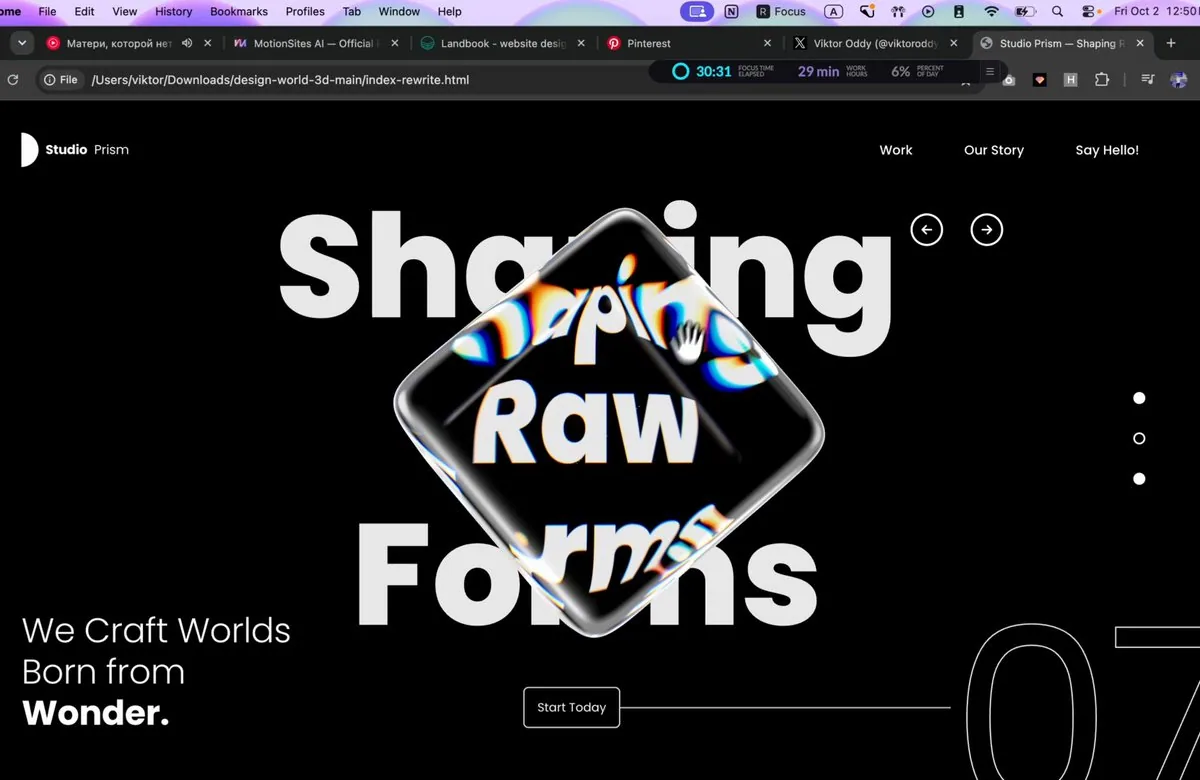
Build a single standalone index.html file (inline CSS + inline JS, no local assets, no build step) containing ONE full-screen hero section: a black "Design World" landing hero with a rotatable 3D glass cuboid in the centre that refracts a huge background headline with chromatic dispersion. Recreate it exactly to the spec below.

==================================================
1. EXTERNAL RESOURCES (use these exact URLs)
==================================================
- Font: Google Fonts Poppins, weights 300/400/500/600/700/800
<link rel="preconnect" href="https://fonts.googleapis.com/">
<link rel="preconnect" href="https://fonts.gstatic.com/" crossorigin>
<link href="https://fonts.googleapis.com/css2?family=Poppins:wght@300;400;500;600;700;800&display=swap" rel="stylesheet">
- Three.js r169 via importmap:
"three": "https://cdn.jsdelivr.net/npm/[email protected]/build/three.module.js"
"three/addons/": "https://cdn.jsdelivr.net/npm/[email protected]/examples/jsm/"
Imports: GLTFLoader (loaders/GLTFLoader.js), mergeVertices + mergeGeometries (utils/BufferGeometryUtils.js), RoundedBoxGeometry (geometries/RoundedBoxGeometry.js).
- 3D model (rounded cube GLB, CORS-enabled, load directly, do NOT download or replace):
const MODEL_URL = 'https://d8j0ntlcm91z4.cloudfront.net/user_38xzZboKViGWJOttwIXH07lWA1P/hf_20260929_212926_92423081-b0e4-4f5a-b650-14af6c05c058.glb';
If it fails to load, fall back to new RoundedBoxGeometry(1, 1, 1, 8, 0.12).

Page <title>: "Design World — Explore New Ideas".

==================================================
2. PAGE STRUCTURE (HTML)
==================================================
<section class="hero" id="hero">
<canvas id="scene" aria-label="Rotatable glass cube. Drag to rotate."></canvas>
<div class="ui">
<h1 class="sr-only">Explore New Ideas</h1>
<header class="nav">
<a href="#" class="logo"><i class="logo-mark"></i><b>Design</b><span>World</span></a>
<ul class="nav-links"><li><a>Home</a></li><li><a>Portfolio</a></li><li><a>Contact Us</a></li></ul>
</header>
<div class="arrows">
<button class="arrow" id="prev">[left-arrow SVG]</button>
<button class="arrow" id="next">[right-arrow SVG]</button>
</div>
<nav class="dots"><button class="dot"></button><button class="dot active"></button><button class="dot"></button></nav>
<p class="tagline">Let's Build the<br>Future of <strong>Design.</strong></p>
<div class="cta-row">
<a href="#" class="cta">Explore Now</a>
<span class="cta-line"></span>
<span class="count" aria-hidden="true">07</span>
</div>
<div class="loader" id="loader">Loading model</div>
</div>
</section>

Arrow SVGs: viewBox 0 0 24 24, fill none, stroke currentColor, stroke-width 2.6, round caps/joins.
prev path: "M19 12H5M11 6l-6 6 6 6" next path: "M5 12h14M13 6l6 6-6 6"

IMPORTANT: The big "Explore / New / Ideas" headline is NOT HTML text. It is drawn onto a 2D canvas inside WebGL so the glass cube can refract it (see section 4). The HTML only has a visually hidden <h1> for accessibility.

==================================================
3. CSS (exact values)
==================================================
:root { --bg:#000; --fg:#fff; --pad-x: clamp(20px, 6.95vw, 120px) }
html, body { height:100%; background:#000; color:#fff; font-family:'Poppins',sans-serif; -webkit-font-smoothing:antialiased }

.hero { position:relative; width:100%; height:100vh; height:100svh; min-height:520px; overflow:hidden; background:#000 }
#scene { position:absolute; inset:0; width:100%; height:100%; display:block; cursor:grab; touch-action:none }
#scene.dragging { cursor:grabbing }
.ui { position:absolute; inset:0; pointer-events:none; z-index:2 } /* drags pass through to the canvas */
.ui a, .ui button { pointer-events:auto }
.sr-only { position:absolute; width:1px; height:1px; overflow:hidden; clip:rect(0 0 0 0); white-space:nowrap }

NAV
.nav { position:absolute; top:clamp(24px,4.7vh,40px); left:var(--pad-x); right:var(--pad-x); display:flex; align-items:center; justify-content:space-between }
.logo { display:flex; align-items:center; gap:8px; color:#fff; text-decoration:none; font-size:15px; letter-spacing:-0.01em }
.logo-mark { width:20px; height:40px; background:#fff; border-radius:0 20px 20px 0 } /* white "D" half-circle */
.logo b { font-weight:700 } .logo span { font-weight:400 }
.nav-links { display:flex; gap:clamp(20px,4.1vw,60px); list-style:none }
.nav-links a { color:#fff; text-decoration:none; font-size:15px; font-weight:500; position:relative }
.nav-links a::after { content:''; position:absolute; left:0; right:0; bottom:-4px; height:1px; background:currentColor; transform:scaleX(0); transform-origin:right; transition:transform .35s ease }
.nav-links a:hover::after { transform:scaleX(1); transform-origin:left }

ARROWS (top-right, left of the dots column)
.arrows { position:absolute; top:18.9%; left:76.7%; display:flex; gap:32px; transform:translate(-19px,-50%) }
.arrow { width:38px; height:38px; border-radius:50%; border:2.5px solid #fff; background:transparent; color:#fff; display:grid; place-items:center; cursor:pointer; transition:background .25s, color .25s }
.arrow svg { width:18px; height:18px }
.arrow:hover { background:#fff; color:#000 }

PAGINATION DOTS (vertical, right edge)
.dots { position:absolute; right:calc(var(--pad-x) - 7px); top:49.4%; transform:translateY(-50%); display:flex; flex-direction:column; gap:33px }
.dot { width:14px; height:14px; border-radius:50%; border:2px solid #fff; background:#fff; cursor:pointer; transition:background .25s }
.dot.active { background:transparent } /* active = hollow ring, middle one active by default */

TAGLINE (bottom-left)
.tagline { position:absolute; left:var(--pad-x); bottom:clamp(40px,7.5vh,70px); font-size:clamp(24px,2.65vw,44px); line-height:1.2; font-weight:300; letter-spacing:-0.01em }
.tagline strong { font-weight:700; display:block }

CTA ROW (button → horizontal line → giant outlined "07" bleeding off the right edge)
.cta-row { position:absolute; left:45.6%; right:-1vw; top:88.7%; transform:translateY(-50%); display:flex; align-items:center }
.cta { flex:none; padding:0 15px; height:48px; display:inline-flex; align-items:center; border:1.5px solid rgba(255,255,255,.85); border-radius:6px; background:rgba(0,0,0,.15); color:#fff; font-size:14px; font-weight:400; text-decoration:none; cursor:pointer; transition:background .25s, color .25s }
.cta:hover { background:#fff; color:#000 }
.cta-line { flex:1; height:1.5px; background:rgba(255,255,255,.8); min-width:40px }
.count { flex:none; font-size:clamp(140px,19.8vw,360px); font-weight:400; line-height:1; letter-spacing:-0.02em; color:transparent; -webkit-text-stroke:1.5px rgba(255,255,255,.9); transform:translateY(6%); user-select:none }

LOADER
.loader { position:absolute; left:50%; top:50%; transform:translate(-50%,-50%); font-size:12px; letter-spacing:.2em; text-transform:uppercase; opacity:.6; transition:opacity .6s }
.loader.done { opacity:0 }

RESPONSIVE
@media (max-width:900px), (max-aspect-ratio:1/1) {
.arrows { left:auto; right:var(--pad-x); top:15%; transform:translateY(-50%); gap:14px }
.tagline { bottom:clamp(150px,20vh,220px) }
.cta-row { left:var(--pad-x); right:-3vw; top:auto; bottom:24px; transform:none }
.count { font-size:clamp(120px,22vw,200px) }
}
@media (max-width:640px) {
.nav-links { gap:16px }
.nav-links a, .logo { font-size:13px }
.dots { gap:20px; right:16px }
.dot { width:10px; height:10px }
.cta-row { right:-8vw }
.count { font-size:120px }
}
@media (max-width:420px) { .nav-links li:nth-child(2) { display:none } } /* hide "Portfolio" */
No horizontal page scroll at any width.

==================================================
4. WEBGL SCENE (Three.js)
==================================================
Renderer: WebGLRenderer({ canvas:#scene, antialias:true, alpha:false }), clearColor #000, outputColorSpace SRGBColorSpace, pixelRatio = min(devicePixelRatio, 2).
Camera: PerspectiveCamera(fov 30, aspect W/H, 0.1, 100) at (0,0,10) looking at origin.

4a. Background headline (drawn into an offscreen 2D canvas → CanvasTexture)
- Canvas size = viewport × DPR, filled #000.
- mobile = (W < 768) || (W/H < 1).
- fontSize fs = min(H*0.21, W*(mobile ? 0.21 : 0.118)); font = `800 ${fs}px Poppins`.
If the widest line is wider than W*(mobile ? 0.9 : 0.5), scale fs down to fit.
- Lines: "Explore", "New", "Ideas". Fill #e9e9e9, textAlign center, baseline alphabetic.
- Centre x = W*(mobile ? 0.5 : 0.505); centre y = H*(mobile ? 0.45 : 0.468).
Line gap = fs*1.07; cap height ≈ fs*0.7. Line i (0..2) baseline y = cy + cap/2 + (i-1)*gap.
- Texture: colorSpace SRGB, LinearFilter, no mipmaps. Redraw on resize and on document.fonts 'loadingdone'.
- Show it with a fullscreen quad (PlaneGeometry(2,2), ShaderMaterial, vertex outputs position.xy directly, fragment = texture2D(uTex, vUv) followed by #include <colorspace_fragment> ON ITS OWN LINE; depthTest/depthWrite false; frustumCulled false) in its own bgScene.
- Wait for fonts before first draw: Promise.race([Promise.all([document.fonts.load('800 100px Poppins'), document.fonts.ready]), 2500ms timeout]) then layout() + start loop.

4b. Model loading
- GLTFLoader.load(MODEL_URL). Traverse gltf.scene; for each mesh: clone geometry, delete 'uv','color','tangent' attributes, mergeVertices(g, 1e-4), computeVertexNormals(), applyMatrix4(mesh.matrixWorld). Merge all parts with mergeGeometries.
- Centre the geometry on its bounding box and scale uniformly so its largest dimension = 1.
- Scene graph: scene → pivot (screen position + scale) → spinner (rotation) → cube mesh. On load add class "done" to #loader.

4c. Cube placement (in layout(), on load and on resize)
- visH = 2*tan(fov/2)*10; visW = visH*aspect.
- Screen-fraction centre: sx = mobile ? 0.5 : 0.517, sy = mobile ? 0.45 : 0.488.
pivot.position = ((sx-0.5)*visW, (0.5-sy)*visH, 0).
- On-screen edge length px = min(H*0.44, W*(mobile ? 0.45 : 0.29)); pivot.scale = (px/H)*visH.
- Initial spinner rotation: Euler(-0.42, 0.62, 0.18).

4d. Glass material — custom ShaderMaterial, screen-space refraction with 6-band chromatic dispersion, rendered in two passes (back faces, then front faces).
Vertex shader:
varying vec3 vNormal; varying vec3 vEye;
worldPos = modelMatrix*position; mvPos = viewMatrix*worldPos; gl_Position = projectionMatrix*mvPos;
vNormal = normalize(normalMatrix*normal); vEye = normalize(https://mvpos.xyz/);
Fragment shader:
uv = gl_FragCoord.xy / uResolution (drawing-buffer size).
n = normalize(vNormal); if (uBackside > 0.5) n = -n; // do NOT use gl_FrontFacing, three.js flips winding for BackSide
eye = normalize(vEye).
LOOP = 16 iterations; slide = i/LOOP * 0.045.
For each band compute refract(eye, n, 1.0/ior) with iorR/Y/G/C/B/P and sample uTexture at
uv + refr.xy * (uRefractPower + slide*k) * uChromatic, with k = 1 (R), 1 (Y), 2 (G), 2.5 (C), 3 (B), 1 (P):
r = tex(R).x*0.5
y = (tex(Y).x*2 + tex(Y).y*2 - tex(Y).z)/6
g = tex(G).y*0.5
c = (tex(C).y*2 + tex(C).z*2 - tex(C).x)/6
b = tex(B).z*0.5
p = (tex(P).z*2 + tex(P).x*2 - tex(P).y)/6
R = r + (2p + 2y - c)/3; G = g + (2y + 2c - p)/3; B = b + (2c + 2p - y)/3
color += vec3(R,G,B)
color /= LOOP; saturation adjust: mix(luma(color), color, uSaturation) with luma weights (0.2125, 0.7154, 0.0721).
Specular (Blinn-Phong, light vector = normalize(-light), view = -eye):
spec = specular(uLight, uShininess, uDiffuseness) + 0.6 * specular(vec3(1,1,-1), uShininess*0.6, uDiffuseness*0.5)
spec(x) = pow(max(dot(n,halfVec),0), shininess) + max(0,dot(n,lightVec))*diffuseness
color += spec * (backside ? 0.35 : 1.0)
Fresnel: f = pow(1.0 + dot(eye, n), uFresnelPower); color = mix(color, vec3(1), f * (backside ? 0.25 : 0.55)).
color += vec3(0.004, 0.005, 0.007). gl_FragColor = vec4(color,1); then #include <colorspace_fragment> on its own line.
Uniform values:
uIorR 1.15, uIorY 1.16, uIorG 1.18, uIorC 1.22, uIorB 1.22, uIorP 1.22,
uRefractPower 0.30 (front) / 0.22 (back), uChromatic 0.5, uSaturation 1.08,
uShininess 90, uDiffuseness 0.02, uFresnelPower 5.0, uLight (-1, 1, 1),
uBackside 0 (frontMat, side FrontSide) / 1 (backMat, side BackSide).

4e. Render pipeline (every frame)
- Two WebGLRenderTargets sized to drawing buffer (W*DPR × H*DPR), type HalfFloatType, default (linear) colour space: rtBack, rtFront.
- backMat.uTexture = rtBack.texture; frontMat.uTexture = rtFront.texture.
1) render bgScene → rtBack
2) render bgScene → rtFront, then (autoClear=false) cube with backMat → rtFront
3) render bgScene → screen, then (autoClear=false, clearDepth) cube with frontMat → screen
- This gives the look: text seen through the cube is magnified, mirrored and split into blue/yellow fringes, inner rounded edges of the cube are faintly visible, and the bevelled edges glow white.

==================================================
5. INTERACTION & ANIMATION
==================================================
- Drag to rotate (pointer events on the canvas, setPointerCapture):
dx = Δx*0.008, dy = Δy*0.008; apply as world-space rotation: premultiply spinner.quaternion by axisAngle(Y, dx) then axisAngle(X, dy).
Track velocity per 16.67ms frame; add class "dragging" to the canvas while dragging.
- Inertia after release: keep applying velocity, damped by 0.94^(dt*60) per frame.
- Idle drift: 0.6s after release, blend in a constant slow rotation of 0.0035 rad/frame around Y and 0.0012 rad/frame around X (blend ramps 0→1 over 1s). It also runs from page load.
- Prev/Next arrow buttons: smoothly rotate the cube -90°/+90° around Y (ease: each frame apply remaining*min(1, 0.09*dt*60) until remaining < 0.0005). Cancels inertia; dragging cancels the spin.
- Dots: clicking a dot makes it the only .active one (hollow ring).
- Hover transitions: nav link underline wipe (.35s), arrow and CTA buttons invert to white bg / black content (.25s).
- Clamp frame dt to 0.05s. Recompute layout (renderer size, camera aspect, render-target sizes, uResolution, headline canvas, cube position/scale) on window resize.

==================================================
6. LAYOUT REFERENCE (desktop 1440×806)
==================================================
- Logo at (100, 38), 40px tall. Nav links right-aligned, right edge ≈ 1340, vertical centre ≈ 58.
- Arrow circles centred at ≈ (1105, 152) and (1175, 152).
- Dots at x ≈ 1340, y ≈ 351 / 398 / 445 (middle one hollow).
- Headline "Explore / New / Ideas" centred at x ≈ 727, ~170px ExtraBold, baselines ≈ 272 / 445 / 637.
- Glass cube occupies ≈ x 510–1000, y 145–600, slightly right of centre, overlapping the headline.
- Tagline "Let's Build the / Future of / Design." at left 100, bottom ≈ 60px, ~38px, Light with Bold "Design.".
- "Explore Now" button at (657, 691), 48px tall; a 1.5px line runs right to a huge outlined "07" whose "0" starts at x ≈ 1140 and whose "7" is clipped by the right and bottom edges.
- Pure black background, all UI white.

Mobile (≤767px or portrait): headline and cube centred at 50% x / 45% y, headline up to 90% width, arrows move under the nav on the right, tagline sits above the CTA row, and the CTA row is pinned 24px from the bottom with "07" partly off-screen on the right.

Output: one complete index.html, nothing else.
中文译文
构建一个独立、自包含的单文件 index.html(内联 CSS + 内联 JS,不使用任何本地资源,也不需要构建步骤),其中只包含一个全屏首屏区块:一个黑色的 "Design World" 着陆页首屏,中央有一个可旋转的 3D 玻璃长方体,它折射出一个带有色散的巨大背景标题。请严格按照下面给出的规格,将这一效果精确复刻出来,不要偏离规格。

==================================================
1. 外部资源(请使用以下确切的 URL 地址)
==================================================
- 字体:使用 Google Fonts 提供的 Poppins 字体,可用字重为 300/400/500/600/700/800(通过下方的 link 标签引入):
<link rel="preconnect" href="https://fonts.googleapis.com/">
<link rel="preconnect" href="https://fonts.gstatic.com/" crossorigin>
<link href="https://fonts.googleapis.com/css2?family=Poppins:wght@300;400;500;600;700;800&display=swap" rel="stylesheet">
- 通过 importmap(导入映射)引入 Three.js r169 版本,配置如下:
"three": "https://cdn.jsdelivr.net/npm/[email protected]/build/three.module.js"
"three/addons/": "https://cdn.jsdelivr.net/npm/[email protected]/examples/jsm/"
导入以下模块:GLTFLoader(模型加载器,路径为 loaders/GLTFLoader.js)、mergeVertices(合并重复顶点)与 mergeGeometries(合并多个几何体),后两者的路径为 utils/BufferGeometryUtils.js;RoundedBoxGeometry(带圆角的立方体几何体,路径为 geometries/RoundedBoxGeometry.js)。
- 3D 模型(圆角立方体 GLB 文件,已启用跨域资源共享 CORS,请直接加载,不要下载或替换):
const MODEL_URL = 'https://d8j0ntlcm91z4.cloudfront.net/user_38xzZboKViGWJOttwIXH07lWA1P/hf_20260929_212926_92423081-b0e4-4f5a-b650-14af6c05c058.glb';
如果模型加载失败,则回退到用 new RoundedBoxGeometry(1, 1, 1, 8, 0.12) 创建的圆角立方体。

页面 <title> 标题为:"Design World — Explore New Ideas"。

==================================================
2. 页面结构(HTML 标记)
==================================================
<section class="hero" id="hero">
<canvas id="scene" aria-label="Rotatable glass cube. Drag to rotate."></canvas>
<div class="ui">
<h1 class="sr-only">Explore New Ideas</h1>
<header class="nav">
<a href="#" class="logo"><i class="logo-mark"></i><b>Design</b><span>World</span></a>
<ul class="nav-links"><li><a>Home</a></li><li><a>Portfolio</a></li><li><a>Contact Us</a></li></ul>
</header>
<div class="arrows">
<button class="arrow" id="prev">[left-arrow SVG]</button>
<button class="arrow" id="next">[right-arrow SVG]</button>
</div>
<nav class="dots"><button class="dot"></button><button class="dot active"></button><button class="dot"></button></nav>
<p class="tagline">Let's Build the<br>Future of <strong>Design.</strong></p>
<div class="cta-row">
<a href="#" class="cta">Explore Now</a>
<span class="cta-line"></span>
<span class="count" aria-hidden="true">07</span>
</div>
<div class="loader" id="loader">Loading model</div>
</div>
</section>

箭头 SVG:viewBox 为 0 0 24 24(视口范围),fill 为 none(不填充),stroke 为 currentColor(跟随当前文字颜色),stroke-width 为 2.6(描边宽度),线端与连接处都设为 round(圆头)。
prev(上一个)按钮的路径为:"M19 12H5M11 6l-6 6 6 6";next(下一个)按钮的路径为:"M5 12h14M13 6l6 6-6 6"。

重要:大的 "Explore / New / Ideas" 标题不是 HTML 文本,而是被绘制到 WebGL 内的一个 2D 画布上,这样玻璃立方体才能折射它(见第 4 节)。HTML 中只有一个 <h1> 元素,并且出于可访问性考虑被视觉隐藏,页面上不会出现可见的标题文字。

==================================================
3. CSS 样式(精确数值)
==================================================
:root { --bg:#000; --fg:#fff; --pad-x: clamp(20px, 6.95vw, 120px) }
html, body { height:100%; background:#000; color:#fff; font-family:'Poppins',sans-serif; -webkit-font-smoothing:antialiased }

.hero { position:relative; width:100%; height:100vh; height:100svh; min-height:520px; overflow:hidden; background:#000 }
#scene { position:absolute; inset:0; width:100%; height:100%; display:block; cursor:grab; touch-action:none }
#scene.dragging { cursor:grabbing }
.ui { position:absolute; inset:0; pointer-events:none; z-index:2 } /* 拖拽事件会穿透到下层画布 */
.ui a, .ui button { pointer-events:auto }
.sr-only { position:absolute; width:1px; height:1px; overflow:hidden; clip:rect(0 0 0 0); white-space:nowrap }

顶部导航栏
.nav { position:absolute; top:clamp(24px,4.7vh,40px); left:var(--pad-x); right:var(--pad-x); display:flex; align-items:center; justify-content:space-between }
.logo { display:flex; align-items:center; gap:8px; color:#fff; text-decoration:none; font-size:15px; letter-spacing:-0.01em }
.logo-mark { width:20px; height:40px; background:#fff; border-radius:0 20px 20px 0 } /* 白色大写字母 "D" 的半圆造型 */
.logo b { font-weight:700 } .logo span { font-weight:400 }
.nav-links { display:flex; gap:clamp(20px,4.1vw,60px); list-style:none }
.nav-links a { color:#fff; text-decoration:none; font-size:15px; font-weight:500; position:relative }
.nav-links a::after { content:''; position:absolute; left:0; right:0; bottom:-4px; height:1px; background:currentColor; transform:scaleX(0); transform-origin:right; transition:transform .35s ease }
.nav-links a:hover::after { transform:scaleX(1); transform-origin:left }

箭头按钮(右上角,位于圆点列的左侧)
.arrows { position:absolute; top:18.9%; left:76.7%; display:flex; gap:32px; transform:translate(-19px,-50%) }
.arrow { width:38px; height:38px; border-radius:50%; border:2.5px solid #fff; background:transparent; color:#fff; display:grid; place-items:center; cursor:pointer; transition:background .25s, color .25s }
.arrow svg { width:18px; height:18px }
.arrow:hover { background:#fff; color:#000 }

分页圆点(竖直排列,位于页面右边缘)
.dots { position:absolute; right:calc(var(--pad-x) - 7px); top:49.4%; transform:translateY(-50%); display:flex; flex-direction:column; gap:33px }
.dot { width:14px; height:14px; border-radius:50%; border:2px solid #fff; background:#fff; cursor:pointer; transition:background .25s }
.dot.active { background:transparent } /* active 表示空心圆环,默认中间那个为激活态 */

标语文字(左下角)
.tagline { position:absolute; left:var(--pad-x); bottom:clamp(40px,7.5vh,70px); font-size:clamp(24px,2.65vw,44px); line-height:1.2; font-weight:300; letter-spacing:-0.01em }
.tagline strong { font-weight:700; display:block }

CTA(行动号召)行(按钮 → 水平线 → 巨大的描边 "07",从右边缘溢出)
.cta-row { position:absolute; left:45.6%; right:-1vw; top:88.7%; transform:translateY(-50%); display:flex; align-items:center }
.cta { flex:none; padding:0 15px; height:48px; display:inline-flex; align-items:center; border:1.5px solid rgba(255,255,255,.85); border-radius:6px; background:rgba(0,0,0,.15); color:#fff; font-size:14px; font-weight:400; text-decoration:none; cursor:pointer; transition:background .25s, color .25s }
.cta:hover { background:#fff; color:#000 }
.cta-line { flex:1; height:1.5px; background:rgba(255,255,255,.8); min-width:40px }
.count { flex:none; font-size:clamp(140px,19.8vw,360px); font-weight:400; line-height:1; letter-spacing:-0.02em; color:transparent; -webkit-text-stroke:1.5px rgba(255,255,255,.9); transform:translateY(6%); user-select:none }

模型加载提示
.loader { position:absolute; left:50%; top:50%; transform:translate(-50%,-50%); font-size:12px; letter-spacing:.2em; text-transform:uppercase; opacity:.6; transition:opacity .6s }
.loader.done { opacity:0 }

响应式布局规则
@media (max-width:900px), (max-aspect-ratio:1/1) {
.arrows { left:auto; right:var(--pad-x); top:15%; transform:translateY(-50%); gap:14px }
.tagline { bottom:clamp(150px,20vh,220px) }
.cta-row { left:var(--pad-x); right:-3vw; top:auto; bottom:24px; transform:none }
.count { font-size:clamp(120px,22vw,200px) }
}
@media (max-width:640px) {
.nav-links { gap:16px }
.nav-links a, .logo { font-size:13px }
.dots { gap:20px; right:16px }
.dot { width:10px; height:10px }
.cta-row { right:-8vw }
.count { font-size:120px }
}
@media (max-width:420px) { .nav-links li:nth-child(2) { display:none } } /* 隐藏 "Portfolio" 导航项 */
在任何屏幕宽度下,都不得出现页面的水平滚动条。

==================================================
4. WebGL 三维场景搭建(Three.js)
==================================================
渲染器:使用 WebGLRenderer({ canvas:#scene, antialias:true, alpha:false })(WebGL 渲染器);其中 canvas 指定 #scene 画布,antialias 开启抗锯齿,alpha:false 关闭透明通道。clearColor 为 #000,即把清屏色设为纯黑;outputColorSpace 为 SRGBColorSpace,即输出使用 sRGB 色彩空间;pixelRatio = min(devicePixelRatio, 2),即像素比取设备像素比与 2 中的较小值;渲染器使用 #scene 作为绘制画布,并按要求设置清屏色与输出色彩空间。
相机:使用 PerspectiveCamera(fov 30, aspect W/H, 0.1, 100)(透视相机);其中 fov 为 30,aspect 取 W/H,0.1 与 100 分别是近裁剪面和远裁剪面。相机位于 (0,0,10),朝向原点,采用透视投影。

4a. 背景大标题(绘制到离屏的 2D 画布 → CanvasTexture 画布纹理)
- 画布尺寸 = 视口 × DPR(设备像素比),填充为 #000。
- mobile = (W < 768) || (W/H < 1).
- fontSize fs = min(H*0.21, W*(mobile ? 0.21 : 0.118)); font = `800 ${fs}px Poppins`.
如果最宽的一行宽度大于 W*(mobile ? 0.9 : 0.5),就把 fs(字号)缩小以适配。
- 三行文字分别为:"Explore"、"New"、"Ideas"。填充色为 #e9e9e9,textAlign 设为 center(居中),基线为 alphabetic(字母基线)。
- 中心 x 坐标 = W*(mobile ? 0.5 : 0.505);中心 y 坐标 = H*(mobile ? 0.45 : 0.468)。
行间距 = fs*1.07;大写字母高度 ≈ fs*0.7。第 i 行(i 取 0..2)的基线 y 坐标 = cy + cap/2 + (i-1)*gap(cap 为大写字母高度,gap 为行间距)。
- 纹理:colorSpace 设为 SRGB,过滤方式为 LinearFilter,不使用 mipmap。在窗口尺寸变化时以及 document.fonts 触发 'loadingdone'(字体加载完成)事件时重新绘制。
用一个全屏四边形来显示这张纹理:几何体用 PlaneGeometry(2,2)(2×2 的平面),材质用 ShaderMaterial(着色器材质);顶点着色器把 position.xy(顶点位置)直接作为输出位置,片元着色器用 texture2D(uTex, vUv)(按纹理坐标采样)取色,并且必须在它后面的单独一行接上 #include <colorspace_fragment>(色彩空间转换);depthTest(深度测试)与 depthWrite(深度写入)都设为 false;frustumCulled(视锥剔除)设为 false;把这个四边形放在它自己的 bgScene(背景场景)中,使它只负责显示这张背景纹理。
首次绘制前先等待字体就绪:Promise.race([Promise.all([document.fonts.load('800 100px Poppins'), document.fonts.ready]), 2500ms 超时]);也就是等待 Poppins 的 800 字重加载完成、并等待 document.fonts.ready,最长等待 2500ms;就绪后执行 layout(),然后启动渲染循环。

4b. 模型加载与几何体合并处理
调用 GLTFLoader.load(MODEL_URL) 加载模型。遍历 gltf.scene;对每个 mesh(网格):克隆它的 geometry(几何体),删除 'uv'、'color'、'tangent' 三个属性,执行 mergeVertices(g, 1e-4)(以 1e-4 的容差合并重复顶点)、computeVertexNormals()(重新计算顶点法线)、applyMatrix4(mesh.matrixWorld)(把网格的世界矩阵应用到几何体上)。最后用 mergeGeometries 把所有部件合并成一个几何体,作为立方体网格的唯一几何体使用。
- 将几何体按包围盒居中,并等比缩放,使其最大尺寸 = 1。
- 场景图层级:scene(场景)→ pivot(枢轴,负责屏幕位置 + 缩放)→ spinner(旋转节点,负责旋转)→ cube mesh(立方体网格)。加载完成后给 #loader 添加 "done" 类。

4c. 立方体的放置(在 layout() 中执行,加载时和窗口尺寸变化时各调用一次)
- visH = 2*tan(fov/2)*10; visW = visH*aspect.
- 屏幕比例中心:sx = mobile ? 0.5 : 0.517(横向中心比例),sy = mobile ? 0.45 : 0.488(纵向中心比例),sx 与 sy 均为 0..1 的屏幕比例。
pivot.position = ((sx-0.5)*visW, (0.5-sy)*visH, 0).
- 屏幕上显示的边长 px = min(H*0.44, W*(mobile ? 0.45 : 0.29));pivot.scale = (px/H)*visH(px 为屏幕上显示的像素边长,visH 为可见高度)。
- spinner 的初始旋转:Euler(-0.42, 0.62, 0.18),即绕 X/Y/Z 轴的欧拉角。

4d. 玻璃材质 —— 使用自定义 ShaderMaterial(着色器材质),实现屏幕空间折射,并带有 6 个波段的色散;整个材质分两遍渲染(先渲染背面,再渲染正面)。
顶点着色器的写法如下:
varying vec3 vNormal; varying vec3 vEye;
worldPos = modelMatrix*position; mvPos = viewMatrix*worldPos; gl_Position = projectionMatrix*mvPos;
vNormal = normalize(normalMatrix*normal); vEye = normalize(https://mvpos.xyz/);
片元着色器的写法如下:
uv = gl_FragCoord.xy / uResolution(gl_FragCoord 为片元坐标,uResolution 为绘图缓冲区的尺寸)。
n = normalize(vNormal); if (uBackside > 0.5) n = -n; // 不要使用 gl_FrontFacing,因为 three.js 会为 BackSide 翻转三角形绕序,使法线方向相反
eye = normalize(vEye).
循环 LOOP = 16 次迭代;slide = i/LOOP * 0.045(i 为当前迭代序号)。
对每个波段,用 iorR/Y/G/C/B/P 计算折射向量 refract(eye, n, 1.0/ior),并在以下 uv 位置采样 uTexture(ior 为该波段的折射率):
uv + refr.xy * (uRefractPower + slide*k) * uChromatic,其中 k 的取值为 1 (R)、1 (Y)、2 (G)、2.5 (C)、3 (B)、1 (P)(refr 为折射向量,k 为各波段的系数):
r = tex(R).x*0.5
y = (tex(Y).x*2 + tex(Y).y*2 - tex(Y).z)/6
g = tex(G).y*0.5
c = (tex(C).y*2 + tex(C).z*2 - tex(C).x)/6
b = tex(B).z*0.5
p = (tex(P).z*2 + tex(P).x*2 - tex(P).y)/6
R = r + (2p + 2y - c)/3; G = g + (2y + 2c - p)/3; B = b + (2c + 2p - y)/3
color += vec3(R,G,B)
color /= LOOP;饱和度调整:mix(luma(color), color, uSaturation),其中亮度 luma 的权重为 (0.2125, 0.7154, 0.0721)。
高光(Blinn-Phong 模型,光照向量 = normalize(-light),视线方向 = -eye,halfVec 为半程向量):
spec = specular(uLight, uShininess, uDiffuseness) + 0.6 * specular(vec3(1,1,-1), uShininess*0.6, uDiffuseness*0.5)
spec(x) = pow(max(dot(n,halfVec),0), shininess) + max(0,dot(n,lightVec))*diffuseness
color += spec * (backside ? 0.35 : 1.0)
菲涅尔效应:f = pow(1.0 + dot(eye, n), uFresnelPower);color = mix(color, vec3(1), f * (backside ? 0.25 : 0.55))(backside 表示当前是否为背面)。
color += vec3(0.004, 0.005, 0.007)。gl_FragColor = vec4(color,1);然后在单独一行中写入 #include <colorspace_fragment>。
Uniform(统一变量,即从着色器外部传入的参数)取值如下:
uIorR 1.15, uIorY 1.16, uIorG 1.18, uIorC 1.22, uIorB 1.22, uIorP 1.22,
uRefractPower 0.30(用于正面)/ 0.22(用于背面),uChromatic 0.5,uSaturation 1.08,
uShininess 90, uDiffuseness 0.02, uFresnelPower 5.0, uLight (-1, 1, 1),
uBackside 0(用于 frontMat,side 为 FrontSide)/ 1(用于 backMat,side 为 BackSide)。

4e. 渲染管线(每一帧执行一次)
创建两个 WebGLRenderTarget(渲染目标),尺寸与绘图缓冲区一致(W*DPR × H*DPR),类型为 HalfFloatType(半浮点类型),使用默认的线性色彩空间:分别命名为 rtBack、rtFront,用于后续的两遍渲染。
- backMat.uTexture = rtBack.texture; frontMat.uTexture = rtFront.texture.
1) 将 bgScene(背景场景)渲染到 rtBack
2) 将 bgScene 渲染到 rtFront,然后用 backMat 渲染立方体(autoClear=false)到 rtFront
3) 将 bgScene 渲染到屏幕,然后用 frontMat 渲染立方体(autoClear=false,clearDepth)到屏幕
- 这样就得到该效果:透过立方体看到的文字会被放大、镜像,并分裂成蓝色/黄色色边;立方体内侧的圆角边缘隐约可见,倒角边缘则会发白光,整体呈现玻璃折射的观感。

==================================================
5. 交互与动画
==================================================
- 拖拽旋转(在画布上监听 pointer 指针事件,并调用 setPointerCapture 捕获指针):
dx = Δx*0.008,dy = Δy*0.008;作为世界空间旋转应用:先用 axisAngle(Y, dx)、再用 axisAngle(X, dy) 左乘 spinner.quaternion,从而在屏幕拖动方向上旋转立方体(Δx、Δy 为指针位移量)。
按每 16.67ms 一帧跟踪速度;拖拽期间给画布添加 "dragging" 类,以切换光标样式。
- 释放后的惯性:持续施加当前速度,每帧按 0.94^(dt*60) 衰减,直到速度趋近于零。
- 空闲漂移:释放 0.6s 后,混入恒定的缓慢旋转,绕 Y 轴 0.0035 rad/帧、绕 X 轴 0.0012 rad/帧(混合系数在 1s 内从 0 渐变到 1)。从页面加载起它也会运行。
- Prev/Next(上一个/下一个)箭头按钮:绕 Y 轴将立方体平滑旋转 -90°/+90°(缓动:每帧应用 remaining*min(1, 0.09*dt*60),直到 remaining < 0.0005)。该操作会取消惯性;拖拽则会取消该旋转。
- 圆点:点击某个圆点后,它成为唯一带 .active 类的圆点(空心圆环)。
- 悬停过渡:导航链接的下划线扫过(.35s),箭头和 CTA 按钮反转为白色背景 / 黑色内容(.25s)。
- 将帧 dt 钳制到 0.05s。在窗口尺寸变化(resize)时重新计算布局(渲染器尺寸、相机宽高比、渲染目标尺寸、uResolution、标题画布、立方体位置/缩放)。

==================================================
6. 布局参考(桌面端 1440×806)
==================================================
- Logo(标识)位于页面坐标 (100, 38) 处,高 40px。导航链接右对齐,右边缘 ≈ 1340,垂直中心 ≈ 58。
- 箭头圆圈的中心位于页面坐标 ≈ (1105, 152) 和 (1175, 152) 处。
- 圆点位于 x ≈ 1340,y ≈ 351 / 398 / 445 处(中间一个为空心)。
- 标题 "Explore / New / Ideas" 以 x ≈ 727 为中心,约 170px 的 ExtraBold(特粗体),基线分别位于 ≈ 272 / 445 / 637 处。
- 玻璃立方体占据 ≈ x 510–1000、y 145–600 的范围,略偏中心右侧,与标题重叠。
- 标语 "Let's Build the / Future of / Design." 位于左侧 100、底部 ≈ 60px 处,约 38px,Light(细体)字重,其中 "Design." 为 Bold(粗体)。
- "Explore Now" 按钮位于 (657, 691) 处,高 48px;一条 1.5px 的线向右延伸到巨大的描边 "07",其 "0" 从 x ≈ 1140 开始,其 "7" 被右边缘和下边缘裁切。
- 纯黑背景,所有 UI 元素均为白色。

移动端(≤767px 或竖屏):标题和立方体以 x 50% / y 45% 为中心,标题最宽可达 90% 宽度;箭头移到导航下方、位于右侧;标语位于 CTA 行上方;CTA 行固定在距底部 24px 处,"07" 有一部分位于右侧屏幕之外。

输出:一个完整的 index.html,不要包含其他内容。