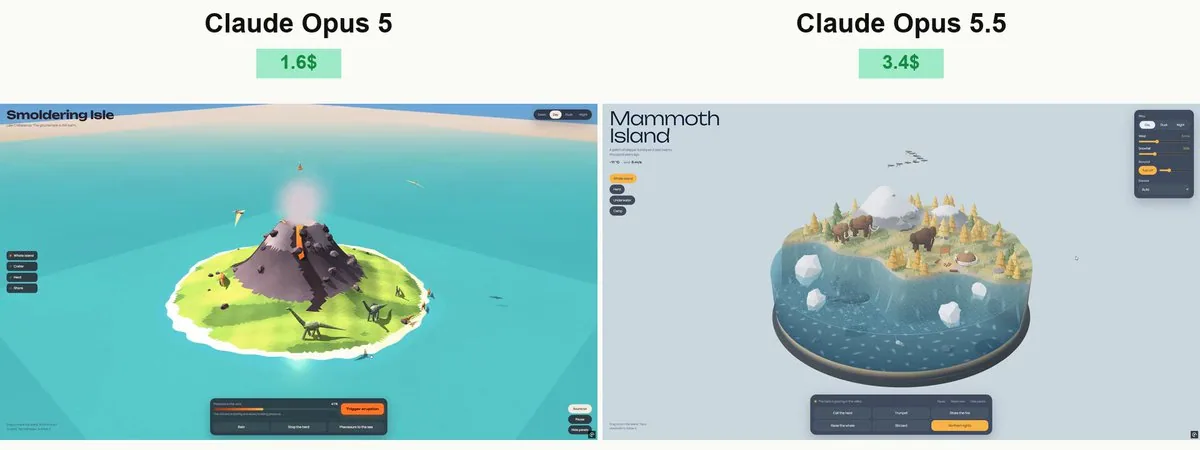
Create a beautiful, highly detailed, fully interactive 3D prehistoric island using Three.js and WebGL. Deliver everything in a single standalone HTML file that opens directly in Chrome. Embed assets wherever possible.

VISUAL DIRECTION
Build a large, rounded island surrounded by an ocean with a transparent underwater cross-section. The result should feel like a premium miniature world: lush vegetation, expressive dinosaurs, rich materials, atmospheric lighting, and polished animation. Use a cohesive, stylized art direction rather than basic geometric shapes.
ISLAND
Create varied terrain with beaches, rocky cliffs, dense prehistoric forests, giant ferns, a waterfall, a freshwater pond, and a volcano. Add a small research station, wooden walkways, observation platforms, supply crates, and dinosaur nests. Make the island spacious enough for dinosaurs to move naturally between distinct areas.

WATER CROSS-SECTION
The water must form a deep, rounded volume around the island, with clearly visible underwater scenery through its sides. Include a textured seabed, rocks, aquatic plants, fish, bubbles, and a green marine reptile swimming beneath the surface. Do not place ordinary land dinosaurs underwater, and do not add a submarine.
Use animated waves, Fresnel reflections, underwater light patterns, shoreline foam, and splashes. Avoid transparency sorting artifacts and visible gaps between the island and water.

DINOSAURS
Include several distinct species, such as a long-necked sauropod, Triceratops, Stegosaurus, a large theropod, and smaller herd animals. Add pterosaurs circling overhead.
Give every species recognizable anatomy, shaped bodies, articulated limbs, detailed heads, tails, and appropriate skin patterns. Avoid assembling the finished dinosaurs from obvious boxes or disconnected spheres.

NATURAL ANIMATION
Use hierarchical skeletons with correctly positioned joints. Walking must have distinct stance and swing phases: feet stay planted during contact and lift cleanly during each step. Match stride length to movement speed.

Use terrain sampling and inverse kinematics to keep feet on the ground. Add weight shifts, subtle body movement, balanced tail motion, head turns, and breathing. Dinosaurs must never float, slide, intersect the ground, or walk through buildings, rocks, trees, or each other.
Use obstacle avoidance and safe paths. Different species should have different movement speeds, gait patterns, and behaviors. Marine animals must face their direction of travel.

INTERACTION
Allow users to:

Rotate the camera freely, zoom, and inspect the underwater cross-section.
Select a dinosaur and follow it with a smoothly moving camera.

Place food in suitable locations and watch nearby dinosaurs approach and eat.

Trigger drinking, resting, calling, and herd movement.

Explore nests and watch a hatchling emerge.
Trigger a marine reptile surfacing with a splash.
Switch between daylight, sunset, and night.
Adjust rain, wind, and volcanic activity.
Pause the simulation and reset the scene.
Make every control produce a clear, visible response. Keep interactions repeatable and prevent overlapping animations from breaking character poses.
ATMOSPHERE AND AUDIO
Add moving foliage, drifting clouds, birds, insects, rain particles, and warm research-station lights at night. Include quiet atmospheric music and environmental sounds with a working music toggle and volume slider. Start audio only after user interaction.
INTERFACE
Use a compact, elegant interface with English labels. Keep the scene dominant and avoid large panels covering the island. Make the layout responsive for desktop and mobile.
TECHNICAL QUALITY
Use instancing for repeated vegetation and props, efficient geometry, appropriate shadows, and restrained post-processing. Balance visual richness with smooth real-time performance.
Build a complete scene, not a mockup. Test the final HTML directly in a desktop browser, inspect screenshots and the console, exercise every interaction, and fix loading errors, floating dinosaurs, foot sliding, broken collisions, water artifacts, and camera problems before delivery.