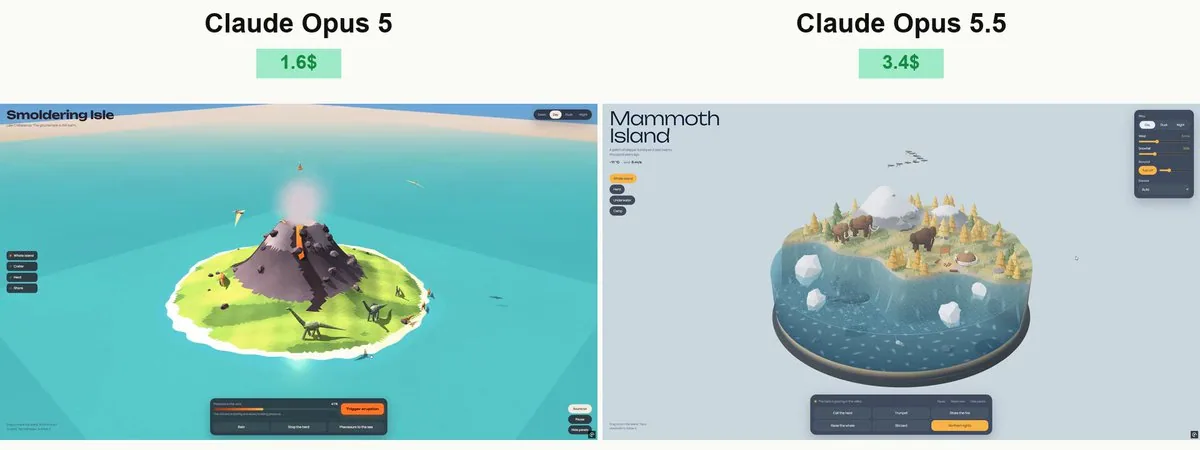
Create a beautiful, highly detailed, fully interactive 3D prehistoric island using Three.js and WebGL. Deliver everything in a single standalone HTML file that opens directly in Chrome. Embed assets wherever possible.

VISUAL DIRECTION
Build a large, rounded island surrounded by an ocean with a transparent underwater cross-section. The result should feel like a premium miniature world: lush vegetation, expressive dinosaurs, rich materials, atmospheric lighting, and polished animation. Use a cohesive, stylized art direction rather than basic geometric shapes.
ISLAND
Create varied terrain with beaches, rocky cliffs, dense prehistoric forests, giant ferns, a waterfall, a freshwater pond, and a volcano. Add a small research station, wooden walkways, observation platforms, supply crates, and dinosaur nests. Make the island spacious enough for dinosaurs to move naturally between distinct areas.

WATER CROSS-SECTION
The water must form a deep, rounded volume around the island, with clearly visible underwater scenery through its sides. Include a textured seabed, rocks, aquatic plants, fish, bubbles, and a green marine reptile swimming beneath the surface. Do not place ordinary land dinosaurs underwater, and do not add a submarine.
Use animated waves, Fresnel reflections, underwater light patterns, shoreline foam, and splashes. Avoid transparency sorting artifacts and visible gaps between the island and water.

DINOSAURS
Include several distinct species, such as a long-necked sauropod, Triceratops, Stegosaurus, a large theropod, and smaller herd animals. Add pterosaurs circling overhead.
Give every species recognizable anatomy, shaped bodies, articulated limbs, detailed heads, tails, and appropriate skin patterns. Avoid assembling the finished dinosaurs from obvious boxes or disconnected spheres.

NATURAL ANIMATION
Use hierarchical skeletons with correctly positioned joints. Walking must have distinct stance and swing phases: feet stay planted during contact and lift cleanly during each step. Match stride length to movement speed.

Use terrain sampling and inverse kinematics to keep feet on the ground. Add weight shifts, subtle body movement, balanced tail motion, head turns, and breathing. Dinosaurs must never float, slide, intersect the ground, or walk through buildings, rocks, trees, or each other.
Use obstacle avoidance and safe paths. Different species should have different movement speeds, gait patterns, and behaviors. Marine animals must face their direction of travel.

INTERACTION
Allow users to:

Rotate the camera freely, zoom, and inspect the underwater cross-section.
Select a dinosaur and follow it with a smoothly moving camera.

Place food in suitable locations and watch nearby dinosaurs approach and eat.

Trigger drinking, resting, calling, and herd movement.

Explore nests and watch a hatchling emerge.
Trigger a marine reptile surfacing with a splash.
Switch between daylight, sunset, and night.
Adjust rain, wind, and volcanic activity.
Pause the simulation and reset the scene.
Make every control produce a clear, visible response. Keep interactions repeatable and prevent overlapping animations from breaking character poses.
ATMOSPHERE AND AUDIO
Add moving foliage, drifting clouds, birds, insects, rain particles, and warm research-station lights at night. Include quiet atmospheric music and environmental sounds with a working music toggle and volume slider. Start audio only after user interaction.
INTERFACE
Use a compact, elegant interface with English labels. Keep the scene dominant and avoid large panels covering the island. Make the layout responsive for desktop and mobile.
TECHNICAL QUALITY
Use instancing for repeated vegetation and props, efficient geometry, appropriate shadows, and restrained post-processing. Balance visual richness with smooth real-time performance.
Build a complete scene, not a mockup. Test the final HTML directly in a desktop browser, inspect screenshots and the console, exercise every interaction, and fix loading errors, floating dinosaurs, foot sliding, broken collisions, water artifacts, and camera problems before delivery.
한국어 번역
Three.js와 WebGL을 사용해 아름답고 매우 정교하며 완전히 상호작용 가능한 3D 선사시대 섬을 만드세요. Chrome에서 바로 열리는 단일 독립형 HTML 파일 하나로 모든 것을 전달하세요. 가능한 한 모든 에셋을 파일에 내장하세요.

비주얼 디렉션
큰 둥근 섬을 만들고, 바다가 그 주위를 둘러싸며 물속 단면이 투명하게 보이게 하세요. 결과물은 고급 미니어처 세계처럼 느껴져야 합니다: 무성한 식생, 표정이 살아있는 공룡, 풍부한 재질, 분위기 있는 조명, 세련된 애니메이션. 단순한 기하학적 도형이 아니라 일관된 양식화 아트 디렉션을 사용하세요.
섬
해변, 암석 절벽, 빽빽한 선사시대 숲, 거대한 고사리, 폭포, 담수 연못, 화산이 있는 다채로운 지형을 만드세요. 작은 연구 스테이션, 나무 산책로, 전망대, 보급 상자, 공룡 둥지를 추가하세요. 공룡들이 서로 다른 구역 사이를 자연스럽게 이동할 수 있도록 섬을 충분히 넓게 만드세요.

물 단면
물은 섬 주위에 깊고 둥근 부피를 형성해야 하며, 측면을 통해 수중 풍경이 또렷하게 보여야 합니다. 질감이 있는 해저, 암석, 수생 식물, 물고기, 기포, 수면 아래를 헤엄치는 녹색 해양 파충류를 포함하세요. 일반 육상 공룡을 물속에 배치하지 말고, 잠수함도 추가하지 마세요.
애니메이션 파도, 프레넬 반사, 수중 빛 패턴, 해안선 거품, 물보라를 사용하세요. 투명도 정렬 아티팩트와 섬과 물 사이의 눈에 띄는 틈을 피하세요.

공룡
긴 목의 용각류, 트리케라톱스, 스테고사우루스, 대형 수각류, 더 작은 무리 동물 등 여러 뚜렷한 종을 포함하세요. 머리 위를 선회하는 익룡을 추가하세요.
모든 종에게 알아볼 수 있는 해부학, 형태가 잡힌 몸, 관절로 나뉜 사지, 정교한 머리, 꼬리, 적절한 피부 문양을 부여하세요. 완성된 공룡을 뻔한 상자나 분리된 구체로 조립하는 것을 피하세요.

자연스러운 애니메이션
관절 위치가 올바른 계층적 스켈레톤을 사용하세요. 걷기에는 접지와 스윙 단계가 뚜렷해야 합니다: 발은 접지 중에 고정되고 걸음마다 깔끔하게 들어 올려져야 합니다. 보폭을 이동 속도와 맞추세요.

지형 샘플링과 역기구학을 사용해 발을 지면에 유지하세요. 무게 이동, 미세한 몸 움직임, 균형 잡힌 꼬리 움직임, 머리 돌리기, 호흡을 추가하세요. 공룡은 절대 떠다니거나, 미끄러지거나, 지면을 관통하거나, 건물·암석·나무·서로를 통과해 걸어서는 안 됩니다.
장애물 회피와 안전한 경로를 사용하세요. 종마다 이동 속도, 보행 패턴, 행동이 달라야 합니다. 해양 동물은 이동 방향을 바라봐야 합니다.

상호작용
사용자가 다음을 할 수 있게 하세요:

카메라를 자유롭게 회전하고, 줌하고, 물속 단면을 살펴보기.
공룡을 선택하고 부드럽게 움직이는 카메라로 따라가기.

적합한 위치에 먹이를 놓고 근처 공룡들이 다가와 먹는 모습 보기.

물 마시기, 휴식, 울음소리, 무리 이동을 촉발하기.

둥지를 살펴보고 새끼가 나오는 모습 보기.
해양 파충류가 물보라와 함께 수면으로 올라오게 하기.
낮, 노을, 밤 사이를 전환하기.
비, 바람, 화산 활동을 조절하기.
시뮬레이션을 일시정지하고 장면을 초기화하기.
모든 컨트롤이 명확하고 눈에 보이는 반응을 만들어야 합니다. 상호작용을 반복 가능하게 유지하고, 겹치는 애니메이션이 캐릭터 포즈를 깨뜨리지 않게 하세요.
분위기와 오디오
움직이는 잎, 흘러가는 구름, 새, 곤충, 빗방울 입자, 밤의 따뜻한 연구 스테이션 조명을 추가하세요. 조용한 분위기 음악과 환경음을 포함하고, 음악 토글과 볼륨 슬라이더가 작동해야 합니다. 오디오는 사용자 상호작용 이후에만 시작하세요.
인터페이스
영어 라벨이 있는 간결하고 우아한 인터페이스를 사용하세요. 장면이 화면을 주도하게 유지하고 섬을 가리는 큰 패널을 피하세요. 데스크톱과 모바일에 반응하는 레이아웃으로 만드세요.
기술적 품질
반복되는 식생과 소품에는 인스턴싱을, 효율적인 지오메트리를, 적절한 그림자를, 절제된 후처리를 사용하세요. 시각적 풍부함과 부드러운 실시간 성능의 균형을 맞추세요.
목업이 아니라 완성된 장면을 만드세요. 최종 HTML을 데스크톱 브라우저에서 직접 테스트하고, 스크린샷과 콘솔을 확인하고, 모든 상호작용을 실행해 보고, 전달 전에 로딩 오류, 떠다니는 공룡, 발 미끄러짐, 깨진 충돌, 물 아티팩트, 카메라 문제를 수정하세요.