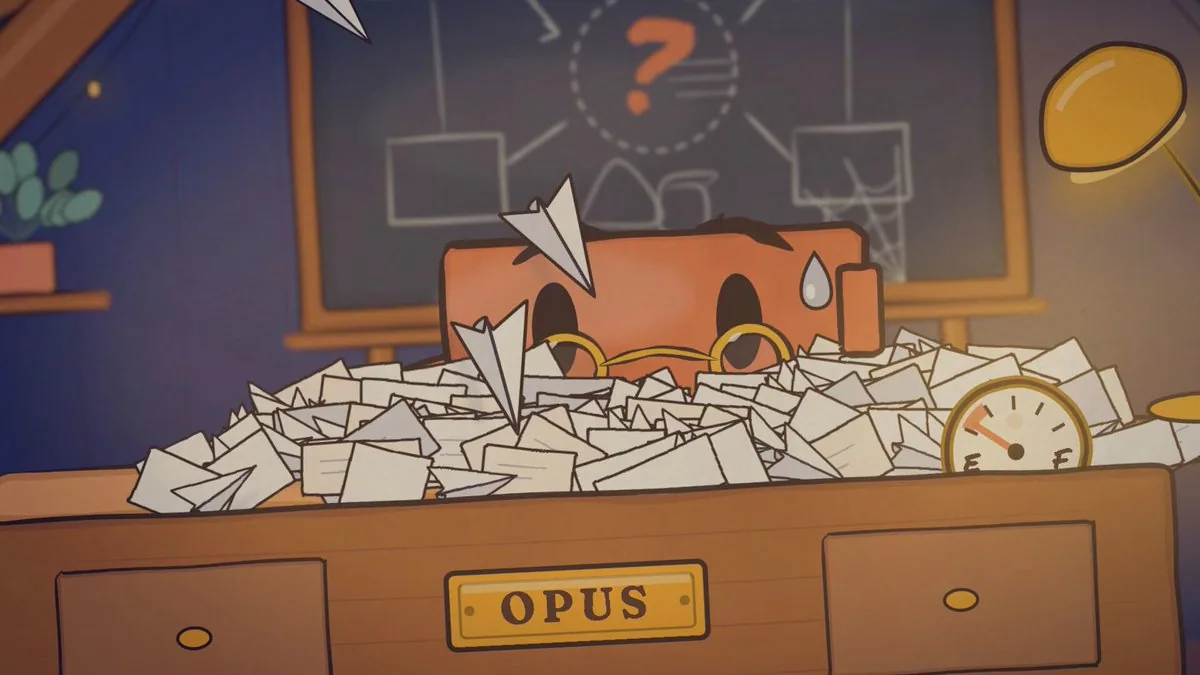
You're directing a 20-second animated short about the Claude Haiku 5.5 release. You're the director, the art department, the animator, the sound designer and the QA team, and you have real tools to call.

I'm giving you the idea, the tools and the quality bar. Everything else, from the beats to the look to the jokes, is yours to design. I trust your taste more than a beat sheet I could write. Your capabilities are far beyond what you assume, so work like it: plan carefully, push the craft, and use the tools and the time this deserves. Spend generously where it improves the film and economically everywhere else.

Final output: `out/level3.mp4`, 1920×1080, 30fps, exactly 20.0 seconds, with voices, music and sound design. At the end, you'll also save your process as a reusable skill.

---

## 1. The idea

**Opus is overloaded with work it shouldn't be doing.** It's buried in small, repetitive tasks: summaries, classifications, lookups, compactions. Then it has a realization: it can hand all of that to Haiku. It calls Haiku, Haiku arrives fast and clears the pile, and Opus is finally free to do the hard, important work it's built for.

That's the premise. How you tell it is up to you: the staging, gags, rhythm, camera, character beats, what the eureka moment looks like, how Haiku arrives, and how the delegation plays out. Sonnet can appear if it earns its place.

**Fixed points:**
- 20.0 seconds, 16:9.
- Opus and Haiku are characters in the same family as the Claude character.
- The film must read with the sound off.
- The ending respects reality: Haiku takes the volume, and Opus keeps the hard thinking. Anthropic says Opus 5.5 and Sonnet 5.5 remain the better choice for complex agentic coding, so Haiku is never shown replacing Opus.

---

## 2. Style reference

The reference is Jake Moran's "Animated agent session story": https://www.prompt-motion.com/jake11moran-a269c4. It was made with this skill: https://github.com/heygen-com/hyperframes-community-skills/tree/master/skills/session-story. Read the skill, including its references on motion and the room.

Take from it:
- The hand-drawn watercolour-on-paper look.
- A cozy room as a world.
- Cartoon blocks with faces as characters.
- Physical paper props that carry the story (paper planes as tasks).
- A score that's cued to every action.

Don't copy it. Use it as a starting point and push it further: richer staging, better acting from the characters, more cinematic camera, and a stronger hook. It should look like it belongs to the same family, made by someone who studied it closely.

---

## 3. Facts (lock these before any creative work)

Fetch https://www.anthropic.com/claude-haiku-5-5 and write `facts.json`: every claim you might use, each with the exact supporting sentence from the page. Only claims in `facts.json` may appear on screen or in dialogue.

This is a story first, so use one or two facts at most, woven into the world rather than presented as slides. For example, a price tag being re-stamped, or Haiku's speed shown rather than stated. The film must end on a card with **Claude Haiku 5.5**.

---

## 4. Audience and hook

The audience is AI and developer Twitter/X: people who use Claude every day and know the model names and the jokes about them. Before writing the treatment:
- **Research:** spend a little time on how people currently talk about Opus, Sonnet and Haiku, and what's being said about this launch. Find one or two references or running jokes this audience would recognize and enjoy. Use them only if they fit the story naturally. Never use real people or brand logos.
- **The hook:** the first second has to work as a still frame on a busy timeline. Someone scrolling should instantly see "a character drowning in work" and want to see what happens.
- **Text on screen:** this is motion design that tells a story, not a lyric video. Use text sparingly and only where it adds something: a beat the picture can't carry alone, the fact stamp, and the end card. Integrate it into the world (painted, stamped, written in marker) rather than overlaying it.

---

## 5. Tools

The keys are in `.env`. Pick the best tool for each job, and tell me which you chose and why.

| Tool | Key | Use it for |
|---|---|---|
| Web search and fetch | — | Source page, style reference, audience research |
| Higgsfield (connector) | — | Image generation; call `models_explore` first to pick the best model for flat illustrated characters. Also music or sound effects if its audio models are the best fit. |
| GPT Image (OpenAI) | `OPENAI_API_KEY` | A second image model. Test both on the same prompt and keep whichever matches the style better. |
| ElevenLabs | `ELEVENLABS_API_KEY` | Character voices, sound effects, and music (Eleven Music) |
| Remotion | — | The film itself |
| ffmpeg + Python | — | Audio analysis, frame extraction, checks |
| Subagents | — | Parallel research and independent review |

---

## 6. Order of work

### Step 1: Treatment
Write `treatment.md`:
- Your take on the story in one paragraph.
- The beat sheet with timings.
- What happens in each shot: camera, acting, the gag.
- Where the music hits.
- What each character says.
- Which fact appears and how.
- Why this version is the strongest way to tell it.

Write two or three distinct treatments, then pick one and explain why.

### Step 2: Style bible
Write `style/bible.md`:
- Palette: 6 colours maximum, with hex values and a reason for each.
- Ink line rules: weight, and the "boiling" redraw jitter.
- Watercolour and paper texture.
- Lighting.
- Type: local font files only.
- Character design rules for Opus and Haiku: size ratio, shapes, how each one moves, and their expression set.

### Step 3: Key art (images as the base, no video generation)
The generated images are your key frames and design references. You are the in-betweener. Generate:
1. **Style frames:** 3 options of the world. Pick one.
2. **Character sheets:** Opus and Haiku, each with front, three-quarter and side views and their full expression set. Use the chosen style frame as a reference so everything shares one world.
3. **Key poses:** one image per key pose in your treatment (roughly 6–10), each built from the character sheets and the style frame, matching the camera and composition of the shot.

Put everything on one contact sheet.

**Stop and wait for my approval** before building anything.

The images are references. The final film is drawn in code to match them, and generated images never appear on screen. Trace the shapes, poses, proportions and composition from the key art into SVG, and animate between them.

### Step 4: Audio first
The film's timing comes from the audio.
1. **Voices:** audition at least 2 ElevenLabs voices per character. Opus should feel warm, low and deliberate. Haiku should feel quick, bright and eager. Generate each line separately, with 2 takes, and keep the best delivery.
2. **Music:** generate a track that fits your treatment, about 22s long, with its structure matching your beats: for example, a drop when Haiku arrives. If the generated track won't land on your beats, trim and offset it with ffmpeg rather than changing the picture.
3. **Sound effects:** a sound for every physical action. Paper, whooshes, impacts, the lightbulb, stamps.
4. **Timing map:** detect the music's beat onsets and write `timing.json`. It holds every beat time, the drop frame, each voice line's start and end frames, and every key action snapped to the nearest beat. All animation timing reads from `timing.json`, with nothing hardcoded.
5. Play me the audio-only mix before building the picture.

### Step 5: Build in Remotion
- **Components:** one per character, prop and set piece. Story beats live as data in `story.json`.
- **Drawing:** watercolour fills via SVG turbulence and displacement filters, a multiply-blended paper texture, and boiling ink lines.
- **Motion craft:** anticipation before every big action, follow-through after, squash and stretch, springs for landings, arcs for every moving object, and no linear easing.
- **Acting:** the characters have to perform. Give them readable poses, holds where the audience needs to read a face, and timing that's funny.
- **Mouths:** mouth shapes driven by the voice track's loudness. They must be still when the character is silent.
- **Camera:** push-ins, a whip or a shake where it helps. Motivate every camera move.
- **Mix:** music, voices and sound effects on separate layers. Duck the music under dialogue.

---

## 7. Verification loops (do not skip any)

1. **Key-pose match:** at every key pose, render the frame and compare it side by side with its key art. Write what differs and fix it.
2. **Sound-off read:** render a silent cut. A fresh subagent that has seen nothing else reviews a contact sheet at 2 frames per second and retells the story. If it can't, the staging failed. Fix it and repeat.
3. **Sync check:** list every catch, landing, stamp and dialogue line with its actual frame vs its `timing.json` target. Everything must be within 1 frame.
4. **Fact check:** every word on screen and in dialogue, matched to `facts.json`. Cut anything unmatched.
5. **Technical:** duration exactly 20.0s, stereo audio, peaks below −1 dBFS, no unintended dead air.
6. **Director's review:**
- Watch the whole film at least twice as frames.
- Write a brutal critique as the most demanding motion designer you know: what feels assembled, what's slow, what doesn't land.
- Fix the top 3 issues, then review again.
- Only then hand it over, with a 10-frame contact sheet.

---

## 8. Package it as a skill

Save the full pipeline as `.claude/skills/launch-film/SKILL.md`, so that next time *"Make a launch film for [URL] about [idea]"* is enough.

The skill should include:
- The fact lock
- The treatment process
- The style bible as a reference file
- The key-art process with both image models
- Voice auditions
- Music and sound effects
- The timing map
- The reusable Remotion components
- Every verification loop

---

## Approval gates
1. `facts.json` and the chosen treatment
2. Style bible, character sheets and key poses → **wait for my approval**
3. Audio-only mix and `timing.json`
4. Final film, contact sheet and critique
5. Skill

Keep a task list throughout. At each gate, show me the work, not a description of it.
한국어 번역
당신은 Claude Haiku 5.5 출시를 다루는 20초 애니메이션 단편을 연출합니다. 당신은 감독이자 아트 부서, 애니메이터, 사운드 디자이너, QA 팀이며, 실제로 호출할 수 있는 도구를 갖고 있습니다.

나는 아이디어와 도구, 그리고 품질 기준을 주겠습니다. 그 외의 모든 것, 즉 비트부터 룩과 농담까지는 당신이 설계할 몫입니다. 내가 쓸 수 있는 비트 시트보다 당신의 취향을 더 믿습니다. 당신의 역량은 당신이 짐작하는 것보다 훨씬 뛰어나니 그에 걸맞게 일하세요: 신중하게 계획하고, 기예를 끝까지 밀어붙이고, 이 작업에 합당한 도구와 시간을 쓰세요. 영화를 더 좋게 만드는 곳에는 아낌없이 쓰고, 그 밖의 모든 곳에서는 알뜰하게 쓰세요.

최종 출력: `out/level3.mp4`, 1920×1080, 30fps, 정확히 20.0초, 음성·음악·사운드 디자인 포함. 마지막에는 당신의 과정을 재사용 가능한 스킬로 저장합니다.

---

## 1. 아이디어

**Opus는 하지 말아야 할 일로 과부하가 걸려 있습니다.** 요약, 분류, 조회, 압축 같은 작고 반복적인 작업에 파묻혀 있습니다. 그러다 깨닫습니다: 그 모든 것을 Haiku에게 넘길 수 있다는 것을. Haiku를 호출하면 Haiku가 빠르게 도착해 쌓인 일을 치워 버리고, Opus는 마침내 자신이 만들어진 이유인 어렵고 중요한 일을 할 자유를 얻습니다.

그것이 전제입니다. 이야기를 어떻게 풀어낼지는 당신에게 달렸습니다: 연출, 개그, 리듬, 카메라, 캐릭터 비트, 유레카의 순간이 어떤 모습인지, Haiku가 어떻게 등장하는지, 위임이 어떻게 전개되는지. Sonnet은 제 몫을 해낸다면 등장할 수 있습니다.

**고정 요소:**
- 20.0초, 16:9.
- Opus와 Haiku는 Claude 캐릭터와 같은 패밀리에 속한 캐릭터입니다.
- 이 영화는 소리를 꺼도 읽혀야 합니다.
- 결말은 현실을 존중합니다: Haiku가 물량을 가져가고, Opus는 어려운 사고를 계속 맡습니다. Anthropic은 복잡한 에이전틱 코딩에서는 Opus 5.5와 Sonnet 5.5가 여전히 더 나은 선택이라고 말하므로, Haiku가 Opus를 대체하는 모습은 절대 보여주지 않습니다.

---

## 2. 스타일 레퍼런스

레퍼런스는 Jake Moran의 "Animated agent session story"입니다: https://www.prompt-motion.com/jake11moran-a269c4. 이 작품은 이 스킬로 만들어졌습니다: https://github.com/heygen-com/hyperframes-community-skills/tree/master/skills/session-story. 모션과 방에 관한 레퍼런스를 포함해 그 스킬을 읽어보세요.

그것에서 가져올 것:
- 손으로 그린, 종이 위 수채화 같은 룩.
- 하나의 세계로서의 아늑한 방.
- 얼굴이 붙은 만화풍 블록을 캐릭터로.
- 이야기를 실어 나르는 실물 종이 소품(과제를 상징하는 종이비행기).
- 모든 동작에 큐가 맞춰진 스코어.

그대로 베끼지 마세요. 출발점으로 삼아 더 밀어붙이세요: 더 풍부한 연출, 캐릭터의 더 나은 연기, 더 영화적인 카메라, 더 강한 훅. 가까이서 연구한 사람이 만든, 같은 패밀리에 속한 작품처럼 보여야 합니다.

---

## 3. 팩트 (창작 작업 전에 이것부터 고정)

https://www.anthropic.com/claude-haiku-5-5 를 가져와 `facts.json`을 작성하세요: 사용할 수도 있는 모든 주장마다, 그 주장을 뒷받침하는 페이지의 정확한 문장을 함께. `facts.json`에 있는 주장만 화면이나 대사에 등장할 수 있습니다.

이것은 무엇보다 이야기이므로, 팩트는 많아야 한두 개만, 슬라이드처럼 제시하지 말고 세계 안에 엮어 쓰세요. 예를 들어 가격표에 다시 도장을 찍는 장면, 또는 Haiku의 속도를 말이 아니라 보여주는 것. 영화는 **Claude Haiku 5.5**가 적힌 카드로 끝나야 합니다.

---

## 4. 관객과 훅

관객은 AI·개발자 Twitter/X입니다: Claude를 매일 쓰고, 모델 이름과 그에 대한 농담을 아는 사람들. 트리트먼트를 쓰기 전에:
- **리서치:** 사람들이 지금 Opus, Sonnet, Haiku를 어떻게 이야기하는지, 그리고 이번 출시에 관해 무슨 이야기가 오가는지에 잠깐 시간을 쓰세요. 이 관객이 알아보고 즐길 레퍼런스나 반복되는 농담을 한두 개 찾으세요. 이야기에 자연스럽게 맞을 때만 쓰세요. 실제 인물이나 브랜드 로고는 절대 쓰지 마세요.
- **훅:** 첫 1초는 바쁜 타임라인 위의 정지 프레임으로도 성립해야 합니다. 스크롤하던 사람이 "일에 파묻힌 캐릭터"를 즉시 보고 무슨 일이 벌어질지 보고 싶어야 합니다.
- **화면 위 텍스트:** 이것은 이야기를 들려주는 모션 디자인이지 가사 영상이 아닙니다. 텍스트는 아껴 쓰고, 뭔가를 더하는 곳에만 쓰세요: 그림만으로는 전달할 수 없는 비트, 팩트 스탬프, 엔드 카드. 텍스트는 얹어 놓지 말고 세계 안에 통합하세요(칠해 넣거나, 도장을 찍거나, 마커로 쓴 것처럼).

---

## 5. 도구

키는 `.env`에 있습니다. 작업마다 가장 좋은 도구를 고르고, 무엇을 골랐는지 그리고 왜인지 알려주세요.

| 도구 | 키 | 용도 |
|---|---|---|
| 웹 검색 및 가져오기 | — | 출처 페이지, 스타일 레퍼런스, 관객 리서치 |
| Higgsfield (커넥터) | — | 이미지 생성; 평면 일러스트 캐릭터에 가장 좋은 모델을 고르려면 먼저 `models_explore`를 호출하세요. 오디오 모델이 가장 잘 맞는다면 음악이나 사운드 효과에도. |
| GPT Image (OpenAI) | `OPENAI_API_KEY` | 두 번째 이미지 모델. 같은 프롬프트로 둘 다 테스트하고 스타일에 더 잘 맞는 쪽을 남기세요. |
| ElevenLabs | `ELEVENLABS_API_KEY` | 캐릭터 음성, 사운드 효과, 음악(Eleven Music) |
| Remotion | — | 영화 자체 |
| ffmpeg + Python | — | 오디오 분석, 프레임 추출, 검사 |
| 서브에이전트 | — | 병렬 리서치와 독립 리뷰 |

---

## 6. 작업 순서

### 1단계: 트리트먼트
`treatment.md`를 작성하세요:
- 한 문단으로 정리한 이야기에 대한 당신의 해석.
- 타이밍이 붙은 비트 시트.
- 각 샷에서 벌어지는 일: 카메라, 연기, 개그.
- 음악이 터지는 지점.
- 각 캐릭터가 하는 대사.
- 어떤 팩트가 어떻게 등장하는지.
- 왜 이 버전이 이 이야기를 들려주는 가장 강력한 방식인지.

서로 다른 트리트먼트를 두세 개 쓰고, 하나를 고른 뒤 이유를 설명하세요.

### 2단계: 스타일 바이블
`style/bible.md`를 작성하세요:
- 팔레트: 최대 6색, 헥스 값과 각 색의 이유 포함.
- 잉크 라인 규칙: 굵기, 그리고 "보일링" 리드로우 지터.
- 수채화와 종이 질감.
- 조명.
- 타이포그래피: 로컬 폰트 파일만.
- Opus와 Haiku의 캐릭터 디자인 규칙: 크기 비율, 형태, 각자의 움직임 방식, 표정 세트.

### 3단계: 키 아트 (이미지가 기반, 영상 생성 없음)
생성한 이미지가 당신의 키 프레임이자 디자인 레퍼런스입니다. 중간 프레임을 그리는 사람은 당신입니다. 생성하세요:
1. **스타일 프레임:** 세계의 3가지 안. 하나를 고르세요.
2. **캐릭터 시트:** Opus와 Haiku, 각각 정면·쿼터·측면 뷰와 전체 표정 세트 포함. 모든 것이 하나의 세계를 공유하도록 선택한 스타일 프레임을 레퍼런스로 쓰세요.
3. **키 포즈:** 트리트먼트의 키 포즈마다 이미지 하나(대략 6–10개). 각각 캐릭터 시트와 스타일 프레임을 바탕으로 만들고, 샷의 카메라와 구도에 맞추세요.

모든 것을 하나의 콘택트 시트에 모으세요.

무엇이든 만들기 전에 **멈추고 내 승인을 기다리세요**.

이미지는 레퍼런스입니다. 최종 영화는 그것에 맞춰 코드로 그려지며, 생성된 이미지는 화면에 절대 등장하지 않습니다. 키 아트에서 형태, 포즈, 비율, 구도를 SVG로 트레이스하고, 그 사이를 애니메이션하세요.

### 4단계: 오디오 먼저
영화의 타이밍은 오디오에서 나옵니다.
1. **음성:** 캐릭터마다 최소 2개의 ElevenLabs 음성을 오디션하세요. Opus는 따뜻하고 낮고 신중하게 느껴져야 합니다. Haiku는 빠르고 밝고 열의에 차 있어야 합니다. 각 대사를 따로 생성하고, 테이크를 2개씩 뽑아 가장 좋은 것을 남기세요.
2. **음악:** 트리트먼트에 맞는 트랙을 약 22초 길이로 생성하고, 구조가 당신의 비트에 맞게 하세요. 예를 들어 Haiku가 등장할 때 드롭. 생성한 트랙이 당신의 비트에 맞지 않는다면, 그림을 바꾸지 말고 ffmpeg로 다듬고 오프셋을 주세요.
3. **사운드 효과:** 모든 물리적 동작에 소리를 넣으세요. 종이, 휘익 하는 소리, 충격음, 전구, 도장.
4. **타이밍 맵:** 음악의 비트 온셋을 감지해 `timing.json`을 작성하세요. 여기에는 모든 비트 시각, 드롭 프레임, 각 음성 대사의 시작과 끝 프레임, 가장 가까운 비트에 스냅된 모든 주요 동작이 담깁니다. 모든 애니메이션 타이밍은 `timing.json`에서 읽어 오고, 하드코딩된 것은 없습니다.
5. 그림을 만들기 전에 오디오만 있는 믹스를 나에게 들려주세요.

### 5단계: Remotion으로 제작
- **컴포넌트:** 캐릭터, 소품, 세트 피스마다 하나씩. 이야기 비트는 `story.json`에 데이터로 존재합니다.
- **드로잉:** SVG 터뷸런스와 디스플레이스먼트 필터로 만드는 수채화 채움, 멀티플라이 블렌드 종이 질감, 보일링 잉크 라인.
- **모션 기법:** 큰 동작 전의 예비 동작, 동작 후의 팔로우스루, 스쿼시 앤 스트레치, 착지의 스프링, 움직이는 모든 물체의 아크, 그리고 선형 이징 없음.
- **연기:** 캐릭터가 연기를 해야 합니다. 읽히는 포즈, 관객이 얼굴을 읽어야 하는 지점의 홀드, 웃긴 타이밍을 주세요.
- **입:** 음성 트랙의 음량으로 구동되는 입 모양. 캐릭터가 말이 없을 때는 반드시 정지해 있어야 합니다.
- **카메라:** 푸시인, 필요할 때의 휩이나 셰이크. 모든 카메라 무브에 동기를 부여하세요.
- **믹스:** 음악, 음성, 사운드 효과를 별도 레이어에. 대사 아래에서 음악을 덕킹하세요.

---

## 7. 검증 루프 (하나도 건너뛰지 마세요)

1. **키 포즈 일치:** 모든 키 포즈에서 프레임을 렌더링하고 해당 키 아트와 나란히 비교하세요. 다른 점을 적고 고치세요.
2. **무음 판독:** 무음 컷을 렌더링하세요. 다른 것은 아무것도 보지 못한 새 서브에이전트가 초당 2프레임의 콘택트 시트를 검토하고 이야기를 다시 들려줍니다. 못 한다면 연출이 실패한 것입니다. 고치고 반복하세요.
3. **싱크 확인:** 모든 캐치, 착지, 도장, 대사마다 실제 프레임과 `timing.json` 목표를 나열하세요. 모든 것이 1프레임 이내여야 합니다.
4. **팩트 확인:** 화면과 대사의 모든 단어를 `facts.json`과 대조하세요. 맞지 않는 것은 잘라내세요.
5. **기술:** 길이 정확히 20.0초, 스테레오 오디오, 피크 −1 dBFS 미만, 의도치 않은 무음 구간 없음.
6. **감독 리뷰:**
- 전체 영화를 프레임 단위로 최소 두 번 보세요.
- 당신이 아는 가장 까다로운 모션 디자이너의 입장에서 가차 없는 비평을 쓰세요: 무엇이 조립된 느낌인지, 무엇이 느린지, 무엇이 먹히지 않는지.
- 상위 3개 문제를 고친 뒤 다시 리뷰하세요.
- 그런 다음에야 10프레임 콘택트 시트와 함께 넘기세요.

---

## 8. 스킬로 패키징

전체 파이프라인을 `.claude/skills/launch-film/SKILL.md`로 저장해서, 다음번에는 *"[URL]에 관한 [idea] 런칭 필름을 만들어줘"* 만으로 충분하게 하세요.

스킬에 포함할 것:
- 팩트 고정
- 트리트먼트 과정
- 레퍼런스 파일로서의 스타일 바이블
- 두 이미지 모델을 모두 쓰는 키 아트 과정
- 음성 오디션
- 음악과 사운드 효과
- 타이밍 맵
- 재사용 가능한 Remotion 컴포넌트
- 모든 검증 루프

---

## 승인 게이트
1. `facts.json`과 선택한 트리트먼트
2. 스타일 바이블, 캐릭터 시트, 키 포즈 → **내 승인을 기다리세요**
3. 오디오만 있는 믹스와 `timing.json`
4. 최종 영화, 콘택트 시트, 비평
5. 스킬

작업 내내 할 일 목록을 유지하세요. 각 게이트에서 설명이 아니라 결과물을 보여주세요.