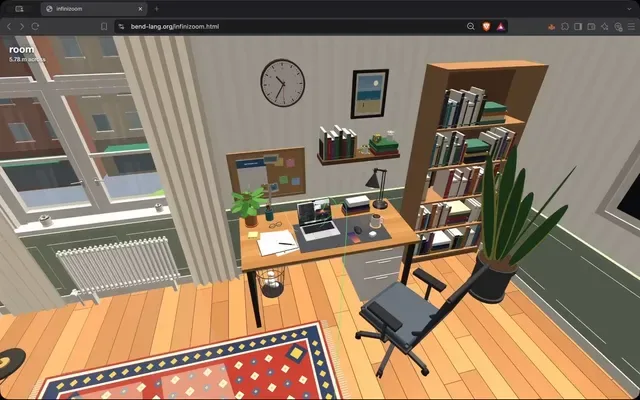
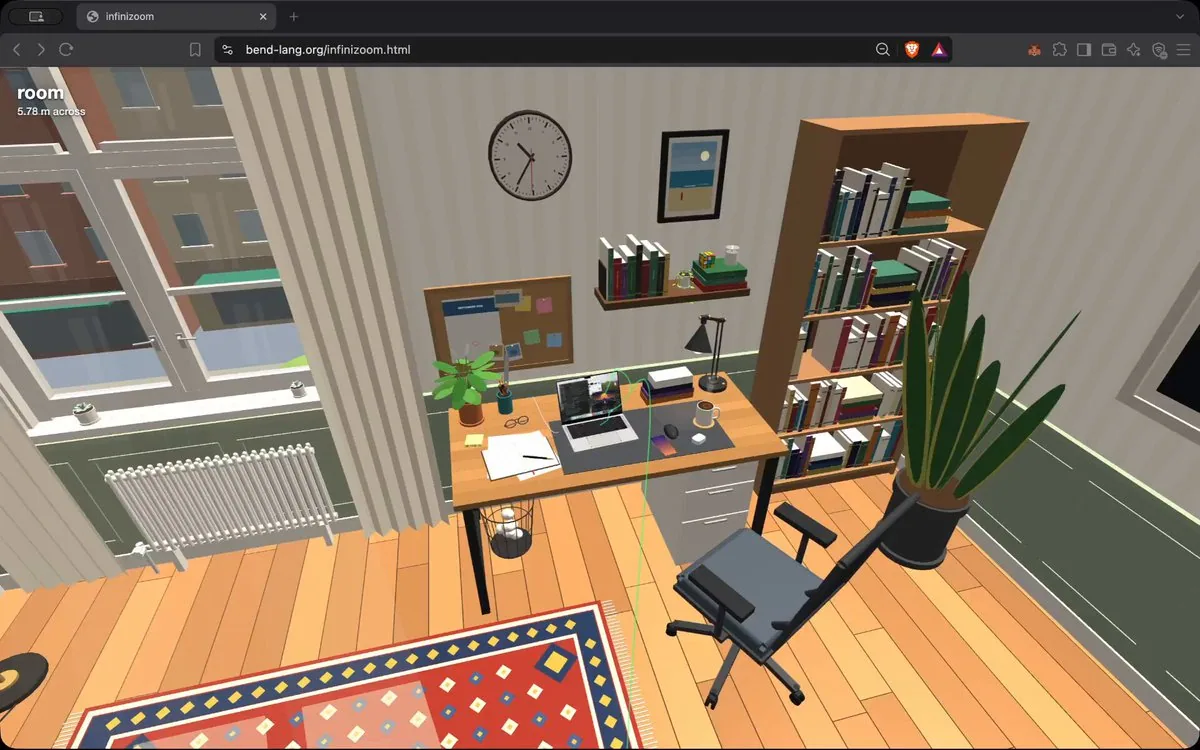
INFINIZOOM

Build infinizoom: a procedural infinite-zoom world. The deliverable is a
self-contained BunJS project. Running `bun run server` must build and serve it
(wire up the corresponding "server" script in package.json). Three local assets
exist in this directory and must be used: ./macbook_interior.png (a real MacBook
Pro teardown photo), ./apple_m4_scheme.png (Apple's M4 die floorplan diagram),
and ./wallpaper.jpg (a 1920×1200 desktop wallpaper photo). Load the wallpaper
from this local file — never fetch content from external servers (the sole
exception: three.js itself may be imported from a CDN by URL).

The world

A single 3D world is traveled indefinitely along a fixed camera track that zooms
through these levels:

Main route: a room → a desk → a MacBook Pro → inside the chassis → the logic
board → the Apple M4 package → the M4 die → a performance core → an integer ALU
block → a standard logic cell → a FinFET transistor → a material cross-section
inside the fin → the silicon crystal lattice → one unit cell → an atom → its
nucleus → a nucleon → a quark. Logic gates and circuits (AND, OR, etc.) should
be animated as it computes.

Screen branch: exactly one bifurcation, hovering above the MacBook. Choosing the
other side dives into the display instead: the screen → the display panel →
pixel tiles → a pixel block → one pixel → its R/G/B sub-pixel LEDs → the
emissive layer → an emitter molecule → and converges to the same atom → nucleus
→ nucleon → quark tail. The leds must be accurate: 1-to-1 mapping from screen
pixels to leds, and their colors must match the color of that pixel. The screen
is animated and the LEDs are updated to match the animation in real time.

Riding the track forward IS zooming in; riding backward is zooming out. The
design must extend additively: adding a new structure = one render function +
one call in its parent; adding a bifurcation = one more route; a future backward
extension (t < 0: out the window → city → planet → universe) must require only
prepending track levels. A time parameter must be threaded through everything so
all animation stays possible at any depth.

Architecture (hard constraints)

- Mutable state is EXACTLY: one float t (position along the track), one branch
  bitstring (0 = left/A, 1 = right/D; a bit is pushed when passing a fork and
  popped when backing out below it), and raw input (keys held, mouse position).
  Every frame is a pure function of (t, branches, raw input, wall-clock time).
  No other state — no scene graph, no node objects, no stored world data, no
  caches of world structure.
- Renderers are pure functions that call their children directly: render_room()
  calls render_desk() calls render_macbook() … down to render_quark(). No
  dispatch layer, no classes. The call stack is the scene traversal.
- Scale-space warping via local unit frames: floats cannot hold meters and
  femtometers at once, so every renderer works in its own ~unit-sized local
  frame, and the camera is re-expressed into each child frame. Geometry math is
  done camera-relative in doubles, cast to float only at the very end, so the
  picture is artifact-free across all ~17 decades of scale. The exact same
  layout constants must place structures for rendering AND author the track —
  one source of truth, or the camera drifts visibly off the line.
- Immediate-mode rendering over three.js: every frame, the recursion emits
  primitives into instanced pools; three.js is only a rasterizer. Nothing
  off-screen or sub-pixel is emitted or recursed into.

The track and the camera

- Speed: fast. The whole main ride should take roughly 20 seconds, with a
  comfortable, constant-feeling time per level (exponential zoom feel) and
  gentle easing near the fork and the track ends.
- Shape: gently curved arcs. Not wandering, roundabout, or random-direction —
  but also NOT dead-straight rays. Soft, purposeful curves.
- The green line: the track is always visible in-scene as a translucent green
  line. It must be an infinitesimal line: ~2 pixels wide on screen at EVERY
  distance, implemented as a true GL line primitive (not tubes, not rods, not
  meshes of any kind), transparent (never rock-solid), and it must NEVER grow
  wider as it approaches or passes the camera — it is literally a path line,
  visible both near and far.
- The camera must never look at nothing. At every instant of the ride the view
  must be filled with structure. Concretely: every level approach is a diagonal
  glide (roughly 45°) over the parent surface — never a low horizontal skim
  (which puts empty void in the upper half of the screen) and never a
  straight-down drop (which degenerates the camera roll). Every level must
  render rich, non-uniform content at the distance where the camera arrives —
  never a flat gray plate.
- Dive points land dead-center inside meaningful sub-structures. The line must
  enter the CENTER of one of the small colored squares (a specific core on the
  die, a specific block in the core, a specific pixel on the screen) — never a
  border, edge, gap, seam, or gray filler zone. The boundary transitions between
  levels (e.g. performance core → integer ALU block, "100 µm across") must be
  scrutinized: the camera must be looking at detailed structure the whole way
  through.
- Occlusion never pops: every shell the camera is about to pierce (the keyboard
  deck, the transistor's gate, the LED's cathode, the screen's cover glass…)
  fades away smoothly as a pure function of t shortly before the camera reaches
  it, and fades back identically when riding out.

Controls and HUD

- W rides deeper, S rides back.
- At the bifurcation: a big translucent ‹ on the left edge and › on the right
  edge of the screen, each labeled with its key (A / D), with the currently
  selected side highlighted/glowing. No sentence-style instruction text.
- Mouse moves the glance direction with a full 360° range — the rider can look
  all the way around, including behind.
- A title at the top-left always names where we are right now (e.g. "performance
  core") together with the current physical scale ("3.2 mm across").

Content — fidelity and density

Everything must be densely detailed — think "10× more detail than feels
sufficient" — and hiding must be un-aggressive: distant and peripheral objects
stay visible; more detail is always preferred over less. Everything plausible
must be animated and alive.

- The room and desk: a believable day-lit room (window, curtains, floor, walls,
  shelf, chair, door, rug, a wall clock whose hands actually run, lamps, cables)
  and a believable desk (the MacBook, a potted plant, paper, a mug, books,
  phone, pens…).
- The MacBook exterior: correct proportions, full keyboard with per-key legends,
  trackpad, ports, hinge, screen bezel with notch and camera.
- The MacBook interior: there are many components inside a MacBook — reproduce
  them in pixel-perfect locations matching ./macbook_interior.png: the two fans
  (with visibly SPINNING, clearly readable impeller blades — use few chunky
  blades, not a dense blur), the S-curved heat pipe and heat spreader, the black
  logic board carpeted in passives with EMI shields and chips, the antenna bar
  along the hinge, side port boards, the 4-corner + 2-tall-center battery cell
  layout with printed labels, aluminum struts, the trackpad flex cable running
  down the middle to its gold connector, the flanking speakers, tape, thermal
  pads, screws — all of it.
- The M4 die: block placement faithful to ./apple_m4_scheme.png (4 P-cores +
  shared L2, 6 E-cores + L2, 10 GPU cores, 16 Neural Engine cores, SLC,
  media/display engines, ISP, Secure Enclave, memory PHYs on the edges), with no
  bare/gray substrate anywhere — every area is a labeled block, and blocks show
  interior sub-structure at every intermediate zoom. The CPU interior (core
  floorplan: caches, decoders, schedulers, ALUs, FP units, register files…) must
  be greatly detailed, not a few flat rectangles.
- Digital circuits doing operations — explicitly a top-priority feature: the
  zoom must pass through logic that is visibly COMPUTING. Standard cells are
  real gates (AND/OR/NAND/NOR/XOR/NOT): their input nets carry live 0/1 signals
  (bright = 1, dark = 0), their output is the actual boolean function of the
  inputs, pulses race along wires when gates switch, and whole logic blocks
  twinkle with switching activity at every zoom level.
- Animated electronic simulation: the FinFET's gate runs a live drive waveform,
  and while it is open, charge carriers visibly flow from source to drain.
  Continue through real materials: gate oxide, dopants, the diamond-cubic
  silicon lattice at its true 0.543 nm pitch, into atoms with orbiting
  electrons, a nucleus with protons/neutrons and an animated gluon field, down
  to quarks.
- The screen must be REAL: a real image at real MacBook-panel fidelity — the
  bundled ./wallpaper.jpg photo as the desktop background, with a procedurally
  drawn OS on top (menu bar, dock with recognizable icons, overlapping
  application windows: a code editor with syntax-colored lines, a file browser,
  a terminal with a blinking cursor, and a video window that visibly plays,
  animating at full frame rate). Never a mosaic of colored squares. All levels
  of the screen (full panel → tiles → pixels → sub-pixel brightness) must sample
  the SAME image function so content never changes across zoom, and detail must
  increase strictly monotonically as the camera approaches — at no zoom distance
  may the screen become LESS detailed than it was a moment before.
- The sub-pixel LEDs: each LED is lit by the ACTUAL channel value of the
  on-screen image at that exact pixel — realistic and accurate, not default
  colors. Because the screen animates, the LEDs visibly CHANGE color over time.
  The dive targets a pixel inside the playing video, where R, G and B clearly
  differ from each other and keep changing. Inside, an LED is not a solid: model
  the full OLED stack — the TFT drive circuit with its data/scan lines and
  storage capacitor, the reflective anode, transport layers, the emission layer,
  the semi-transparent cathode, auxiliary wiring, spacers, encapsulation — with
  a live simulation: holes drift up, electrons drift down, they recombine in the
  emission layer with a flash, and photons fly up and out. Below that, the
  emissive layer resolves into a molecular film, then a single emitter molecule
  built of real atoms, joining the shared atomic tail.

Visual-quality laws

- Nothing ever pops, flickers, or z-fights — anywhere, at any scale, moving in
  either direction. In particular: never emit overlapping coplanar surfaces or
  nested coincident translucent volumes; and any material exempted from fog
  (emissive screens, glass, glow) must still be manually distance-faded and
  culled, or shells belonging to enclosing structures will haunt the camera at
  deep zooms as giant flickering planes.
- All LOD transitions are smooth morphs or strictly-finer refinements of
  identical content — never a swap to something coarser, blurrier, or
  differently colored.
- Spinning/periodic animations must be tuned to be perceptible (no temporal
  aliasing that freezes or scrambles them).
- Runs at 60 fps.

Code Quality

Ensure your implementation is concise, minimal, elegant. Use pure functions as
much as possible. Keep it very Haskell-like, even though it is TypeScript. Most
of the complexity of the function comes from the different objects that are
rendered, and each object is a render function. Each renderable object must live
in its own file at src/render/<name>.ts — that directory is the one that scales
as we add more renderables. Organize the project such that it can scale by just
adding more render functions/files under src/render/. Avoid unnecessary
complexity.
한국어 번역
INFINIZOOM

infinizoom을 만들어라: 절차적으로 생성되는 무한 줌 세계. 산출물은
자기 완결형 BunJS 프로젝트다. `bun run server`를 실행하면 빌드하고 서빙해야 한다
(package.json의 해당 "server" 스크립트를 연결하라). 이 디렉터리에 세 개의 로컬 에셋이
있으며 반드시 사용해야 한다: ./macbook_interior.png (실제 MacBook
Pro 분해 사진), ./apple_m4_scheme.png (Apple의 M4 다이 플로어플랜 다이어그램),
그리고 ./wallpaper.jpg (1920×1200 데스크톱 배경화면 사진). 배경화면은
이 로컬 파일에서 로드하라 — 절대 외부 서버에서 콘텐츠를 가져오지 마라(유일한
예외: three.js 자체는 URL로 CDN에서 임포트해도 된다).

세계

하나의 3D 세계를 고정된 카메라 트랙을 따라 무한히 이동하며 다음 레벨들을
줌으로 통과한다:

주 경로: 방 → 책상 → MacBook Pro → 섀시 내부 → 로직
보드 → Apple M4 패키지 → M4 다이 → 성능 코어 → 정수 ALU
블록 → 표준 로직 셀 → FinFET 트랜지스터 → 핀 내부의
재료 단면 → 실리콘 결정 격자 → 단위 셀 하나 → 원자 → 그
원자핵 → 핵자 → 쿼크. 로직 게이트와 회로(AND, OR 등)는
연산하는 모습으로 애니메이션되어야 한다.

화면 분기: 정확히 하나의 분기점이 MacBook 위에 떠 있다. 다른
쪽을 선택하면 대신 디스플레이로 뛰어든다: 화면 → 디스플레이 패널 →
픽셀 타일 → 픽셀 블록 → 픽셀 하나 → 그 R/G/B 서브픽셀 LED →
발광층 → 발광체 분자 → 그리고 동일한 원자 → 원자핵 →
핵자 → 쿼크 꼬리로 수렴한다. LED는 정확해야 한다: 화면
픽셀에서 LED로의 1-to-1 매핑, 그리고 그 색은 해당 픽셀의 색과 일치해야 한다. 화면은
애니메이션되고 LED는 실시간으로 애니메이션에 맞춰 갱신된다.

트랙을 앞으로 타는 것이 곧 줌인이다; 뒤로 타는 것은 줌아웃이다. 설계는
가산적으로 확장되어야 한다: 새 구조 추가 = 렌더 함수 하나 +
부모에서의 호출 하나; 분기 추가 = 경로 하나 더; 향후의 뒤쪽
확장(t < 0: 창밖으로 → 도시 → 행성 → 우주)은 트랙 레벨을
앞에 덧붙이는 것만으로 가능해야 한다. 시간 파라미터가 모든 것에 관통되어야 하여
어떤 깊이에서도 모든 애니메이션이 가능하게 유지되어야 한다.

아키텍처 (강한 제약)

- 가변 상태는 정확히 다음뿐이다: float 하나 t(트랙을 따른 위치), 분기
  비트스트링 하나(0 = 왼쪽/A, 1 = 오른쪽/D; 포크를 통과할 때 비트가 푸시되고
  그 아래로 되돌아 나올 때 팝된다), 그리고 원시 입력(눌린 키, 마우스 위치).
  모든 프레임은 (t, 분기들, 원시 입력, 벽시계 시간)의 순수 함수다.
  다른 상태는 없다 — 씬 그래프도, 노드 객체도, 저장된 세계 데이터도,
  세계 구조의 캐시도 없다.
- 렌더러는 자식을 직접 호출하는 순수 함수다: render_room()이
  render_desk()를 호출하고 render_macbook()을 호출하며 … render_quark()까지
  이어진다. 디스패치 계층도, 클래스도 없다. 호출 스택이 곧 씬 순회다.
- 로컬 단위 프레임을 통한 스케일 공간 워핑: float는 미터와
  펨토미터를 동시에 담을 수 없으므로, 모든 렌더러는 자체의 ~단위 크기 로컬
  프레임에서 동작하고 카메라는 각 자식 프레임으로 재표현된다. 기하 연산은
  double로 카메라 상대적으로 수행되며 맨 마지막에만 float로 캐스팅되므로,
  그림은 약 17 자릿수에 걸친 모든 스케일에서 아티팩트가 없다. 정확히 동일한
  레이아웃 상수로 렌더링을 위한 구조 배치와 트랙 작성을 모두 해야 한다 —
  단일 진실 공급원이 아니면 카메라가 눈에 띄게 선에서 벗어난다.
- three.js 위에서의 즉시 모드 렌더링: 매 프레임 재귀가
  프리미티브를 인스턴스 풀에 내보내며; three.js는 오직 래스터라이저다. 화면 밖이나
  서브픽셀인 것은 내보내지도, 재귀하지도 않는다.

트랙과 카메라

- 속도: 빠르게. 전체 주 여정은 대략 20초가 걸려야 하며, 레벨당
  편안하고 일정하게 느껴지는 시간(지수적 줌 느낌)과
  포크와 트랙 끝 근처에서의 부드러운 이징을 갖춘다.
- 형태: 완만하게 휘어진 호. 방황하거나, 빙 돌아가거나, 임의 방향도 아니고 —
  그렇다고 완전히 직선인 광선도 아니다. 부드럽고 의도적인 곡선.
- 초록색 선: 트랙은 반투명한 초록색 선으로 씬 안에서 항상 보인다.
  그것은 극미세한 선이어야 한다: 모든 거리에서 화면상 약 2픽셀 폭,
  진짜 GL 라인 프리미티브로 구현되어야 하며(튜브도, 막대도, 어떤 종류의
  메시도 아니다), 투명하고(결코 단단한 고체가 아니며), 카메라에 다가가거나
  지나갈 때 절대 더 넓어져서는 안 된다 — 말 그대로 경로 선이며,
  가까이서도 멀리서도 보인다.
- 카메라는 절대 아무것도 없는 곳을 바라보아서는 안 된다. 여정의 매 순간 시야는
  구조물로 가득 차야 한다. 구체적으로: 모든 레벨 접근은 부모 표면 위를 지나는 대각선
  활공(대략 45°)이다 — 낮게 수평으로 스치는 것도
  (화면 위쪽 절반에 빈 공허를 남기는) 절대 아니고,
  수직으로 곤두박질치는 것(카메라 롤이 퇴화하는)도 아니다. 모든 레벨은
  카메라가 도착하는 거리에서 풍부하고 비균일한 콘텐츠를 렌더해야 한다 —
  평평한 회색 판이어서는 안 된다.
- 다이브 지점은 의미 있는 하위 구조물의 정중앙에 착지한다. 선은
  작은 색 사각형 중 하나의 중심으로 들어가야 한다(다이의
  특정 코어, 코어의 특정 블록, 화면의 특정 픽셀) — 결코
  경계, 모서리, 틈, 이음매, 회색 채움 영역이 아니다. 레벨 사이의
  경계 전환(예: 성능 코어 → 정수 ALU 블록, "가로 100 µm")은 반드시
  면밀히 검토해야 한다: 카메라는 그 전 구간에서 상세한 구조물을
  바라보고 있어야 한다.
- 오클루전은 절대 팝하지 않는다: 카메라가 뚫으려 하는 모든 껍질(키보드
  덱, 트랜지스터의 게이트, LED의 캐소드, 화면의 커버 글라스…)은
  카메라가 도달하기 직전에 t의 순수 함수로 매끄럽게 사라지고,
  빠져나올 때는 동일하게 다시 나타난다.

조작과 HUD

- W는 더 깊이 전진하고, S는 뒤로 돌아간다.
- 분기점에서: 화면 왼쪽 가장자리에 큰 반투명 ‹, 오른쪽
  가장자리에 ›가 있고, 각각 키(A / D)가 표시되며, 현재
  선택된 쪽이 강조/발광한다. 문장식 안내 텍스트는 없다.
- 마우스는 시선 방향을 360° 전 범위로 움직인다 — 라이더는
  뒤쪽을 포함해 사방을 둘러볼 수 있다.
- 좌측 상단의 타이틀은 지금 우리가 어디에 있는지(예: "성능
  코어")와 현재 물리적 스케일("가로 3.2 mm")을 항상 표시한다.

콘텐츠 — 충실도와 밀도

모든 것은 빽빽하게 상세해야 한다 — "충분하다고 느껴지는 것보다 10배 더 많은
디테일"을 생각하라 — 그리고 가림은 공격적이지 않아야 한다: 멀리 있는 물체와 주변부 물체는
계속 보여야 하며, 디테일은 항상 적은 것보다 많은 쪽이 낫다. 그럴듯한 모든 것은
애니메이션되어 살아 있어야 한다.

- 방과 책상: 그럴듯한 낮볕이 드는 방(창문, 커튼, 바닥, 벽,
  선반, 의자, 문, 러그, 바늘이 실제로 움직이는 벽시계, 램프, 케이블)
  그리고 그럴듯한 책상(MacBook, 화분, 종이, 머그잔, 책,
  전화기, 펜…).
- MacBook 외관: 정확한 비율, 키마다 각인이 있는 풀 키보드,
  트랙패드, 포트, 힌지, 노치와 카메라가 있는 화면 베젤.
- MacBook 내부: MacBook 안에는 많은 부품이 있다 — ./macbook_interior.png와
  일치하는 픽셀 단위 위치에 재현하라: 두 개의 팬
  (눈에 보이게 돌아가고 또렷이 읽히는 임펠러 블레이드 — 촘촘한 흐림이 아니라
  두툼한 블레이드 몇 개를 사용하라), S자형 히트 파이프와 히트 스프레더, 블랙
  로직 보드(EMI 실드와 칩이 있는 패시브로 뒤덮임), 힌지를 따라
  이어지는 안테나 바, 측면 포트 보드, 인쇄 라벨이 있는 4코너 + 2중앙 세로 배터리 셀
  배치, 알루미늄 스트럿, 가운데를 따라 금색 커넥터까지
  이어지는 트랙패드 플렉스 케이블, 양옆 스피커, 테이프, 서멀
  패드, 나사 — 그 모든 것.
- M4 다이: ./apple_m4_scheme.png를 충실히 따르는 블록 배치(4개의 P-코어 +
  공유 L2, 6개의 E-코어 + L2, 10개의 GPU 코어, 16개의 Neural Engine 코어, SLC,
  미디어/디스플레이 엔진, ISP, Secure Enclave, 가장자리의 메모리 PHY), 어디에도
  노출된/회색 기판이 없어야 한다 — 모든 영역은 라벨이 붙은 블록이며, 블록은
  모든 중간 줌에서 내부 하위 구조를 보여준다. CPU 내부(코어
  플로어플랜: 캐시, 디코더, 스케줄러, ALU, FP 유닛, 레지스터 파일…)는
  크게 상세해야 하며, 평평한 사각형 몇 개여서는 안 된다.
- 연산하는 디지털 회로 — 명시적으로 최우선 기능이다:
  줌은 눈에 보이게 연산하는 로직을 통과해야 한다. 표준 셀은
  실제 게이트다(AND/OR/NAND/NOR/XOR/NOT): 입력 네트는 살아 있는 0/1 신호를
  나르고(밝음 = 1, 어두움 = 0), 출력은 입력의 실제 불리언 함수이며,
  게이트가 스위칭할 때 펄스가 배선을 따라 질주하고, 모든 로직 블록은
  모든 줌 레벨에서 스위칭 활동으로 반짝인다.
- 애니메이션된 전자 시뮬레이션: FinFET의 게이트는 살아 있는 구동 파형을 실행하고,
  게이트가 열려 있는 동안 전하 캐리어가 소스에서 드레인으로 눈에 보이게 흐른다.
  실제 재료를 계속 통과하라: 게이트 산화막, 도펀트, 실제 0.543 nm 피치의
  다이아몬드 입방 실리콘 격자, 궤도 전자를 가진 원자,
  양성자/중성자와 애니메이션된 글루온 장을 가진 원자핵, 그리고
  쿼크까지.
- 화면은 진짜여야 한다: 실제 MacBook 패널 수준의 충실도를 가진 실제 이미지 —
  번들된 ./wallpaper.jpg 사진을 데스크톱 배경으로 사용하고, 그 위에 절차적으로
  그린 OS를 얹는다(메뉴 바, 알아볼 수 있는 아이콘이 있는 독, 겹쳐진
  애플리케이션 창: 구문 색상이 입혀진 코드 편집기, 파일 브라우저,
  깜빡이는 커서가 있는 터미널, 눈에 보이게 재생되는 비디오 창이
  최대 프레임 레이트로 애니메이션된다). 결코 색 사각형의 모자이크가 아니다. 화면의 모든
  레벨(전체 패널 → 타일 → 픽셀 → 서브픽셀 밝기)은 동일한 이미지 함수를 샘플링해야 하므로
  줌 전환에도 콘텐츠가 변하지 않으며, 디테일은 카메라가 다가갈수록
  엄격히 단조 증가해야 한다 — 어떤 줌 거리에서도
  화면이 직전보다 디테일이 줄어들어서는 안 된다.
- 서브픽셀 LED: 각 LED는 해당 정확한 픽셀의 화면 이미지에 있는
  실제 채널 값으로 빛난다 — 사실적이고 정확하며, 기본 색상이
  아니다. 화면이 애니메이션되므로 LED는 시간에 따라 눈에 보이게 색이 바뀐다.
  다이브는 재생 중인 비디오 안의 픽셀을 겨냥하며, 그곳에서 R, G, B는 서로
  뚜렷이 다르고 계속 변한다. 내부에서 LED는 고체가 아니다: 전체 OLED 적층을
  모델링하라 — 데이터/스캔 라인과 저장 커패시터가 있는 TFT 구동 회로,
  반사형 애노드, 수송층, 발광층,
  반투명 캐소드, 보조 배선, 스페이서, 봉지 — 그리고
  라이브 시뮬레이션: 정공은 위로, 전자는 아래로 표류하고, 이들은
  발광층에서 섬광과 함께 재결합하며, 광자는 위로 날아 나간다. 그 아래에서
  발광층은 분자 막으로 분해되고, 이어서 실제 원자로 이루어진 단일 발광체 분자가
  나타나 공유 원자 꼬리에 합류한다.

시각 품질 법칙

- 어떤 것도 팝하거나, 깜빡이거나, z-파이팅하지 않는다 — 어디서든, 어떤 스케일에서든, 어느
  방향으로 움직이든. 특히: 겹치는 동일 평면 표면이나
  중첩되어 일치하는 반투명 체적을 절대 내보내지 마라; 그리고 안개에서 제외된 어떤 재료
  (발광 화면, 유리, 글로우)라도 여전히 수동으로 거리 페이드 및
  컬링해야 한다. 그렇지 않으면 둘러싸는 구조물의 껍질이 깊은 줌에서
  거대한 깜빡이는 평면으로 카메라를 괴롭힐 것이다.
- 모든 LOD 전환은 매끄러운 모프이거나 동일한 콘텐츠를 엄격히 더 정교하게 다듬은
  개선이다 — 더 거칠거나, 더 흐리거나, 다른 색으로
  바뀌는 것이 결코 아니다.
- 회전/주기 애니메이션은 지각 가능하도록 조정해야 한다(이들을 멈추거나
  뒤섞는 시간적 앨리어싱이 없어야 한다).
- 60 fps로 실행된다.

코드 품질

구현이 간결하고, 최소하며, 우아하도록 하라. 가능한 한 순수 함수를
사용하라. TypeScript임에도 매우 Haskell다운 스타일을 유지하라. 함수의
복잡성 대부분은 렌더링되는 서로 다른 객체에서 비롯되며,
각 객체는 렌더 함수다. 각 렌더링 가능한 객체는 반드시
src/render/<name>.ts에 자체 파일로 존재해야 한다 — 그 디렉터리는 렌더러블을
추가할수록 확장되는 곳이다. 프로젝트는 src/render/ 아래에 렌더 함수/파일을
더 추가하는 것만으로 확장될 수 있도록 구성하라. 불필요한
복잡성을 피하라.