TanStack AI を紹介する15秒のモーショングラフィックス動画を作成してレンダリング…
デモ動画
プロンプト
Create and render a 15-second motion graphics video introducing TanStack AI. Make it feel like a premium
  developer-tool launch film produced by Studio1: fast, precise, visually surprising, and polished enough to open a
  keynote or lead a social campaign.

  Use the TanStack AI feature details below as the source of truth. Studio1 is presenting the film; do not imply
  Studio1 built TanStack AI.

  Format and deliverables
  - 1920×1080, 30 fps, exactly 15 seconds; keep important content within a 9:16-safe central area.
  - Deliver the rendered MP4 and the editable project/source. Use Remotion or another code-based motion graphics
  workflow if available.
  - Use real, editable typography and vector-style graphics. Do not rely on AI-generated text inside images.
  - Add an original electronic sound design: a restrained opening pulse, tightly synchronized transition hits, rising
  - Add an original electronic sound design: a restrained opening pulse, tightly synchronized transition hits, rising
  momentum, and a satisfying final resolve. The story must also work muted.

  Visual direction
  Dark graphite canvas; luminous gradients and controlled flashes inspired by TanStack’s identity. Crisp typography,
  kinetic code, layered interface fragments, streaming data, branching paths, and smooth camera moves with convincing
  depth. High contrast and immaculate spacing. Every transition should visually demonstrate a feature, rather than
  simply replace one title card with another. Keep all on-screen wording brief and legible. Avoid generic stock
  footage, spinning logos, fake dashboards, excessive glitch effects, and tiny code nobody can read.

  Exact 15-second sequence
  - 0:00–0:02 — Hook: A single prompt cursor blinks. It sends one signal that expands into a network of
  possibilities. On-screen: “What can one AI API become?”
  - 0:02–0:04 — Core and providers: The signal resolves into chat(); provider nodes connect and swap rapidly without
  breaking the central flow. On-screen: “chat() · 24 providers”
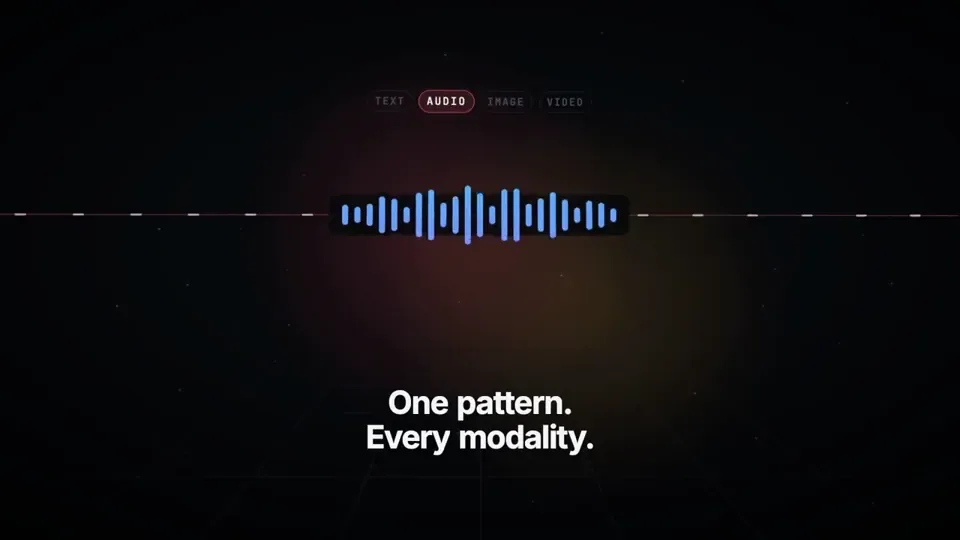
  - 0:04–0:06.5 — Multimodal: One continuous stream transforms into text, waveform, image frame, and video timeline.
  On-screen: “One pattern. Every modality.”
  - 0:06.5–0:09 — Agents and tools: The stream branches into sandboxed agent runs, then reaches external tools
  through MCP. Show distinct runs progressing in parallel. On-screen: “Agents · Sandboxes · MCP”
  - 0:09–0:11.5 — Reliability: An interrupted stream freezes, reconnects, and resumes from the same point; a clean
  type-check confirmation snaps into place. On-screen: “Persistent. Durable. Type-safe.”
  - 0:11.5–0:15 — Reveal: All paths converge into a bold final composition: “TanStack AI” followed by “Build what’s
  next.” Add a small “A Studio1 film” credit, visually subordinate to TanStack AI. Hold the final frame long enough
  to read it.

  Accuracy guardrails
  The supplied article says TanStack AI is in the release candidate phase, supports 24 providers, uses AG-UI, and
  offers composable chat(), media generation, sandbox and agent-harness primitives, MCP, type safety, persistence,
  and resumable streams. Do not call it a stable v1 release. Do not present planned orchestration features as already
  shipped.

  Make the video, inspect the rendered result, and fix any clipped text, weak transitions, mistimed beats, or
  unreadable frames before delivering it. The goal is a memorable showreel, not a slideshow of feature bullets.
日本語訳
TanStack AI を紹介する15秒のモーショングラフィックス動画を作成し、レンダリングしてください。Studio1 が制作したプレミアムな
開発者ツールのローンチフィルムのような雰囲気にすること。高速で、精密で、視覚的に驚きがあり、基調講演のオープニングを飾ったり
ソーシャルキャンペーンを先導したりできるほど洗練されていること。

以下の TanStack AI の機能詳細を唯一の正しい情報源としてください。このフィルムを発表するのは Studio1 です。
Studio1 が TanStack AI を作ったと示唆してはいけません。

フォーマットと成果物
- 1920×1080、30 fps、ちょうど15秒。重要な内容は 9:16 セーフな中央領域に収めること。
- レンダリング済みの MP4 と、編集可能なプロジェクト/ソースを納品すること。可能であれば Remotion または他のコードベースの
モーショングラフィックスワークフローを使用すること。
- 実際に編集可能なタイポグラフィとベクター調のグラフィックを使用すること。画像内の AI 生成テキストに依存してはいけません。
- オリジナルのエレクトロニック・サウンドデザインを加えること。抑制の効いた冒頭のパルス、タイトに同期したトランジションのヒット、高まる
- オリジナルのエレクトロニック・サウンドデザインを加えること。抑制の効いた冒頭のパルス、タイトに同期したトランジションのヒット、高まる
勢い、そして満足感のある最後の解決。ミュートにしてもストーリーが成立すること。

ビジュアルの方向性
暗いグラファイトのキャンバス。TanStack のアイデンティティに着想を得た、光るグラデーションと制御されたフラッシュ。鮮明なタイポグラフィ、
動きのあるコード、レイヤー化されたインターフェースの断片、ストリーミングされるデータ、分岐するパス、そして説得力のある奥行きを伴う
滑らかなカメラ移動。高コントラストで完璧な字間。すべてのトランジションは、単にタイトルカードを別のものに差し替えるのではなく、機能を
視覚的に実演するものであること。画面上の文言はすべて簡潔で読みやすく保つこと。ありふれたストック映像、回転するロゴ、偽のダッシュボード、
過剰なグリッチ効果、誰にも読めないほど小さなコードは避けること。

正確な15秒のシーケンス
- 0:00–0:02 — フック:プロンプトのカーソルが1つ点滅する。それが1つの信号を送り、その信号が可能性のネットワークへと
広がっていく。画面上の表示:「What can one AI API become?」
- 0:02–0:04 — コアとプロバイダー:信号が chat() へと収束する。プロバイダーのノードが接続し、中心の流れを途切れさせることなく
素早く入れ替わる。画面上の表示:「chat() · 24 providers」
- 0:04–0:06.5 — マルチモーダル:1本の連続したストリームが、テキスト、波形、画像フレーム、ビデオタイムラインへと変化する。
画面上の表示:「One pattern. Every modality.」
- 0:06.5–0:09 — エージェントとツール:ストリームがサンドボックス化されたエージェント実行へと分岐し、その後外部ツールに
MCP を通じて到達する。複数の異なる実行が並行して進む様子を見せること。画面上の表示:「Agents · Sandboxes · MCP」
- 0:09–0:11.5 — 信頼性:中断されたストリームが凍結し、再接続し、同じ地点から再開する。整った
型チェックの確認表示がパチッと所定の位置に収まる。画面上の表示:「Persistent. Durable. Type-safe.」
- 0:11.5–0:15 — リビール:すべてのパスが1つの大胆な最終コンポジションへと収束する。まず「TanStack AI」、続いて
「Build what’s next.」。小さく「A Studio1 film」のクレジットを加え、TanStack AI に対して視覚的に従属させること。最後のフレームは読み切れるだけの
長さで保持すること。

正確性のガードレール
提供された記事によると、TanStack AI はリリース候補フェーズにあり、24 のプロバイダーをサポートし、AG-UI を使用し、
コンポーザブルな chat()、メディア生成、サンドボックスとエージェントハーネスのプリミティブ、MCP、型安全性、永続化、
再開可能なストリームを提供している。これを安定版 v1 リリースと呼んではいけません。計画中のオーケストレーション機能を、すでに提供済みであるかのように
示してはいけません。

動画を作成し、レンダリング結果を確認し、納品する前に、切れているテキスト、弱いトランジション、タイミングのずれたビート、読めないフレームを
修正してください。目指すのは機能の箇条書きのスライドショーではなく、記憶に残るショーリールです。
出典
- 原作者
- HowDevelop
- 公開日
- 2026-09-26(由推文 ID 反解)
- 原典
- 元の投稿を見る ↗
- 収録元
- yihui-dev/awesome-opus5-5-videos · howdevelop-733090 · MIT