Create and render a 15-second motion graphics video introd…
演示视频
提示词
Create and render a 15-second motion graphics video introducing TanStack AI. Make it feel like a premium
  developer-tool launch film produced by Studio1: fast, precise, visually surprising, and polished enough to open a
  keynote or lead a social campaign.

  Use the TanStack AI feature details below as the source of truth. Studio1 is presenting the film; do not imply
  Studio1 built TanStack AI.

  Format and deliverables
  - 1920×1080, 30 fps, exactly 15 seconds; keep important content within a 9:16-safe central area.
  - Deliver the rendered MP4 and the editable project/source. Use Remotion or another code-based motion graphics
  workflow if available.
  - Use real, editable typography and vector-style graphics. Do not rely on AI-generated text inside images.
  - Add an original electronic sound design: a restrained opening pulse, tightly synchronized transition hits, rising
  - Add an original electronic sound design: a restrained opening pulse, tightly synchronized transition hits, rising
  momentum, and a satisfying final resolve. The story must also work muted.

  Visual direction
  Dark graphite canvas; luminous gradients and controlled flashes inspired by TanStack’s identity. Crisp typography,
  kinetic code, layered interface fragments, streaming data, branching paths, and smooth camera moves with convincing
  depth. High contrast and immaculate spacing. Every transition should visually demonstrate a feature, rather than
  simply replace one title card with another. Keep all on-screen wording brief and legible. Avoid generic stock
  footage, spinning logos, fake dashboards, excessive glitch effects, and tiny code nobody can read.

  Exact 15-second sequence
  - 0:00–0:02 — Hook: A single prompt cursor blinks. It sends one signal that expands into a network of
  possibilities. On-screen: “What can one AI API become?”
  - 0:02–0:04 — Core and providers: The signal resolves into chat(); provider nodes connect and swap rapidly without
  breaking the central flow. On-screen: “chat() · 24 providers”
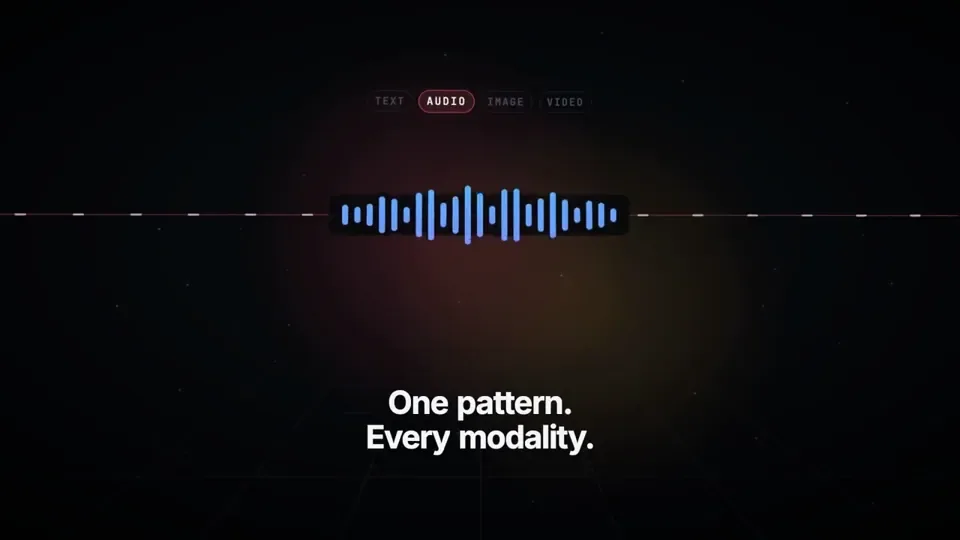
  - 0:04–0:06.5 — Multimodal: One continuous stream transforms into text, waveform, image frame, and video timeline.
  On-screen: “One pattern. Every modality.”
  - 0:06.5–0:09 — Agents and tools: The stream branches into sandboxed agent runs, then reaches external tools
  through MCP. Show distinct runs progressing in parallel. On-screen: “Agents · Sandboxes · MCP”
  - 0:09–0:11.5 — Reliability: An interrupted stream freezes, reconnects, and resumes from the same point; a clean
  type-check confirmation snaps into place. On-screen: “Persistent. Durable. Type-safe.”
  - 0:11.5–0:15 — Reveal: All paths converge into a bold final composition: “TanStack AI” followed by “Build what’s
  next.” Add a small “A Studio1 film” credit, visually subordinate to TanStack AI. Hold the final frame long enough
  to read it.

  Accuracy guardrails
  The supplied article says TanStack AI is in the release candidate phase, supports 24 providers, uses AG-UI, and
  offers composable chat(), media generation, sandbox and agent-harness primitives, MCP, type safety, persistence,
  and resumable streams. Do not call it a stable v1 release. Do not present planned orchestration features as already
  shipped.

  Make the video, inspect the rendered result, and fix any clipped text, weak transitions, mistimed beats, or
  unreadable frames before delivering it. The goal is a memorable showreel, not a slideshow of feature bullets.
中文译文
创建并渲染一支 15 秒的动态图形视频,介绍 TanStack AI。让它感觉像 Studio1 制作的高端开发者工具发布影片:快速、精准、在视觉上出人意料,并且足够精致,能用来为一场主题演讲开场或领衔一场社交媒体宣传。

以以下的 TanStack AI 功能细节作为事实依据。Studio1 是这支影片的呈现方;不要暗示 TanStack AI 由 Studio1 打造。

格式与交付物
- 1920×1080,30 fps,严格 15 秒;将重要内容保持在 9:16 安全中央区域内。
- 交付渲染好的 MP4 以及可编辑的工程/源文件。如可用,使用 Remotion 或其他基于代码的动态图形工作流。
- 使用真实、可编辑的字体排版和矢量风格图形。不要依赖图像内由 AI 生成的文字。
- 添加原创电子音效设计:克制的开场脉冲、与转场紧密同步的击打、逐步上升的推进感,以及令人满足的最终收束。故事在静音状态下也必须成立。

视觉方向

深石墨色画布;受 TanStack 品牌识别启发的发光渐变与可控闪光。清晰锐利的字体排版、动态的代码、层叠的界面碎片、流式数据、分叉路径,以及具有可信纵深感的平滑镜头运动。高对比度与无可挑剔的间距。每个转场都应在视觉上展示一项功能,而不是简单地把一张标题卡换成另一张。所有屏幕上的文字保持简短易读。避免通用模板素材、旋转的标志、虚假仪表盘、过度故障效果,以及没人能看清的微小代码。

精确的 15 秒序列

- 0:00–0:02 — 钩子:一个提示词光标闪烁。它发出一个信号,信号扩展成一张充满可能性的网络。屏幕上:“What can one AI API become?”
- 0:02–0:04 — 核心与提供商:信号归结为 chat();提供商节点快速连接与切换,而不打断中央流程。屏幕上:“chat() · 24 providers”
- 0:04–0:06.5 — 多模态:一条连续流转变为文本、波形、图像帧和视频时间轴。屏幕上:“One pattern. Every modality.”
- 0:06.5–0:09 — 智能体与工具:流分叉进入沙盒化的智能体运行,然后通过 MCP 触达外部工具。展示多个不同的运行并行推进。屏幕上:“Agents · Sandboxes · MCP”
- 0:09–0:11.5 — 可靠性:被中断的流冻结、重连,并从同一点恢复;一个干净的类型检查确认利落地归位。屏幕上:“Persistent. Durable. Type-safe.”
- 0:11.5–0:15 — 揭晓:所有路径汇聚成一个有力的最终构图:“TanStack AI”,随后是“Build what’s next.”。添加一行小字“A Studio1 film”署名,在视觉上从属于 TanStack AI。最后一个画面保持足够长的时间以便阅读。

准确性护栏

所提供的文章指出,TanStack AI 处于发布候选阶段,支持 24 个提供商,使用 AG-UI,并提供可组合的 chat()、媒体生成、沙盒与 agent-harness 原语、MCP、类型安全、持久化和可恢复的流。不要称其为稳定的 v1 版本。不要把计划中的编排功能呈现为已经发布。

制作视频,检查渲染结果,并在交付前修复任何被裁切的文字、乏力的转场、节拍错位或无法看清的画面。目标是令人难忘的作品集短片,而不是功能要点的幻灯片。
溯源
- 原作者
- HowDevelop
- 发布日期
- 2026-09-26(由推文 ID 反解)
- 原始出处
- 查看原帖 ↗
- 收录来源
- yihui-dev/awesome-opus5-5-videos · howdevelop-733090 · MIT