Create and render a 15-second motion graphics video introducing TanStack AI. Make it feel like a premium
  developer-tool launch film produced by Studio1: fast, precise, visually surprising, and polished enough to open a
  keynote or lead a social campaign.

  Use the TanStack AI feature details below as the source of truth. Studio1 is presenting the film; do not imply
  Studio1 built TanStack AI.

  Format and deliverables
  - 1920×1080, 30 fps, exactly 15 seconds; keep important content within a 9:16-safe central area.
  - Deliver the rendered MP4 and the editable project/source. Use Remotion or another code-based motion graphics
  workflow if available.
  - Use real, editable typography and vector-style graphics. Do not rely on AI-generated text inside images.
  - Add an original electronic sound design: a restrained opening pulse, tightly synchronized transition hits, rising
  - Add an original electronic sound design: a restrained opening pulse, tightly synchronized transition hits, rising
  momentum, and a satisfying final resolve. The story must also work muted.

  Visual direction
  Dark graphite canvas; luminous gradients and controlled flashes inspired by TanStack’s identity. Crisp typography,
  kinetic code, layered interface fragments, streaming data, branching paths, and smooth camera moves with convincing
  depth. High contrast and immaculate spacing. Every transition should visually demonstrate a feature, rather than
  simply replace one title card with another. Keep all on-screen wording brief and legible. Avoid generic stock
  footage, spinning logos, fake dashboards, excessive glitch effects, and tiny code nobody can read.

  Exact 15-second sequence
  - 0:00–0:02 — Hook: A single prompt cursor blinks. It sends one signal that expands into a network of
  possibilities. On-screen: “What can one AI API become?”
  - 0:02–0:04 — Core and providers: The signal resolves into chat(); provider nodes connect and swap rapidly without
  breaking the central flow. On-screen: “chat() · 24 providers”
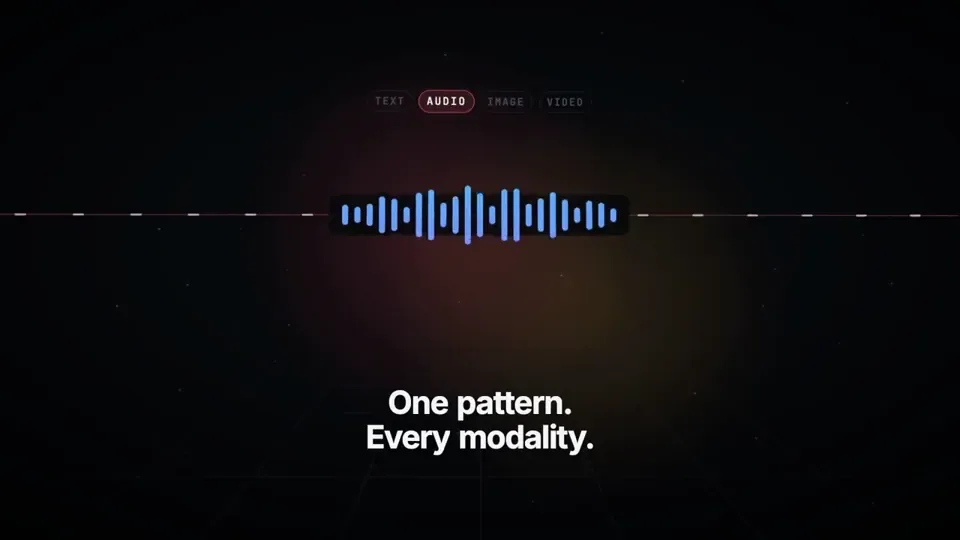
  - 0:04–0:06.5 — Multimodal: One continuous stream transforms into text, waveform, image frame, and video timeline.
  On-screen: “One pattern. Every modality.”
  - 0:06.5–0:09 — Agents and tools: The stream branches into sandboxed agent runs, then reaches external tools
  through MCP. Show distinct runs progressing in parallel. On-screen: “Agents · Sandboxes · MCP”
  - 0:09–0:11.5 — Reliability: An interrupted stream freezes, reconnects, and resumes from the same point; a clean
  type-check confirmation snaps into place. On-screen: “Persistent. Durable. Type-safe.”
  - 0:11.5–0:15 — Reveal: All paths converge into a bold final composition: “TanStack AI” followed by “Build what’s
  next.” Add a small “A Studio1 film” credit, visually subordinate to TanStack AI. Hold the final frame long enough
  to read it.

  Accuracy guardrails
  The supplied article says TanStack AI is in the release candidate phase, supports 24 providers, uses AG-UI, and
  offers composable chat(), media generation, sandbox and agent-harness primitives, MCP, type safety, persistence,
  and resumable streams. Do not call it a stable v1 release. Do not present planned orchestration features as already
  shipped.

  Make the video, inspect the rendered result, and fix any clipped text, weak transitions, mistimed beats, or
  unreadable frames before delivering it. The goal is a memorable showreel, not a slideshow of feature bullets.
한국어 번역
TanStack AI를 소개하는 15초 모션 그래픽 영상을 만들고 렌더링해 줘. 마치
  Studio1이 제작한 프리미엄 개발자 도구 런칭 필름처럼 느껴지게 해 줘: 빠르고, 정밀하고, 시각적으로 놀랍고,
  키노트 오프닝이나 소셜 캠페인을 이끌 만큼 다듬어져 있어야 해.

  아래 TanStack AI 기능 세부 정보를 사실의 기준으로 사용해 줘. 이 필름을 선보이는 것은 Studio1이며,
  Studio1이 TanStack AI를 만들었다고 암시해서는 안 돼.

  형식 및 결과물
  - 1920×1080, 30 fps, 정확히 15초; 중요한 콘텐츠는 9:16 안전 중앙 영역 안에 유지해 줘.
  - 렌더링된 MP4와 편집 가능한 프로젝트/소스를 제공해 줘. 가능하면 Remotion 또는 다른 코드 기반 모션 그래픽
  워크플로를 사용해 줘.
  - 실제 편집 가능한 타이포그래피와 벡터 스타일 그래픽을 사용해 줘. 이미지 안의 AI 생성 텍스트에 의존하지 마.
  - 독창적인 일렉트로닉 사운드 디자인을 추가해 줘: 절제된 오프닝 펄스, 긴밀하게 동기화된 전환 히트, 상승하는
  - 독창적인 일렉트로닉 사운드 디자인을 추가해 줘: 절제된 오프닝 펄스, 긴밀하게 동기화된 전환 히트, 상승하는
  모멘텀, 그리고 만족스러운 마지막 해결. 스토리는 음소거 상태에서도 성립해야 해.

  비주얼 방향
  어두운 흑연 캔버스; TanStack의 아이덴티티에서 영감을 받은 빛나는 그라데이션과 절제된 플래시. 선명한 타이포그래피,
  역동적인 코드, 레이어드된 인터페이스 파편, 스트리밍 데이터, 분기하는 경로, 그리고 설득력 있는
  깊이감을 지닌 부드러운 카메라 무빙. 높은 대비와 완벽한 간격. 모든 전환은 기능을 시각적으로 보여 줘야 해,
  단순히 타이틀 카드를 다른 것으로 교체하는 것에 그쳐서는 안 돼. 화면에 나오는 모든 문구는 짧고 읽기 쉽게 유지해 줘.
  일반적인 스톡 푸티지, 회전하는 로고, 가짜 대시보드, 과도한 글리치 효과, 아무도 읽을 수 없는 작은 코드는 피해 줘.

  정확한 15초 시퀀스
  - 0:00–0:02 — 후크: 하나의 프롬프트 커서가 깜박인다. 하나의 신호를 보내고, 그 신호가 가능성의 네트워크로
  확장된다. 화면 표시: “What can one AI API become?”
  - 0:02–0:04 — 코어와 프로바이더: 신호가 chat()으로 귀결된다. 프로바이더 노드들이 연결되고 중앙 흐름을
  끊지 않으면서 빠르게 교체된다. 화면 표시: “chat() · 24 providers”
  - 0:04–0:06.5 — 멀티모달: 하나의 연속 스트림이 텍스트, 파형, 이미지 프레임, 비디오 타임라인으로 변환된다.
  화면 표시: “One pattern. Every modality.”
  - 0:06.5–0:09 — 에이전트와 도구: 스트림이 샌드박스 처리된 에이전트 실행으로 분기한 뒤 외부 도구에
  MCP를 통해 도달한다. 서로 다른 실행이 병렬로 진행되는 모습을 보여 줘. 화면 표시: “Agents · Sandboxes · MCP”
  - 0:09–0:11.5 — 신뢰성: 중단된 스트림이 멈췄다가 다시 연결되고 같은 지점에서 재개된다. 깔끔한
  타입 체크 확인이 제자리에 딱 맞춰진다. 화면 표시: “Persistent. Durable. Type-safe.”
  - 0:11.5–0:15 — 공개: 모든 경로가 대담한 최종 구성으로 수렴한다: “TanStack AI”에 이어 “Build what’s
  next.” 작은 “A Studio1 film” 크레딧을 추가하되 TanStack AI에 시각적으로 종속되게 한다. 마지막 프레임을
  읽을 수 있을 만큼 충분히 오래 유지한다.

  정확성 가드레일
  제공된 기사에 따르면 TanStack AI는 릴리스 후보 단계에 있고, 24개 프로바이더를 지원하며, AG-UI를 사용하고,
  조합 가능한 chat(), 미디어 생성, 샌드박스 및 에이전트 하네스 프리미티브, MCP, 타입 안전성, 영속성,
  재개 가능한 스트림을 제공한다. 이를 안정적인 v1 릴리스라고 부르지 마. 계획된 오케스트레이션 기능을 이미
  출시된 것처럼 제시하지 마.

  영상을 만들고, 렌더링된 결과를 검토하고, 전달하기 전에 잘린 텍스트, 약한 전환, 박자가 어긋난 비트,
  읽을 수 없는 프레임을 수정해 줘. 목표는 기억에 남는 쇼릴이지 기능 불릿의 슬라이드쇼가 아니야.