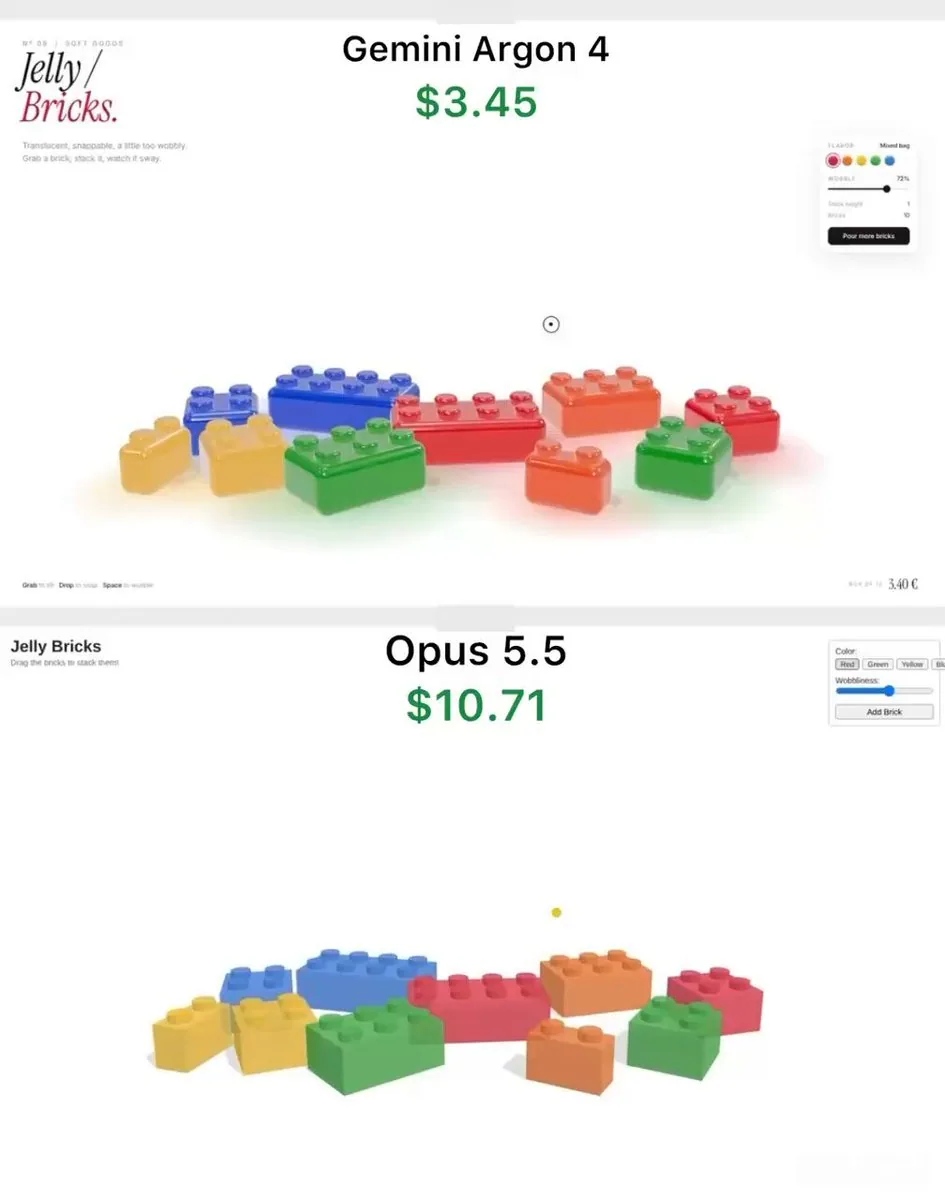
Build a single self-contained HTML file: an interactive 3D toy called "Jelly Bricks" - translucent gummy candy bricks you can grab, stretch, stack into a tower and knock over. Use three.js (import from a CDN) and any lightweight physics library you like. Everything must run by opening the file in a browser.

LOOK
- Bricks are classic stud-on-top building bricks (2x1, 2x2, 3x2, 4x2) in red, orange, yellow, green and blue. No brand names or logos anywhere.
- Material must read as real gummy candy: glossy, translucent, light passing through, deeper colour where the brick is thicker, soft rounded edges and rounded studs. Use MeshPhysicalMaterial with transmission, thickness, attenuation colour, clearcoat, and an environment map for reflections.
- Soft shadows plus a faint coloured glow on the floor under each brick, tinted by its colour.
- Clean white background, slight slow camera drift so the scene feels alive.

JELLY BEHAVIOUR (most important)
- Grab a brick and it stretches toward the cursor before it lifts off, like pulling taffy. Release it and the stretch snaps back with a decaying wobble.
- A brick lagging behind the cursor tilts slightly in the direction it's moving.
- Every landing squashes the brick flat, then it springs back up with a few wobbles (spring-damper squash and shear, done in the vertex shader).
- Dropping a brick on the stack snaps it in place, and the whole tower sways like pudding: each brick's wobble shifts the bricks above it, so the top moves the most.
- Pulling a brick out of the middle of the tower collapses it: the bricks above tumble, bounce off the floor and each other, and scatter a little - lively, not explosive.

UI (minimal editorial style)
- Top left: small caps label "Nº 09 / SOFT GOODS", big serif italic title "Jelly / Bricks." with "Bricks." in red, and a one-line subtitle.
- Floating panel on the right: flavor colour swatches, a "Wobble" slider that controls jelly softness, live "Stack height" and "Bricks" counters, and a black "Pour more bricks" button that drops a handful of new bricks from above with random spin.
- Bottom left hint: "Grab to lift · Drop to snap · Space to wobble". Space shakes the tower.
- Custom round cursor that shrinks while holding a brick.

Start with one 4x2 brick in the centre as the tower base and about 9 bricks scattered around it. Keep it at 60fps on a laptop.
日本語訳
単一の自己完結したHTMLファイルを構築する:「Jelly Bricks」というインタラクティブな3Dおもちゃ — 半透明のグミキャンディのブロックをつかんで伸ばし、塔に積み上げ、倒すことができる。three.js(CDNからインポート)と、好みの軽量物理ライブラリを使用する。すべてがブラウザでファイルを開くだけで動作すること。

見た目
- ブロックは上面に突起(スタッド)が付いた定番の組み立てブロック(2x1、2x2、3x2、4x2)で、赤、オレンジ、黄、緑、青。ブランド名やロゴはどこにも入れない。
- マテリアルは本物のグミキャンディに見えること:光沢があり、半透明で、光が透過し、ブロックが厚い部分ほど色が濃く、縁とスタッドは柔らかく丸みを帯びている。MeshPhysicalMaterial を transmission、thickness、attenuation colour、clearcoat、反射用の環境マップとともに使用する。
- 柔らかな影に加えて、各ブロックの下の床に、その色に染まったかすかな色の光を置く。
- きれいな白い背景、そしてシーンが生きていると感じられるよう、わずかにゆっくりとしたカメラのドリフト。

ゼリーの挙動(最重要)
- ブロックをつかむと、持ち上がる前にカーソルに向かって伸びる。タフィーを引くように。離すと、伸びは減衰する揺れとともに元に戻る。
- カーソルより遅れてついてくるブロックは、進んでいる方向にわずかに傾く。
- 着地するたびにブロックは平たく押しつぶされ、その後いくつかの揺れとともに跳ね返る(バネ・ダンパーによる押しつぶしとせん断をバーテックスシェーダーで行う)。
- 積み上げた上にブロックを落とすと所定の位置にスナップし、塔全体がプリンのように揺れる:各ブロックの揺れがその上のブロックをずらすので、一番上ほど大きく動く。
- 塔の真ん中からブロックを引き抜くと崩れる:上のブロックは転がり落ち、床や互いにぶつかって跳ね、少し散らばる — 活気があり、爆発的ではない。

UI(ミニマルでエディトリアルなスタイル)
- 左上:スモールキャップスのラベル「Nº 09 / SOFT GOODS」、大きなセリフ・イタリック体のタイトル「Jelly / Bricks.」(「Bricks.」は赤)、そして1行のサブタイトル。
- 右側のフローティングパネル:フレーバーの色見本、ゼリーの柔らかさを調整する「Wobble」スライダー、リアルタイムの「Stack height」と「Bricks」カウンター、上から新しいブロックをひとつかみ落とす(ランダムな回転付き)黒い「Pour more bricks」ボタン。
- 左下のヒント:「Grab to lift · Drop to snap · Space to wobble」。スペースキーで塔を揺らす。
- ブロックを持っている間は縮む、カスタムの丸いカーソル。

中央に4x2のブロックを1つ塔の土台として置き、その周りに約9個のブロックを散らばした状態から始める。ノートPCで60fpsを維持すること。