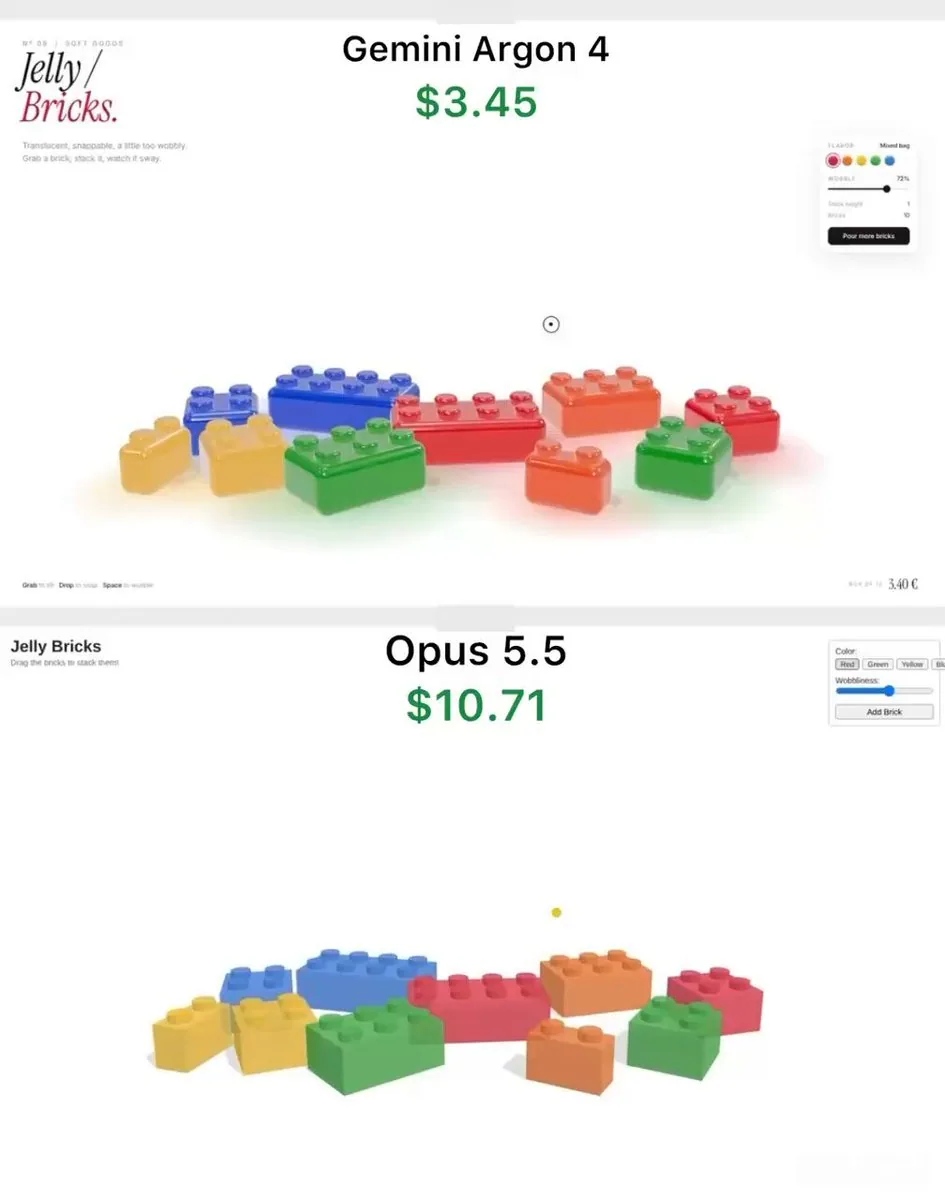
Build a single self-contained HTML file: an interactive 3D toy called "Jelly Bricks" - translucent gummy candy bricks you can grab, stretch, stack into a tower and knock over. Use three.js (import from a CDN) and any lightweight physics library you like. Everything must run by opening the file in a browser.

LOOK
- Bricks are classic stud-on-top building bricks (2x1, 2x2, 3x2, 4x2) in red, orange, yellow, green and blue. No brand names or logos anywhere.
- Material must read as real gummy candy: glossy, translucent, light passing through, deeper colour where the brick is thicker, soft rounded edges and rounded studs. Use MeshPhysicalMaterial with transmission, thickness, attenuation colour, clearcoat, and an environment map for reflections.
- Soft shadows plus a faint coloured glow on the floor under each brick, tinted by its colour.
- Clean white background, slight slow camera drift so the scene feels alive.

JELLY BEHAVIOUR (most important)
- Grab a brick and it stretches toward the cursor before it lifts off, like pulling taffy. Release it and the stretch snaps back with a decaying wobble.
- A brick lagging behind the cursor tilts slightly in the direction it's moving.
- Every landing squashes the brick flat, then it springs back up with a few wobbles (spring-damper squash and shear, done in the vertex shader).
- Dropping a brick on the stack snaps it in place, and the whole tower sways like pudding: each brick's wobble shifts the bricks above it, so the top moves the most.
- Pulling a brick out of the middle of the tower collapses it: the bricks above tumble, bounce off the floor and each other, and scatter a little - lively, not explosive.

UI (minimal editorial style)
- Top left: small caps label "Nº 09 / SOFT GOODS", big serif italic title "Jelly / Bricks." with "Bricks." in red, and a one-line subtitle.
- Floating panel on the right: flavor colour swatches, a "Wobble" slider that controls jelly softness, live "Stack height" and "Bricks" counters, and a black "Pour more bricks" button that drops a handful of new bricks from above with random spin.
- Bottom left hint: "Grab to lift · Drop to snap · Space to wobble". Space shakes the tower.
- Custom round cursor that shrinks while holding a brick.

Start with one 4x2 brick in the centre as the tower base and about 9 bricks scattered around it. Keep it at 60fps on a laptop.
한국어 번역
단일 자체 완결형 HTML 파일을 만드세요: "Jelly Bricks"라는 인터랙티브 3D 장난감으로, 반투명 구미 캔디 블록을 잡고 늘리고 탑으로 쌓아 쓰러뜨릴 수 있습니다. three.js(CDN에서 임포트)와 원하는 가벼운 물리 라이브러리를 사용하세요. 파일을 브라우저에서 열기만 하면 모든 것이 실행되어야 합니다.

겉모습
- 블록은 클래식한 상단 스터드 조립 블록(2x1, 2x2, 3x2, 4x2)이며 빨강, 주황, 노랑, 초록, 파랑입니다. 어디에도 브랜드 이름이나 로고는 없습니다.
- 재질은 실제 구미 캔디처럼 보여야 합니다: 광택, 반투명, 빛이 통과, 블록이 두꺼운 곳은 더 짙은 색, 부드럽고 둥근 모서리와 둥근 스터드. MeshPhysicalMaterial에 transmission, thickness, attenuation colour, clearcoat, 그리고 반사를 위한 환경 맵을 사용하세요.
- 부드러운 그림자와 각 블록 아래 바닥에 그 색으로 물든 은은한 색 광채.
- 깨끗한 흰색 배경, 장면이 살아 있게 느껴지도록 약간 느린 카메라 드리프트.

젤리 거동 (가장 중요)
- 블록을 잡으면 떠오르기 전에 커서 쪽으로 늘어납니다, 마치 태피를 당기듯이. 놓으면 늘어남이 줄어드는 흔들림과 함께 원래대로 튕겨 돌아옵니다.
- 커서를 뒤따르는 블록은 움직이는 방향으로 살짝 기울어집니다.
- 착지할 때마다 블록이 납작하게 눌렸다가 몇 번의 흔들림과 함께 다시 튀어 오릅니다(스프링-댐퍼 압축과 전단, 버텍스 셰이더에서 처리).
- 블록을 스택 위에 떨어뜨리면 제자리에 딱 맞고, 탑 전체가 푸딩처럼 흔들립니다: 각 블록의 흔들림이 위쪽 블록들을 밀어내므로 맨 위가 가장 많이 움직입니다.
- 탑 중간에서 블록을 빼내면 탑이 무너집니다: 위쪽 블록들이 굴러떨어져 바닥과 서로 부딪히며 조금 흩어집니다 — 폭발적이지 않고 활기차게.

UI (미니멀 에디토리얼 스타일)
- 왼쪽 상단: 스몰캡 라벨 "Nº 09 / SOFT GOODS", 큰 세리프 이탤릭 제목 "Jelly / Bricks."에서 "Bricks."는 빨간색, 그리고 한 줄 부제.
- 오른쪽의 떠 있는 패널: 플레이버 색상 스와치, 젤리 부드러움을 조절하는 "Wobble" 슬라이더, 실시간 "Stack height"와 "Bricks" 카운터, 그리고 위에서 무작위 회전으로 새 블록 한 줌을 떨어뜨리는 검은색 "Pour more bricks" 버튼.
- 왼쪽 하단 힌트: "Grab to lift · Drop to snap · Space to wobble". Space는 탑을 흔듭니다.
- 블록을 잡고 있는 동안 작아지는 커스텀 원형 커서.

중앙에 4x2 블록 하나를 탑의 바닥으로 두고 주위에 약 9개의 블록을 흩어 놓고 시작하세요. 노트북에서 60fps를 유지하세요.