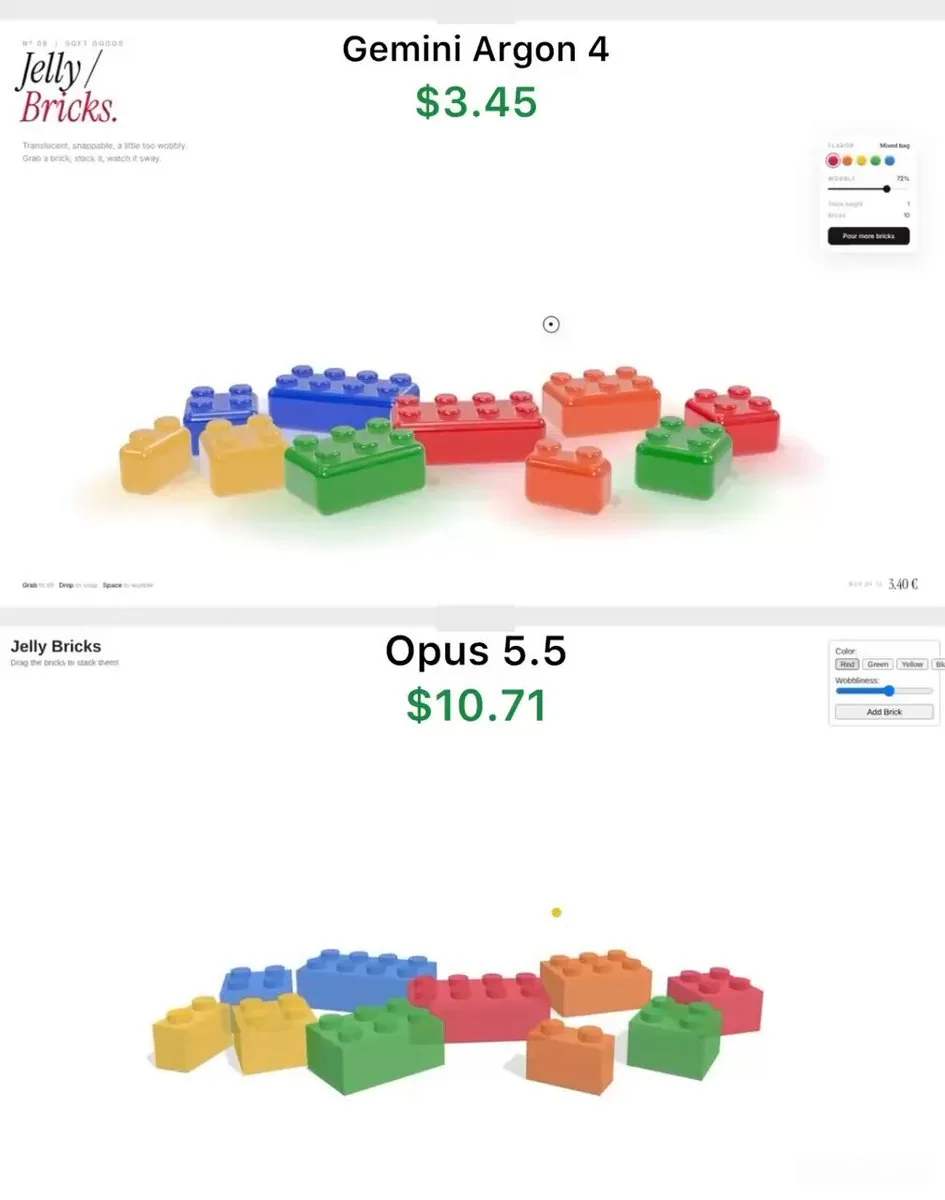
Build a single self-contained HTML file: an interactive 3D toy called "Jelly Bricks" - translucent gummy candy bricks you can grab, stretch, stack into a tower and knock over. Use three.js (import from a CDN) and any lightweight physics library you like. Everything must run by opening the file in a browser.

LOOK
- Bricks are classic stud-on-top building bricks (2x1, 2x2, 3x2, 4x2) in red, orange, yellow, green and blue. No brand names or logos anywhere.
- Material must read as real gummy candy: glossy, translucent, light passing through, deeper colour where the brick is thicker, soft rounded edges and rounded studs. Use MeshPhysicalMaterial with transmission, thickness, attenuation colour, clearcoat, and an environment map for reflections.
- Soft shadows plus a faint coloured glow on the floor under each brick, tinted by its colour.
- Clean white background, slight slow camera drift so the scene feels alive.

JELLY BEHAVIOUR (most important)
- Grab a brick and it stretches toward the cursor before it lifts off, like pulling taffy. Release it and the stretch snaps back with a decaying wobble.
- A brick lagging behind the cursor tilts slightly in the direction it's moving.
- Every landing squashes the brick flat, then it springs back up with a few wobbles (spring-damper squash and shear, done in the vertex shader).
- Dropping a brick on the stack snaps it in place, and the whole tower sways like pudding: each brick's wobble shifts the bricks above it, so the top moves the most.
- Pulling a brick out of the middle of the tower collapses it: the bricks above tumble, bounce off the floor and each other, and scatter a little - lively, not explosive.

UI (minimal editorial style)
- Top left: small caps label "Nº 09 / SOFT GOODS", big serif italic title "Jelly / Bricks." with "Bricks." in red, and a one-line subtitle.
- Floating panel on the right: flavor colour swatches, a "Wobble" slider that controls jelly softness, live "Stack height" and "Bricks" counters, and a black "Pour more bricks" button that drops a handful of new bricks from above with random spin.
- Bottom left hint: "Grab to lift · Drop to snap · Space to wobble". Space shakes the tower.
- Custom round cursor that shrinks while holding a brick.

Start with one 4x2 brick in the centre as the tower base and about 9 bricks scattered around it. Keep it at 60fps on a laptop.
中文翻譯
構建一個單一的自包含 HTML 文件:一個名爲“Jelly Bricks”的可交互 3D 玩具——半透明的軟糖積木,你可以抓取、拉伸、堆成塔再推倒。使用 three.js(從 CDN 導入)以及任何你喜歡的輕量級物理庫。一切必須通過在瀏覽器中打開該文件來運行。

外觀
- 積木是經典的頂部帶凸點的拼插積木(2x1、2x2、3x2、4x2),顏色爲紅、橙、黃、綠和藍。任何地方都不得出現品牌名稱或標誌。
- 材質必須呈現爲真正的軟糖:有光澤、半透明、光線穿透、積木更厚處顏色更深、邊緣柔和圓潤、凸點圓潤。使用 MeshPhysicalMaterial,配合 transmission、thickness、attenuation colour、clearcoat,以及用於反射的環境貼圖。
- 柔和陰影,外加每塊積木下方地面上微弱的有色輝光,顏色由該積木自身的顏色染成。
- 乾淨的白色背景,輕微而緩慢的鏡頭漂移,讓場景顯得有生氣。

果凍行爲(最重要)
- 抓住一塊積木,它會先朝光標方向拉伸,然後才被提起,就像拉扯太妃糖。鬆開後,拉伸會伴隨逐漸衰減的晃動彈回原狀。
- 落在光標後面的積木會朝它正在移動的方向略微傾斜。
- 每一次落地都會把積木壓扁,然後帶幾次晃動彈回(彈簧-阻尼式擠壓與剪切,在頂點着色器中實現)。
- 把一塊積木落到堆疊上,它會咔噠一聲就位,整座塔像布丁一樣搖晃:每塊積木的晃動會帶動它上面的積木,因此頂部移動得最多。
- 從塔中間抽出一塊積木會讓塔倒塌:上方的積木翻滾、從地面和彼此身上彈開,並四散一點——活潑,但不爆炸。

UI(極簡編輯風格)
- 左上角:小型大寫字母標籤“Nº 09 / SOFT GOODS”,大號襯線斜體標題“Jelly / Bricks.”,其中“Bricks.”爲紅色,以及一行副標題。
- 右側浮動面板:口味顏色色塊、控制果凍柔軟度的“Wobble”滑塊、實時的“Stack height”和“Bricks”計數器,以及一個黑色的“Pour more bricks”按鈕,從上方隨機旋轉着丟下一把新積木。
- 左下角提示:“Grab to lift · Drop to snap · Space to wobble”。空格鍵會晃動整座塔。
- 自定義圓形光標,在抓取積木時縮小。

開始時在中央放一塊 4x2 積木作爲塔的底座,周圍散落約 9 塊積木。在筆記本電腦上保持 60fps。