Using HyperFrames, make a hype teaser for the product in this post - [link]. Landscape, around 27 seconds. Match the product UI, wallpaper and copy from the post's video

Motion should feel slow and polished - one continuous camera over one Mac desktop, no hard cuts. Camera pushes, pulls and pans run like 1.5 to 3 seconds on gentle ease-in-out curves, nothing snappy - aim for half the speed you'd default to. Add motion blur on fast moves and a light film grain finish. Use an oversized macOS cursor. No audio. All on-screen copy lowercase like the post.

1. Open on a big centered line - "in the AI era, the hard part is" - entering word by word from the right with an orange colorama text wipe over it (the `colorama-wipe` registry component). Hold it about a second, then scale it down into place above a spinning list.
2. The list rotates through 30 hard things about working in the AI era - spending tokens wisely, picking the right model, managing context windows, etc - each with a real app icon. Go fast, it's not meant to be read, then land slowly on "managing your desktop". 0.2s after it lands a question mark pops on after it.
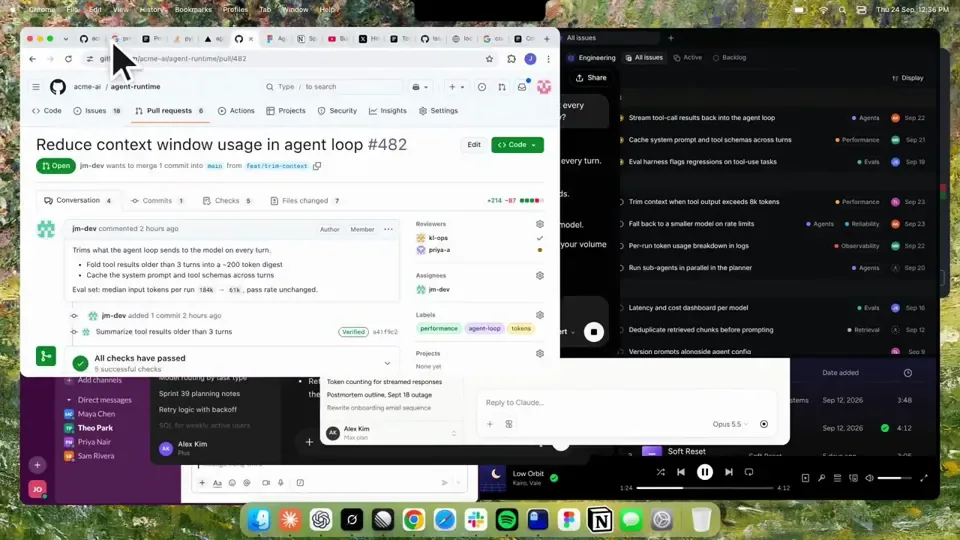
3. Pull the camera back to reveal the Mac desktop as windows pile in on top of each other, arriving from behind the camera - Claude, ChatGPT, Grok, Linear, Chrome, Spotify, Slack and Claude Code in a terminal. Build these as accurate recreations of the real apps with real icons.
4. Push back in so the windows fly past the camera, back to text - "don't make your browser / one of them".
5. Pan up to a really tight framing of just the notch and the top of the wallpaper. A cursor comes up and hovers - the notch morphs into a pill with the name "NotchBrowser", then opens into the browser panel exactly like in the video.
6. Click through the tabs like the video does, then click the collapse chevron so the panel retracts into the notch.
7. End on a checklist of the post's claims with rings and ticks drawing on
日本語訳
HyperFrames を使って、この投稿にある製品のハイプ・ティザーを作ってください - [link]。横長、約27秒。製品のUI、壁紙、コピーを投稿の動画に合わせること。

モーションはゆっくりで洗練された感じに — 1台のMacデスクトップ上を巡る1本の連続したカメラで、ハードカットはなし。カメラのプッシュ、プル、パンは1.5〜3秒の緩やかなイーズインアウト・カーブで動かし、キレのある動きはなし — 自分がデフォルトで出す速度の半分を目指すこと。速い動きにはモーションブラーをかけ、軽いフィルムグレインで仕上げる。特大サイズのmacOSカーソルを使うこと。音声はなし。画面内のコピーはすべて投稿と同じく小文字に。

1. 中央に大きく置かれた一行 — 「in the AI era, the hard part is」 — で始める。右から一語ずつ現れ、その上をオレンジのcoloramaテキストワイプがかかる(`colorama-wipe` レジストリコンポーネント)。約1秒ホールドし、その後スピンするリストの上に収まるよう縮小する。
2. リストはAI時代に働くことの30の難しいこと — トークンを賢く使う、適切なモデルを選ぶ、コンテキストウィンドウを管理する、など — をローテーションし、それぞれに実際のアプリアイコンを付ける。速く進めること、読ませるためのものではない。最後は「managing your desktop」でゆっくり着地する。着地の0.2秒後に疑問符がポンと付く。
3. カメラを引いてMacデスクトップを見せ、ウィンドウが次々に積み重なっていく。カメラの背後から現れる — Claude、ChatGPT、Grok、Linear、Chrome、Spotify、Slack、そしてターミナルの中のClaude Code。これらは実際のアプリと実際のアイコンを正確に再現して作ること。
4. カメラを押し戻して、ウィンドウがカメラの横を飛び去り、テキストに戻る — 「don't make your browser / one of them」。
5. 上にパンして、ノッチと壁紙の上部だけを映す非常にタイトなフレーミングにする。カーソルが上がってきてホバーする — ノッチが「NotchBrowser」という名前のピルにモーフィングし、動画とまったく同じようにブラウザパネルに開く。
6. 動画と同じようにタブをクリックしていき、折りたたみシェブロンをクリックしてパネルをノッチに収める。
7. 投稿の主張のチェックリストで終わる。リングとチェックが描かれていく。