Using HyperFrames, make a hype teaser for the product in this post - [link]. Landscape, around 27 seconds. Match the product UI, wallpaper and copy from the post's video

Motion should feel slow and polished - one continuous camera over one Mac desktop, no hard cuts. Camera pushes, pulls and pans run like 1.5 to 3 seconds on gentle ease-in-out curves, nothing snappy - aim for half the speed you'd default to. Add motion blur on fast moves and a light film grain finish. Use an oversized macOS cursor. No audio. All on-screen copy lowercase like the post.

1. Open on a big centered line - "in the AI era, the hard part is" - entering word by word from the right with an orange colorama text wipe over it (the `colorama-wipe` registry component). Hold it about a second, then scale it down into place above a spinning list.
2. The list rotates through 30 hard things about working in the AI era - spending tokens wisely, picking the right model, managing context windows, etc - each with a real app icon. Go fast, it's not meant to be read, then land slowly on "managing your desktop". 0.2s after it lands a question mark pops on after it.
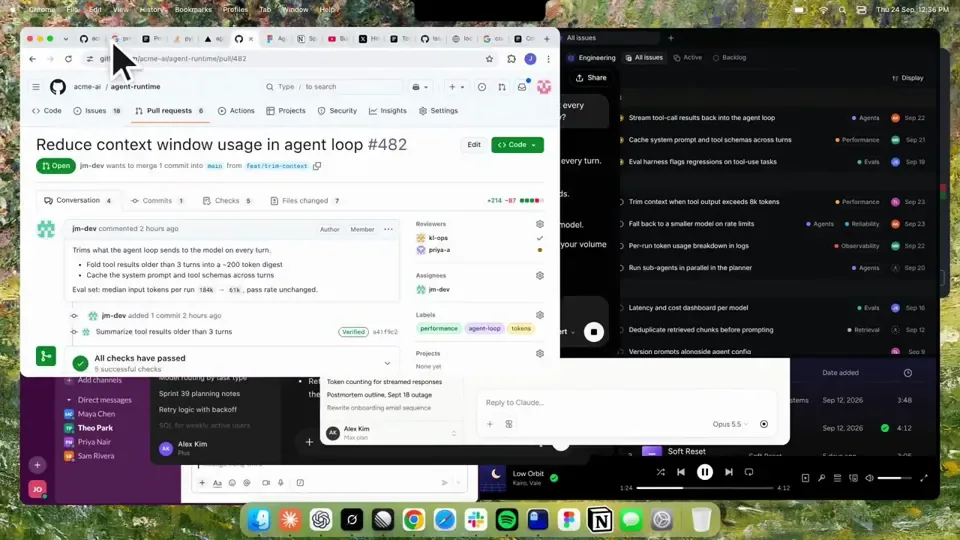
3. Pull the camera back to reveal the Mac desktop as windows pile in on top of each other, arriving from behind the camera - Claude, ChatGPT, Grok, Linear, Chrome, Spotify, Slack and Claude Code in a terminal. Build these as accurate recreations of the real apps with real icons.
4. Push back in so the windows fly past the camera, back to text - "don't make your browser / one of them".
5. Pan up to a really tight framing of just the notch and the top of the wallpaper. A cursor comes up and hovers - the notch morphs into a pill with the name "NotchBrowser", then opens into the browser panel exactly like in the video.
6. Click through the tabs like the video does, then click the collapse chevron so the panel retracts into the notch.
7. End on a checklist of the post's claims with rings and ticks drawing on
한국어 번역
HyperFrames를 사용해 이 게시물에 있는 제품의 하입 티저를 만들어 주세요 - [link]. 가로형, 약 27초. 게시물 영상의 제품 UI와 배경화면, 카피를 그대로 맞춰 주세요.

모션은 느리고 세련되게 느껴져야 합니다 - 하나의 Mac 데스크톱을 지나가는 하나의 연속된 카메라, 하드 컷 없음. 카메라 푸시, 풀, 팬은 부드러운 이징 인아웃 곡선을 따라 1.5~3초 정도로 진행되고, 결코 빠릿하지 않게 - 기본으로 잡을 속도의 절반을 목표로 하세요. 빠른 움직임에는 모션 블러를 넣고 가벼운 필름 그레인 마감을 더하세요. 지나치게 큰 macOS 커서를 사용하세요. 오디오 없음. 화면의 모든 카피는 게시물처럼 소문자로.

1. 중앙에 크게 놓인 한 줄로 시작하세요 - "in the AI era, the hard part is" - 오른쪽에서 단어 하나씩 들어오고 그 위로 주황색 컬러라마 텍스트 와이프가 지나갑니다 (`colorama-wipe` 레지스트리 컴포넌트). 약 1초간 유지한 뒤, 회전하는 목록 위의 자리로 축소하세요.
2. 목록은 AI 시대에 일하는 것에 관한 30가지 어려운 것들을 회전합니다 - 토큰을 현명하게 쓰기, 알맞은 모델 고르기, 컨텍스트 윈도 관리하기 등 - 각 항목에는 실제 앱 아이콘이 있습니다. 빠르게 진행하세요, 읽히기 위한 것이 아니니까요, 그런 다음 "managing your desktop"에서 천천히 멈추세요. 멈춘 뒤 0.2초 후에 물음표가 그 뒤에 톡 나타납니다.
3. 카메라를 뒤로 빼서 Mac 데스크톱을 드러내세요. 창들이 카메라 뒤쪽에서 도착해 서로 위로 쌓입니다 - Claude, ChatGPT, Grok, Linear, Chrome, Spotify, Slack, 그리고 터미널의 Claude Code. 이것들은 실제 앱과 실제 아이콘을 정확히 재현해 만드세요.
4. 다시 카메라를 밀어 넣어 창들이 카메라 옆을 스쳐 날아가게 하고, 텍스트로 돌아가세요 - "don't make your browser / one of them".
5. 위로 팬해서 노치와 배경화면 상단만 담는 아주 타이트한 프레이밍으로 가세요. 커서가 올라와 머무르면 - 노치가 "NotchBrowser"라는 이름의 알약 모양으로 변형되고, 그다음 영상에서처럼 정확히 브라우저 패널로 열립니다.
6. 영상에서처럼 탭을 클릭해 넘긴 다음, 접기 셰브론을 클릭해 패널이 노치 안으로 접히게 하세요.
7. 게시물의 주장들을 담은 체크리스트로 끝내세요. 링과 체크 표시가 그려지면서