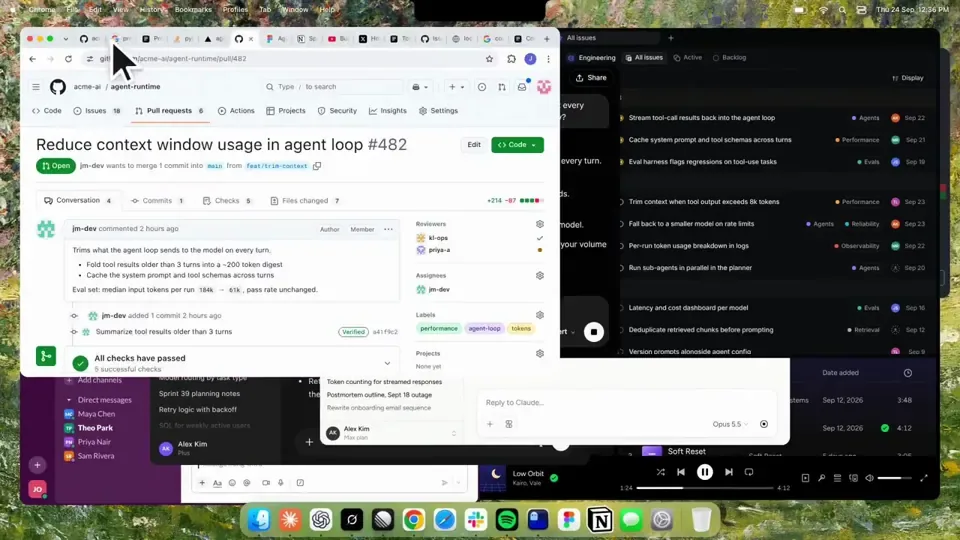
Using HyperFrames, make a hype teaser for the product in this post - [link]. Landscape, around 27 seconds. Match the product UI, wallpaper and copy from the post's video

Motion should feel slow and polished - one continuous camera over one Mac desktop, no hard cuts. Camera pushes, pulls and pans run like 1.5 to 3 seconds on gentle ease-in-out curves, nothing snappy - aim for half the speed you'd default to. Add motion blur on fast moves and a light film grain finish. Use an oversized macOS cursor. No audio. All on-screen copy lowercase like the post.

1. Open on a big centered line - "in the AI era, the hard part is" - entering word by word from the right with an orange colorama text wipe over it (the `colorama-wipe` registry component). Hold it about a second, then scale it down into place above a spinning list.
2. The list rotates through 30 hard things about working in the AI era - spending tokens wisely, picking the right model, managing context windows, etc - each with a real app icon. Go fast, it's not meant to be read, then land slowly on "managing your desktop". 0.2s after it lands a question mark pops on after it.
3. Pull the camera back to reveal the Mac desktop as windows pile in on top of each other, arriving from behind the camera - Claude, ChatGPT, Grok, Linear, Chrome, Spotify, Slack and Claude Code in a terminal. Build these as accurate recreations of the real apps with real icons.
4. Push back in so the windows fly past the camera, back to text - "don't make your browser / one of them".
5. Pan up to a really tight framing of just the notch and the top of the wallpaper. A cursor comes up and hovers - the notch morphs into a pill with the name "NotchBrowser", then opens into the browser panel exactly like in the video.
6. Click through the tabs like the video does, then click the collapse chevron so the panel retracts into the notch.
7. End on a checklist of the post's claims with rings and ticks drawing on
中文译文
使用 HyperFrames,为这篇帖子中的产品制作一支预热预告片——[link]。横屏,约 27 秒。匹配帖子视频中的产品 UI、壁纸和文案

动态应当缓慢而精致——一个连续的镜头掠过同一个 Mac 桌面,没有硬切。相机的推进、拉远和平移大约持续 1.5 到 3 秒,采用柔和的 ease-in-out 曲线,不要有急促感——速度控制在你默认速度的一半。在快速移动处添加运动模糊,并加上轻微的胶片颗粒质感。使用超大尺寸的 macOS 光标。无音频。所有屏幕上的文案都用小写,与帖子一致。

1. 以一行居中的大字开场——“in the AI era, the hard part is”——从右侧逐词进入,其上掠过一道橙色的 colorama 文字擦除效果(`colorama-wipe` 注册表组件)。停留约一秒,然后缩小并落到旋转列表上方的位置。
2. 列表轮播 30 件在 AI 时代工作的难事——明智地使用 token、挑对模型、管理上下文窗口等——每一项都带一个真实的 app 图标。速度要快,它并不是给人读的,然后缓慢停在“managing your desktop”上。停稳 0.2s 后,后面弹出一个问号。
3. 相机拉远,露出 Mac 桌面,窗口彼此堆叠着涌进来,从相机后方飞入——Claude、ChatGPT、Grok、Linear、Chrome、Spotify、Slack,以及终端里的 Claude Code。把这些窗口构建成真实 app 的精确复刻,并使用真实图标。
4. 再推进回去,让窗口从相机旁掠过,回到文字——“don't make your browser / one of them”。
5. 向上平移到只框住刘海和壁纸顶部的极紧构图。一个光标升起并悬停——刘海形变为一颗写着“NotchBrowser”的胶囊,然后展开成与视频中完全一样的浏览器面板。
6. 像视频里那样逐个点按标签页,然后点击折叠箭头,让面板收回到刘海之中。
7. 结束于帖子各项主张的清单,圆环和对勾逐个绘制出来