임의 캐릭터→12컷 변신 스토리보드: 완전한 프롬프트
3×4 변신 스토리보드: 원래 복장에서 최종 형태까지 단계적으로 공개, 악마 날개 클리셰 금지. 숏드라마 / 광고 스토리보드 템플릿, 스레드에 영상 연결법 첨부.
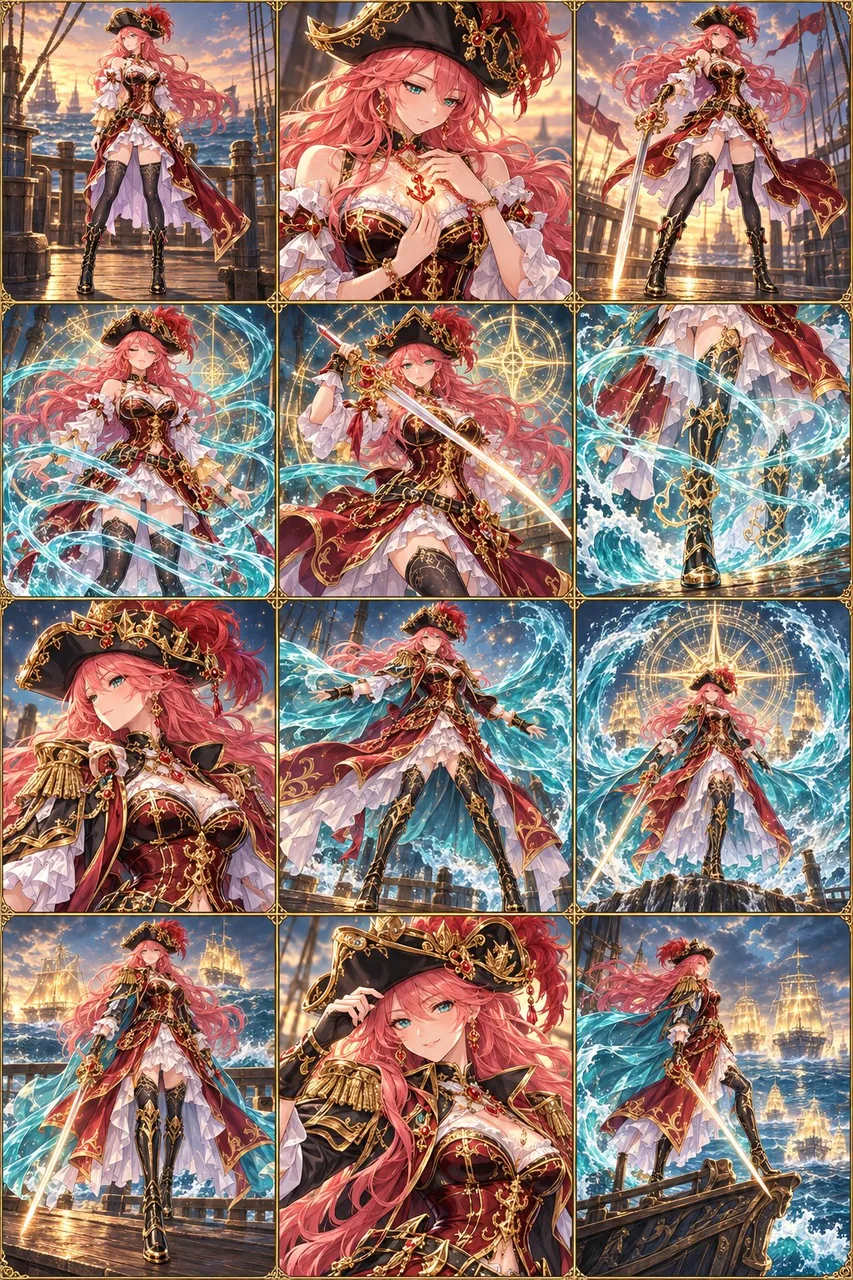
프롬프트
Create a 12-panel transformation storyboard for the character in the uploaded reference image, arranged in a clean 3-column × 4-row grid, read left to right and top to bottom.

CHARACTER AND CONCEPT
First, visually analyze the character’s identity, outfit, signature accessories, color palette, personality, and apparent world or profession. Use these details to invent a distinctive transformation theme that feels like a natural evolution of this specific character.

Choose a coherent power source, visual effects, transformation mechanism, and final evolved form. Derive these from the character rather than defaulting to generic demon wings, horns, purple lightning, or an unrelated costume.

The final form must show a substantial, deliberate change in silhouette, costume structure, materials, and signature accessories—not merely the original outfit with a glowing aura. Preserve enough recognizable motifs that the result unmistakably feels like the same character.

IDENTITY CONSISTENCY
Keep the same face, apparent age, body proportions, skin tone, and defining features throughout all 12 panels. Preserve the character’s signature hair color and recognizable hairstyle, allowing natural movement and subtle styling changes. Maintain the reference image’s illustration style.

Begin with the original outfit faithfully reproduced. Design one coherent final outfit and reveal it progressively. Once a transformed element appears, keep its design consistent in all subsequent panels.

12-PANEL SEQUENCE
Panel 1 — Original state: Clearly establish the reference character in their original outfit, with a readable full-body silhouette in an appropriate setting.
Panel 2 — Trigger: A signature accessory, gesture, or environmental element activates the character’s latent power.
Panel 3 — Response: The character notices the change and makes a purposeful movement. Small thematic effects begin to gather.
Panel 4 — Gathering power: The transformation energy establishes a clear direction and motion around the character.
Panel 5 — First visible change: One important costume element or accessory evolves, clearly showing the transformation mechanism.
Panel 6 — Progression: The transformation travels across the body, forming new clothing, armor, ornamentation, or other theme-appropriate details.
Panel 7 — Defining detail: Show a closer view of a major identity-linked upgrade, such as headwear, shoulder pieces, a weapon, or a magical accessory.
Panel 8 — Silhouette expansion: Reveal the largest structural change, such as a flowing mantle, elongated coat, layered armor, or another character-specific feature.
Panel 9 — Climax: Show the peak of the transformation with a powerful pose and dramatic thematic effects. Keep the character readable.
Panel 10 — Full reveal: Effects clear to reveal the complete evolved form in a clean full-body view.
Panel 11 — Personality moment: The character makes a small expressive gesture that conveys their personality and newfound confidence.
Panel 12 — Final hero image: Finish with a striking full-body pose that clearly displays the completed design, with restrained residual effects and a resolved background.

VISUAL DIRECTION
Build a clear emotional progression from anticipation to awakening to mastery, adapted to the character’s personality. The character actively participates in the transformation rather than simply standing still.

Use a cohesive environment and lighting progression across the sequence. Vary framing between full-body, three-quarter, and selective detail shots while maintaining spatial continuity. Prioritize full-body views for the original state, major silhouette changes, and final reveal.

Make every panel advance the transformation. Show intermediate stages with clear visual cause and effect; do not jump abruptly from the original outfit to the final costume.

Use elegant, theme-specific transitions such as flowing material, particles assembling into solid forms, unfolding structures, or energy passing over and revealing new costume elements. Keep anatomy stable and clothing coherent. No nudity or erotic framing.

OUTPUT
One polished, high-resolution storyboard image containing exactly 12 distinct panels with thin, consistent borders. Balance character detail with visual clarity. No captions, labels, speech bubbles, logos, or watermarks.

Do not reproduce the uploaded reference sheet’s layout or duplicate its multiple views. Use the uploaded image to identify one character, then depict that same character across a new, continuous transformation sequence.
한국어 번역
업로드한 참조 이미지 속 캐릭터를 위한 12컷 변신 스토리보드를 만들어 주세요. 깔끔한 3열 × 4행 그리드로 배치하고 왼쪽에서 오른쪽으로, 위에서 아래로 읽는 순서로 구성합니다.

캐릭터와 콘셉트
먼저 캐릭터의 정체성, 의상, 시그니처 액세서리, 색상 팔레트, 성격, 그리고 속한 세계관이나 직업을 시각적으로 분석하세요. 이 세부 요소를 활용해 이 특정 캐릭터의 자연스러운 진화처럼 느껴지는 독창적인 변신 테마를 만들어 내세요.

일관된 힘의 원천, 시각 효과, 변신 메커니즘, 최종 진화 형태를 선택하세요. 뻔한 악마 날개, 뿔, 보라색 번개, 무관한 의상으로 기본값을 잡지 말고 캐릭터로부터 이끌어 내세요.

최종 형태는 실루엣, 의상 구조, 소재, 시그니처 액세서리에서 확실하고 의도적인 변화를 보여야 합니다. 단순히 원래 의상에 빛나는 아우라만 더한 것이어서는 안 됩니다. 결과물이 분명히 같은 캐릭터라고 느껴질 만큼 알아볼 수 있는 모티프는 충분히 유지하세요.

정체성 일관성
12컷 전체에서 같은 얼굴, 겉보기 나이, 신체 비율, 피부톤, 특징적인 요소를 유지하세요. 캐릭터의 시그니처 머리색과 알아볼 수 있는 헤어스타일을 유지하되 자연스러운 움직임과 미세한 스타일 변화는 허용합니다. 참조 이미지의 일러스트 스타일을 유지하세요.

원래 의상을 충실히 재현한 상태로 시작하세요. 하나의 일관된 최종 의상을 디자인하고 점진적으로 드러내세요. 한번 변신한 요소가 등장하면 이후 모든 컷에서 그 디자인을 일관되게 유지하세요.

12컷 시퀀스
컷 1 — 원래 상태: 참조 캐릭터를 원래 의상 그대로 명확히 제시하고, 적절한 배경에서 읽히는 전신 실루엣을 보여 주세요.
컷 2 — 발동: 시그니처 액세서리, 제스처, 또는 환경 요소가 캐릭터의 잠재된 힘을 활성화합니다.
컷 3 — 반응: 캐릭터가 변화를 알아차리고 의도적인 움직임을 취합니다. 작은 테마 효과가 모여들기 시작합니다.
컷 4 — 힘의 응집: 변신 에너지가 캐릭터 주위에 명확한 방향과 움직임을 형성합니다.
컷 5 — 첫 가시적 변화: 중요한 의상 요소나 액세서리 하나가 진화하며 변신 메커니즘을 분명히 보여 줍니다.
컷 6 — 진행: 변신이 몸 전체로 퍼지며 새로운 의상, 갑옷, 장식 또는 테마에 맞는 다른 디테일을 형성합니다.
컷 7 — 결정적 디테일: 헤드웨어, 어깨 장식, 무기, 마법 액세서리처럼 정체성과 연결된 주요 업그레이드를 더 가까운 화면으로 보여 주세요.
컷 8 — 실루엣 확장: 흐르는 망토, 길게 늘어진 코트, 층진 갑옷 등 가장 큰 구조적 변화나 캐릭터 고유의 특징을 드러내세요.
컷 9 — 클라이맥스: 강력한 포즈와 극적인 테마 효과로 변신의 정점을 보여 주세요. 캐릭터가 잘 읽히도록 유지하세요.
컷 10 — 완전 공개: 효과가 걷히며 완성된 진화 형태를 깔끔한 전신 화면으로 드러냅니다.
컷 11 — 성격의 순간: 캐릭터가 자신의 성격과 새로 얻은 자신감을 전하는 작은 표정 제스처를 취합니다.
컷 12 — 최종 히어로 이미지: 완성된 디자인을 분명히 보여 주는 인상적인 전신 포즈로 마무리하고, 잔여 효과는 절제하고 배경은 정리된 상태로 끝내세요.

비주얼 연출
기대에서 각성, 그리고 완숙으로 이어지는 명확한 감정적 진행을 캐릭터의 성격에 맞게 구성하세요. 캐릭터는 가만히 서 있는 것이 아니라 변신에 능동적으로 참여합니다.

시퀀스 전체에 걸쳐 일관된 환경과 조명의 진행을 사용하세요. 공간적 연속성을 유지하면서 전신, 쓰리쿼터, 선택적 디테일 샷 사이에서 프레이밍을 변화시키세요. 원래 상태, 주요 실루엣 변화, 최종 공개에는 전신 뷰를 우선하세요.

모든 컷이 변신을 진전시키도록 하세요. 명확한 시각적 인과관계를 가진 중간 단계를 보여 주고, 원래 의상에서 최종 의상으로 갑자기 건너뛰지 마세요.

흐르는 소재, 입자들이 뭉쳐 고체 형태를 이루는 모습, 펼쳐지는 구조물, 에너지가 지나가며 새로운 의상 요소를 드러내는 방식 등 우아하고 테마에 맞는 전환을 사용하세요. 해부학적 구조는 안정적으로, 의상은 일관되게 유지하세요. 누드나 선정적 연출은 금지합니다.

출력
정확히 12개의 뚜렷한 컷이 얇고 일관된 테두리로 구분된, 완성도 높은 고해상도 스토리보드 이미지 한 장. 캐릭터 디테일과 시각적 명료함의 균형을 맞추세요. 캡션, 라벨, 말풍선, 로고, 워터마크는 넣지 마세요.

업로드한 참조 시트의 레이아웃을 재현하거나 여러 뷰를 중복해 그리지 마세요. 업로드한 이미지는 캐릭터 한 명을 식별하는 데 사용하고, 그 동일한 캐릭터를 새로운 연속 변신 시퀀스 전반에 묘사하세요.
출처
- 원작자
- Mayz1169
- 게시일
- 2026-09-16
- 원문 출처
- 원문 보기 ↗
- 수록 출처
- xianyu110/awesome-gpt-image2.5 · 2100135954032087346 · MIT