화보 UGC: 진짜 사진의 그레인/색조를 먼저 훔치고 얼굴 고정
레퍼런스 없음 = 가짜 색감, 가짜 노이즈, 가짜 피부. 광고 소재/시딩 이미지는 이걸 그대로 쓰면 충분히 날카롭다.
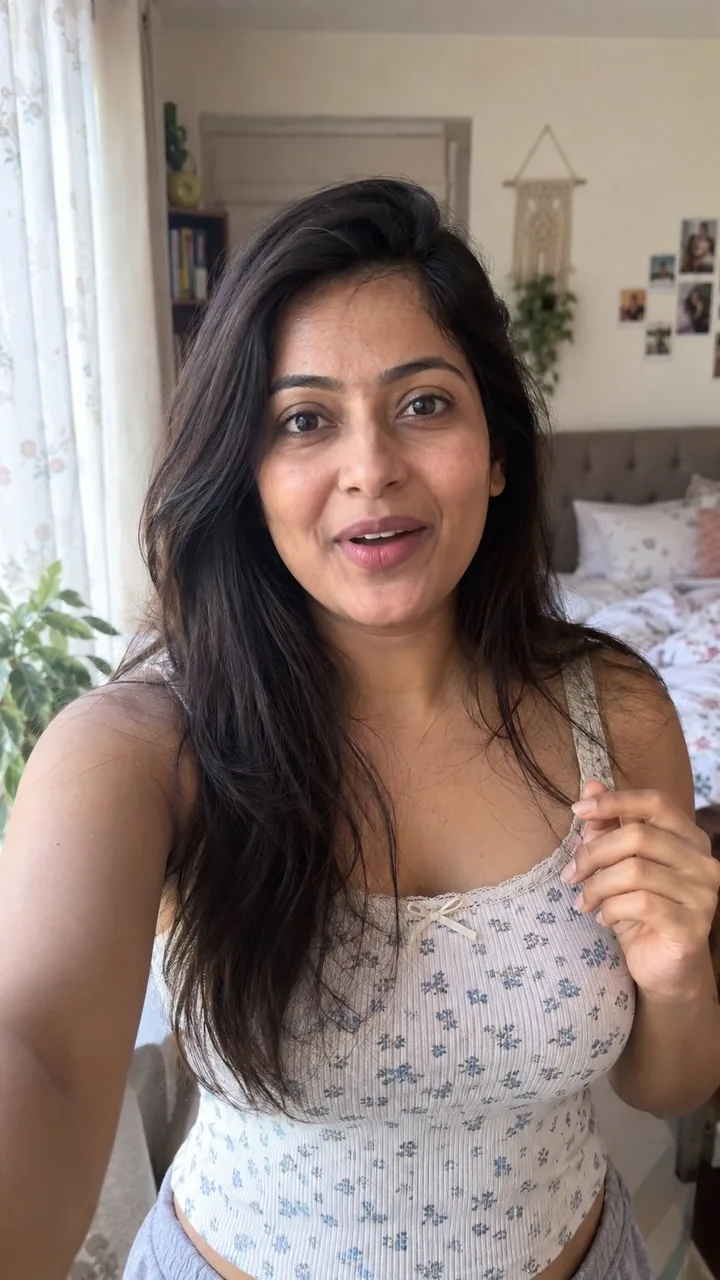
프롬프트
how to generate AI photos that look 100% real with GPT-Image 2.5:

GPT-Image 2.5 is a bit nodern than image 2, but if you still get that obvious AI look. no references = fake color, fake grain, fake skin.

so steal this trick from a real photo, then lock a woman as your UGC face.

 find a real photo with the aesthetic you want (phone snap, not a campaign)

 drop it into GPT-6 Astra in ChatGPT and ask:

“analyze this photo and give me a very detailed json prompt describing its visual style. really break down the color grading, lighting, and the exact colors so i can apply that look to my own images”

Astra writes the look. you don’t sit there naming every shadow.

 take that json into GPT-Image 2.5 (ChatGPT is enough)

 attach a face you like, or generate one, and prompt:

“using this json as reference, generate a candid ugc photo of a woman. phone camera, not studio. keep the grade and lighting from the json. no beauty filter, no plastic skin.”

 compare it to a version with no json. the difference is the grade.

 save the still you’re happy with as your character ref

 every next image: attach that woman + the json, and tell it to keep the same face

now you have one girl you can drop into new locations without rewriting the whole prompt.

iterate the json with Astra when the look drifts. leftover “basic” color and cheap grain are usually what still reads as AI.

json = lighting and color. character ref = the same woman. you just change the scene.
한국어 번역
GPT-Image 2.5로 100% 진짜처럼 보이는 AI 사진을 생성하는 방법:

GPT-Image 2.5는 image 2보다 조금 더 현대적이지만, 여전히 뻔한 AI 느낌이 난다면. 레퍼런스 없음 = 가짜 색감, 가짜 그레인, 가짜 피부.

그래서 진짜 사진에서 이 트릭을 훔친 다음, 여성을 UGC 얼굴로 고정하라.

 원하는 미감의 진짜 사진을 찾아라(폰 스냅, 캠페인 사진 말고)

 그것을 ChatGPT의 GPT-6 Astra에 넣고 물어봐라:

“이 사진을 분석해서 시각적 스타일을 설명하는 아주 상세한 json 프롬프트를 만들어줘. 컬러 그레이딩, 조명, 정확한 색상까지 정말 잘 분해해서 내 이미지에 그 룩을 적용할 수 있게 해줘”

Astra가 룩을 써준다. 네가 앉아서 모든 그림자를 하나하나 이름 붙일 필요가 없다.

 그 json을 GPT-Image 2.5로 가져가라(ChatGPT면 충분하다)

 마음에 드는 얼굴을 첨부하거나 하나 생성하고 이렇게 프롬프트하라:

“이 json을 레퍼런스로 사용해서 여성의 캔디드 ugc 사진을 생성해줘. 폰 카메라, 스튜디오 아님. json의 그레이딩과 조명을 유지해줘. 뷰티 필터 없음, 플라스틱 피부 없음.”

 json 없이 만든 버전과 비교해보라. 차이는 그레이딩이다.

 마음에 드는 스틸을 캐릭터 레퍼런스로 저장하라

 이후 모든 이미지: 그 여성 + json을 첨부하고 같은 얼굴을 유지하라고 말하라

이제 프롬프트 전체를 다시 쓰지 않고도 새로운 장소에 넣을 수 있는 한 명의 여성이 생겼다.

룩이 흐트러지면 Astra로 json을 반복 개선하라. 남아 있는 “기본” 색감과 싸구려 그레인이 보통 여전히 AI처럼 보이게 만드는 원인이다.

json = 조명과 색. 캐릭터 레퍼런스 = 같은 여성. 장면만 바꾸면 된다.
출처
- 원작자
- 0x_harness
- 게시일
- 2026-09-10
- 원문 출처
- 원문 보기 ↗
- 수록 출처
- xianyu110/awesome-gpt-image2.5 · 2097864879843746285 · MIT