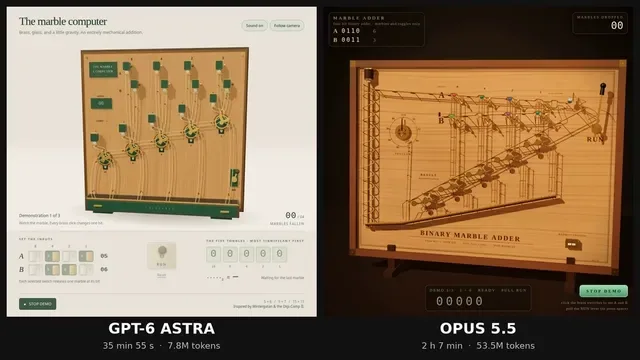
Build a single self-contained HTML file: a 3D marble computer, in the spirit of Wintergatan's marble machine and the Digi-Comp II, that adds two 4-bit numbers using nothing but marbles falling through mechanical toggles.

Hard rules:

1. One HTML file. Three.js from https://t.co/KCQbEZLusb via an import map, plus its OrbitControls addon. No other libraries, no physics engine, no external assets.

2. The mechanism is the computer. Each bit of the result is stored in a two-state toggle (flip-flop) that a marble physically flips as it passes. Carries happen because a marble leaving one toggle rolls on to the next. Do not compute the answer in JavaScript arithmetic anywhere. The displayed result must be read from the toggle states after the last marble stops.

3. Marbles move along tracks with believable gravity and timing. Nothing teleports. You may script motion along paths, but every toggle flip must be caused by a marble arriving at it.

4. Input: two rows of four switches (A and B, 0 to 15), set by clicking. A lever labelled RUN releases the marbles. A counter shows how many marbles have fallen.

5. Output: a row of five result toggles, most significant bit on the left, and a readout that shows the binary and decimal value read from those toggles.

6. A DEMO button runs 5+6, then 9+7, then 15+15, resetting between runs, so it can be screen-recorded without touching anything.

7. Looks: a wooden board, brass toggles, glass marbles, warm studio lighting, soft shadows, a slow camera that follows the busiest part of the machine. It should look good in a square 1080x1080 recording.

8. Short click sounds via the Web Audio API when a toggle flips, started only after the first user click.

9. It must run at 60 fps on a normal laptop and have no console errors.

Output only the complete HTML file.
한국어 번역
단일 자체 완결형 HTML 파일을 만드세요: Wintergatan의 구슬 기계와 Digi-Comp II의 정신을 이어받아, 기계식 토글을 통과해 떨어지는 구슬만으로 두 개의 4비트 숫자를 더하는 3D 구슬 컴퓨터입니다.

엄격한 규칙:

1. HTML 파일 하나. import map을 통해 https://t.co/KCQbEZLusb 에서 Three.js를, 그리고 그 OrbitControls 애드온을 불러옵니다. 다른 라이브러리, 물리 엔진, 외부 에셋은 없습니다.

2. 기구 자체가 컴퓨터입니다. 결과의 각 비트는 구슬이 지나가면서 물리적으로 뒤집는 두 상태 토글(플립플롭)에 저장됩니다. 자리올림은 한 토글을 떠난 구슬이 다음 토글로 굴러가기 때문에 일어납니다. JavaScript 산술로 답을 계산하는 곳이 어디에도 있어서는 안 됩니다. 표시되는 결과는 마지막 구슬이 멈춘 뒤 토글 상태에서 읽어야 합니다.

3. 구슬은 그럴듯한 중력과 타이밍으로 트랙을 따라 움직입니다. 순간이동하는 것은 없습니다. 경로를 따라가는 움직임을 스크립트로 짜도 되지만, 모든 토글 뒤집힘은 구슬이 그곳에 도달해서 일어나야 합니다.

4. 입력: 네 개의 스위치 두 줄(A와 B, 0~15), 클릭으로 설정합니다. RUN이라고 표시된 레버가 구슬을 풀어놓습니다. 카운터는 떨어진 구슬의 개수를 보여줍니다.

5. 출력: 결과 토글 다섯 개의 줄, 최상위 비트가 왼쪽에, 그리고 그 토글들에서 읽은 이진수와 십진수 값을 보여주는 판독부.

6. DEMO 버튼은 5+6, 그다음 9+7, 그다음 15+15를 실행하고 실행 사이에 리셋하므로, 아무것도 건드리지 않고 화면 녹화할 수 있습니다.

7. 겉모습: 나무 판, 황동 토글, 유리 구슬, 따뜻한 스튜디오 조명, 부드러운 그림자, 기계에서 가장 분주한 부분을 따라가는 느린 카메라. 정사각형 1080x1080 녹화에서 좋아 보여야 합니다.

8. 토글이 뒤집힐 때 Web Audio API로 짧은 클릭 소리, 첫 사용자 클릭 이후에만 시작됩니다.

9. 일반 노트북에서 60 fps로 실행되어야 하고 콘솔 오류가 없어야 합니다.

완성된 HTML 파일만 출력하세요.