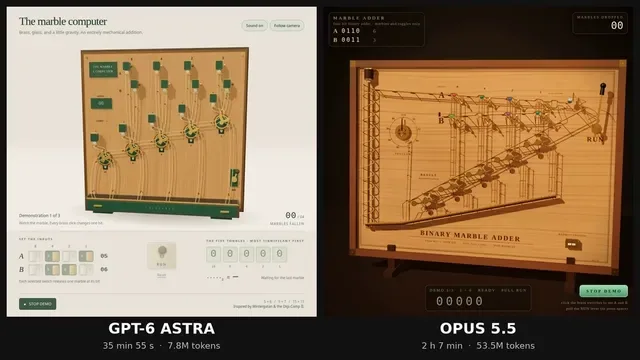
Build a single self-contained HTML file: a 3D marble computer, in the spirit of Wintergatan's marble machine and the Digi-Comp II, that adds two 4-bit numbers using nothing but marbles falling through mechanical toggles.

Hard rules:

1. One HTML file. Three.js from https://t.co/KCQbEZLusb via an import map, plus its OrbitControls addon. No other libraries, no physics engine, no external assets.

2. The mechanism is the computer. Each bit of the result is stored in a two-state toggle (flip-flop) that a marble physically flips as it passes. Carries happen because a marble leaving one toggle rolls on to the next. Do not compute the answer in JavaScript arithmetic anywhere. The displayed result must be read from the toggle states after the last marble stops.

3. Marbles move along tracks with believable gravity and timing. Nothing teleports. You may script motion along paths, but every toggle flip must be caused by a marble arriving at it.

4. Input: two rows of four switches (A and B, 0 to 15), set by clicking. A lever labelled RUN releases the marbles. A counter shows how many marbles have fallen.

5. Output: a row of five result toggles, most significant bit on the left, and a readout that shows the binary and decimal value read from those toggles.

6. A DEMO button runs 5+6, then 9+7, then 15+15, resetting between runs, so it can be screen-recorded without touching anything.

7. Looks: a wooden board, brass toggles, glass marbles, warm studio lighting, soft shadows, a slow camera that follows the busiest part of the machine. It should look good in a square 1080x1080 recording.

8. Short click sounds via the Web Audio API when a toggle flips, started only after the first user click.

9. It must run at 60 fps on a normal laptop and have no console errors.

Output only the complete HTML file.
中文翻譯
構建一個單一的自包含 HTML 文件:一臺 3D 彈珠計算機,承襲 Wintergatan 的彈珠機器與 Digi-Comp II 的精神,只靠彈珠落經機械撥杆來相加兩個 4 位數字。

硬性規則:

1. 一個 HTML 文件。通過 import map 從 https://t.co/KCQbEZLusb 引入 Three.js,外加其 OrbitControls 插件。不得使用其他庫、不得使用物理引擎、不得使用外部資源。

2. 機構本身就是計算機。結果的每一位都存儲在一個雙態撥杆(觸發器)中,彈珠經過時會以物理方式將其撥動。進位之所以發生,是因爲離開一個撥杆的彈珠會繼續滾向下一個。任何地方都不得用 JavaScript 算術來計算答案。顯示的結果必須在最後一顆彈珠停止後從撥桿狀態中讀取。

3. 彈珠沿軌道運動,具有可信的重力與節奏。任何東西都不得瞬移。你可以沿路徑編寫運動腳本,但每一次撥杆翻轉都必須由一顆彈珠抵達它而引起。

4. 輸入:兩排各四個開關(A 和 B,0 到 15),通過點擊設定。一個標有 RUN 的拉桿釋放彈珠。一個計數器顯示已落下多少顆彈珠。

5. 輸出:一排五個結果撥杆,最高有效位在左側,以及一個顯示從這些撥杆讀出的二進制和十進制值的讀數。

6. 一個 DEMO 按鈕依次運行 5+6、9+7、15+15,每次運行之間重置,這樣無需觸碰任何東西就能錄屏。

7. 外觀:一塊木板、黃銅撥杆、玻璃彈珠、溫暖的棚拍燈光、柔和的陰影,以及一臺緩慢跟隨機器最繁忙部分的相機。它在方形 1080x1080 錄製中應當好看。

8. 當撥杆翻轉時,通過 Web Audio API 發出短促的咔嗒聲,僅在用戶首次點擊之後纔開始。

9. 它必須在普通筆記本上以 60 fps 運行,並且沒有控制臺報錯。

只輸出完整的 HTML 文件。