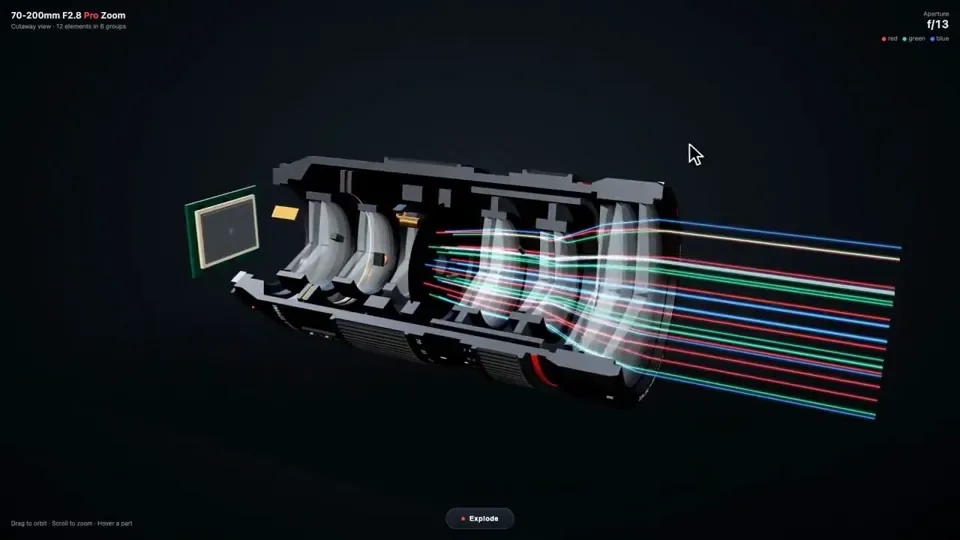
Build me a camera lens in interactive 3D, in one HTML file with Three.js.

Make it look real: a big black pro zoom lens with its glass front, the rubber focus and zoom rings, the red stripe and the white numbers, and inside it the parts you never get to see. The stack of glass elements in their groups, the aperture blades that open and close, the focus motor, the image stabilizer, the zoom cams, and the gold contacts on the mount. Cut it open down the side so I can see the glass inside, with light passing through it as colored beams that bend and meet on the camera sensor behind it. The aperture blades open and close slowly. I can drag to orbit around it and scroll to zoom.

Add an Explode button. When I press it, every part slides apart along the lens with its name on a label. Press it again and it all snaps back together. When I hover a part, it lights up and shows one line on what it does.

No images. Do not ask me any questions. Just build it.
한국어 번역
HTML 파일 하나에서 Three.js로 인터랙티브 3D 카메라 렌즈를 만들어 줘.

실물처럼 보이게 해 줘: 유리 전면이 있는 크고 검은 프로 줌 렌즈, 고무 재질의 포커스 링과 줌 링, 빨간 줄무늬와 흰 숫자들, 그리고 그 안쪽의 평소엔 볼 수 없는 부품들까지. 그룹으로 묶인 유리 요소들의 적층, 열리고 닫히는 조리개 날들, 포커스 모터, 손떨림 보정 장치, 줌 캠, 그리고 마운트의 금색 접점들. 옆면을 따라 잘라 열어서 안쪽 유리가 보이게 해 주고, 빛이 색색의 광선이 되어 통과하며 휘어져 뒤쪽 카메라 센서에서 만나게 해 줘. 조리개 날들은 천천히 열리고 닫혀. 드래그해서 주위를 돌리고 스크롤해서 확대할 수 있어야 해.

Explode 버튼을 추가해 줘. 버튼을 누르면 모든 부품이 렌즈 축을 따라 미끄러지듯 분리되고 각 부품에 이름 라벨이 붙어. 다시 누르면 전부 원래대로 딱 맞춰 조립돼. 부품에 마우스를 올리면 하이라이트되고 그 기능을 한 줄로 보여 줘.

이미지는 쓰지 마. 나한테 질문하지 마. 그냥 만들어 줘.